
Blog

ATS-Compliant Resume Formatting Guide for 2026
ATS-Compliant Resume Formatting Guide for 2026
You’ve spent hours crafting a resume that accurately represents your experience, only to hear nothing back. This ats-compliant resume formatting guide exists because that silence is rarely about your qualifications. About 88% of employers use Applicant Tracking Systems that automatically reject candidates before a human ever reads a single line. The system is scanning for structure, keywords, and file compatibility. Get any one of those wrong and you’re out, regardless of how strong your background is. Here’s exactly how to fix that.
Table of Contents
- Key takeaways
- Essential ATS format requirements
- Keyword optimization for ATS ranking
- Step-by-step ATS-friendly resume formatting
- Testing and verifying ATS compliance
- My honest take on ATS optimization
- Get your resume working harder with Resumewiz
- FAQ
Key takeaways
| Point | Details |
|---|---|
| Format for machines first | Single-column layouts with standard fonts prevent parsing errors that silently eliminate qualified candidates. |
| Keywords must match exactly | ATS systems primarily match exact phrases from job descriptions, so mirror the posting’s language in your resume. |
| Contact info belongs in the body | Headers and footers are skipped by most ATS parsers, so your phone and email must sit in the main document body. |
| Test before you submit | Use ATS scanner tools to catch formatting errors and keyword gaps before your resume reaches any employer. |
| Customize every application | A single generic resume rarely scores well across multiple job postings — tailor each version to the specific role. |
Essential ATS format requirements
ATS software doesn’t “read” your resume the way a human does. It parses it, pulling text into structured fields like name, job title, company, and dates. When your formatting disrupts that process, data ends up in the wrong field or disappears entirely. Understanding this is what separates a resume that passes from one that never gets seen.
The layout rules that matter most
The single most protective thing you can do is use a one-column layout. Two-column designs look polished to the human eye, but many ATS parsers read columns left to right across the full page width rather than column by column. That means your job title could end up merged with a skill from the adjacent column, producing gibberish in the system.
Tables, text boxes, and graphics cause parsing errors and data loss across most ATS platforms. Even a simple two-cell table used to align your name and phone number can confuse a parser. Avoid them entirely.
Here’s a quick reference for what works and what breaks the system:
| Element | ATS-safe choice | What to avoid |
|---|---|---|
| Layout | Single column | Two or three columns |
| Fonts | Arial, Calibri, Times New Roman | Decorative or custom fonts |
| Font size | 10 to 12pt body, 14 to 16pt headings | Below 10pt or above 18pt |
| Bullets | Standard round bullets | Wingdings, arrows, custom symbols |
| File format | .docx or text-based PDF | Image-based PDF, .pages, .odt |
| Contact placement | Main document body | Header or footer zones |
Why headers and footers are silent killers
This one surprises people. Most ATS parsers skip all content placed in Word headers and footers. If your name, phone number, or email address lives in the header zone, the employer’s system may record you as an anonymous applicant with no contact details. You passed screening and they literally cannot reach you. Place every piece of contact information in the main body of the document.

File format guidance
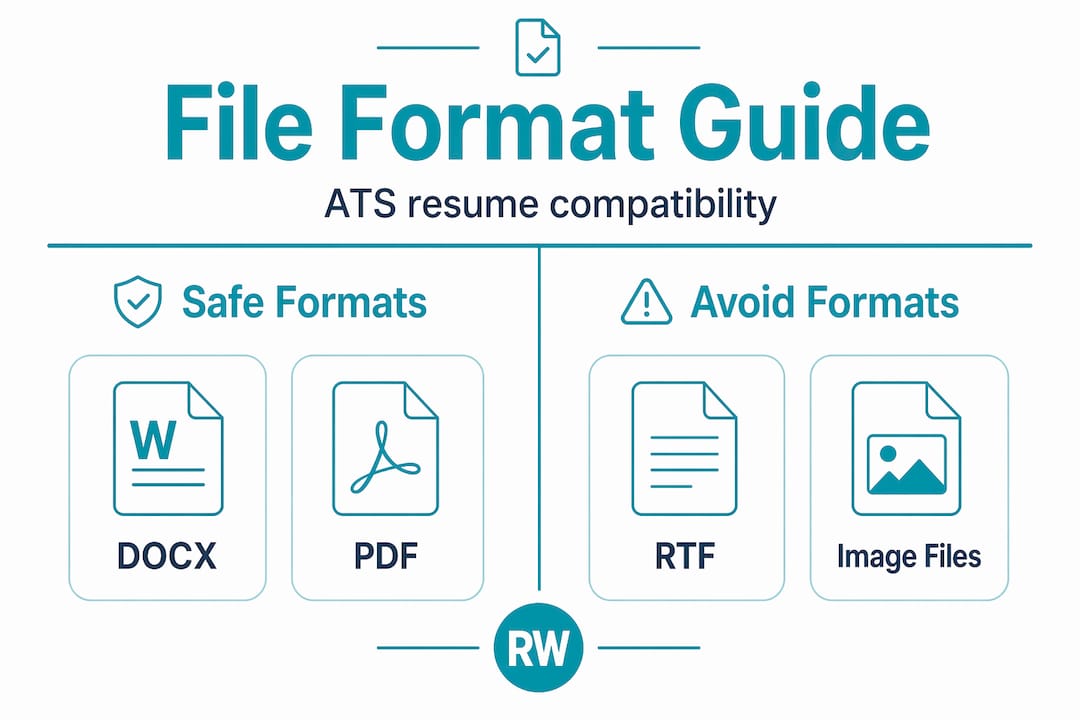
ATS accepts .docx format best, though modern systems handle text-based PDFs reliably. The key distinction is text-based versus image-based PDF. If you scan a printed resume and save it as a PDF, the system sees an image, not text. It extracts nothing. Always export from a word processor directly to PDF if that’s your preferred format.
Pro Tip: Use standard section headings like “Work Experience,” “Education,” and “Skills.” Clever labels like “Where I’ve Been” or “My Toolkit” confuse ATS section detection and can cause your entire work history to go unrecognized.
Keyword optimization for ATS ranking
Getting your resume parsed correctly is step one. Step two is getting it ranked. ATS systems don’t just extract your data. They score it against the job description using keyword matching. ATS is not fully semantic, meaning it primarily matches exact keywords and phrases rather than understanding your intent. “Customer success manager” and “client relationship manager” may mean the same thing to you, but they’re different strings to the parser.
How to research and apply keywords
-
Pull the job description apart. Copy the posting into a document and highlight every skill, tool, credential, and phrase that appears more than once or sits in a requirements section.
-
Match the exact language. If the posting says “project management,” your resume should say “project management,” not “managing projects.” Using exact keywords from job postings, including both acronyms and spelled-out terms, improves ATS matching significantly.
-
Cover both formats for every acronym. Write “Search Engine Optimization (SEO)” the first time you use it. The posting might have the acronym, the full phrase, or both. You want to match either version.
-
Place keywords in the right sections. Your professional summary, skills section, and experience bullets are the three highest-impact areas. Don’t hide important keywords only in a cover letter. Many ATS platforms don’t process cover letters at all.
-
Use keywords in context, not as a list. Keyword stuffing harms ATS evaluation. A bullet that reads “Managed cross-functional teams, CRM, KPIs, Salesforce, Agile” is a red flag for both the system and the recruiter who eventually reads it. Instead, write: “Led a cross-functional team of 12 using Agile methodology, improving quarterly KPIs tracked in Salesforce by 22%.”
-
Customize for every application. One resume cannot be optimized for multiple distinct roles. Treat each application as its own project. Swap in the terms, tools, and priorities that match that specific posting.
Pro Tip: Paste your resume text and the job description into a keyword comparison tool to instantly spot gaps between your language and the posting’s language. It’s one of the fastest ways to raise your match score without rewriting your entire resume.
Step-by-step ATS-friendly resume formatting
Knowing the rules is one thing. Building a resume that follows them is another. Here’s a practical walkthrough you can apply right now.
-
Start with a blank document. Don’t build on a pre-made template from a design platform. Many of those templates use text boxes, tables, or multi-column layouts that look clean on screen but break parsing. Open a standard word processor document with default margins.
-
Place your contact information first, in the body. Your name (bold, 14 to 16pt), phone number, professional email, LinkedIn URL, and city or state should appear as plain text at the very top of the document. No columns, no icons, no text boxes around them.
-
Add a professional summary section. Label it exactly “Professional Summary” or “Summary.” Write 3 to 4 sentences that include your target job title, years of experience, and two or three of the most important keywords from the job posting.
-
Build your work experience section in reverse chronological order. Label it “Work Experience.” For each role, list company name, job title, dates (Month Year to Month Year), and bullet points starting with strong action verbs. Quantify achievements wherever possible: “Reduced onboarding time by 30%” is far stronger than “Improved onboarding.”
-
Create a dedicated skills section. Label it “Skills.” List both hard skills (tools, platforms, certifications) and relevant soft skills in a simple comma-separated or bulleted format. This is your keyword-density powerhouse.
-
Add your education section. Label it “Education.” Include degree, institution, and graduation year. If you graduated within the last five years, this section can come before work experience.
-
Do a final format check against this list:
- Single column only
- No tables, text boxes, or graphics
- Standard font at 10 to 12pt
- All contact info in the main body
- Standard section headings used throughout
- Saved as .docx or text-based PDF
For executives and career changers, a combination format that opens with a strong summary and a core competencies section before work experience can work well in ATS systems, as long as the structure stays clean and single-column.
Pro Tip: Stick with a chronological or combination resume format. Functional resumes, which lead with skills and bury dates, often confuse ATS parsers and raise red flags with recruiters. Most systems expect a recognizable date-anchored structure.
Testing and verifying ATS compliance
Building a well-formatted resume isn’t enough if you never verify it works. ATS scanner tools can identify parsing errors and keyword mismatches before your resume reaches any employer, saving you from silent rejection.
Here’s how to run a proper compliance check before you submit:
- Use a dedicated ATS scanner. Tools like Jobscan let you upload your resume and paste in a job description. They generate a match score and highlight missing keywords and formatting problems.
- Run the plain-text test. Copy all text from your resume and paste it into a plain-text editor like Notepad. If the content reads cleanly and in the right order, parsing will likely work. If words appear jumbled or out of sequence, you have a layout problem.
- Check your file naming. Name your file professionally: “FirstName-LastName-Resume.docx.” Avoid generic names like “Resume_Final_v3.docx,” which signal a lack of attention to detail to human reviewers.
- Proofread for typos. An ATS won’t correct spelling errors, and a typo in a keyword means a missed match. “Mangement” will never match “management” in any system.
- Save a master version and customize from it. Keep one clean master document and create a new copy for each application. Label copies by company and date so you track what you’ve sent.
Pro Tip: After passing the ATS, your resume still needs to impress a human. Read it aloud before submitting. If it sounds robotic or keyword-stuffed, a recruiter will notice. The goal is a document that passes the machine and engages the person.
My honest take on ATS optimization
I’ve spent over a decade in recruiting, and I’ve seen this from both sides of the desk. Here’s what most guides won’t tell you: getting overly fixated on ATS can actually hurt your application.
I’ve reviewed resumes that were technically perfect for parsing but completely hollow to read. They were full of keywords and empty of personality or real achievement. They passed the system and lost the human. That’s not a win.
My experience is that contextual keyword matching matters more than sheer keyword volume. ATS systems with natural language processing capabilities evaluate how keywords appear, not just whether they appear. So when I coach clients on resume optimization for ATS, I tell them to lead with real accomplishments that happen to contain the right language. Not the other way around.
The other thing I always say: ATS rules change as technology evolves. What broke a parser in 2020 may work fine in a modern system today. Stay current, test your resume regularly, and treat each job search as a fresh opportunity to update your approach. Don’t rely on the same document you polished three years ago. The challenges AI introduces to hiring are real, and staying informed helps you adapt faster than most candidates will.
Rejection stings, but it’s almost always fixable. A formatting error isn’t a reflection of your worth. It’s a solvable technical problem.
— Kim
Get your resume working harder with Resumewiz
If you’ve read this far and you’re thinking “I need someone to do this right the first time,” that’s exactly what Resumewiz is built for.
Resumewiz offers ATS-friendly resume templates, professional resume writing, and keyword optimization tailored to your specific target roles. Whether you’re a senior manager stepping into an executive role or a professional making a strategic career change, the team brings real recruiting experience to every resume they build. You don’t have to guess whether your resume will pass ATS screening. With Resumewiz, you get a document that’s built to pass the machine and impress the person reading it on the other side. Your next interview is closer than you think.
FAQ
What is an ATS-compliant resume?
An ATS-compliant resume is formatted so that Applicant Tracking Systems can accurately parse and rank its content. It uses a single-column layout, standard fonts, plain text, and section headings that ATS software recognizes.
Why do qualified candidates get rejected by ATS?
Formatting errors, missing keywords, and incompatible file types cause ATS systems to misread or discard resumes before any human reviews them. Research shows 88% of employers use ATS filtering that rejects qualified candidates for these reasons.
What file format should I use for an ATS resume?
Use .docx format as your first choice, since most ATS platforms parse it most reliably. Text-based PDFs are generally accepted, but image-based PDFs fail parsing entirely and should never be submitted.
How do I know if my resume is ATS-friendly?
Paste your resume text into a plain-text editor and check whether it reads clearly in the correct order. You can also use dedicated ATS scanner tools that compare your resume against a job description and flag formatting or keyword issues.
How many keywords should I include in my resume?
There’s no magic number, but every key skill, tool, and requirement listed in the job posting should appear somewhere in your resume if you genuinely have that experience. Focus on using keywords in context within your accomplishment statements rather than listing them in bulk.
Recommended


Executive career coaching, resume optimization, and done-for-you job search helping professionals from entry-level to C-suite land interviews faster. Founded by Kim Taynor.

