ATS resume scanning: a job seeker's guide to getting noticed
ATS resume scanning: a job seeker’s guide to getting noticed
Your resume might be flawless on paper and still never reach a human eye. That is what makes understanding what is ATS resume scanning so critical for anyone applying to jobs at mid-to-large companies right now. The majority of corporate job postings run through an applicant tracking system (ATS) before a recruiter ever scrolls through the candidate list. For executives and managers who invest real time in crafting strong applications, learning how this system actually works is the difference between landing interviews and wondering why the phone never rings.
Table of Contents
- What is ATS resume scanning and why does it matter?
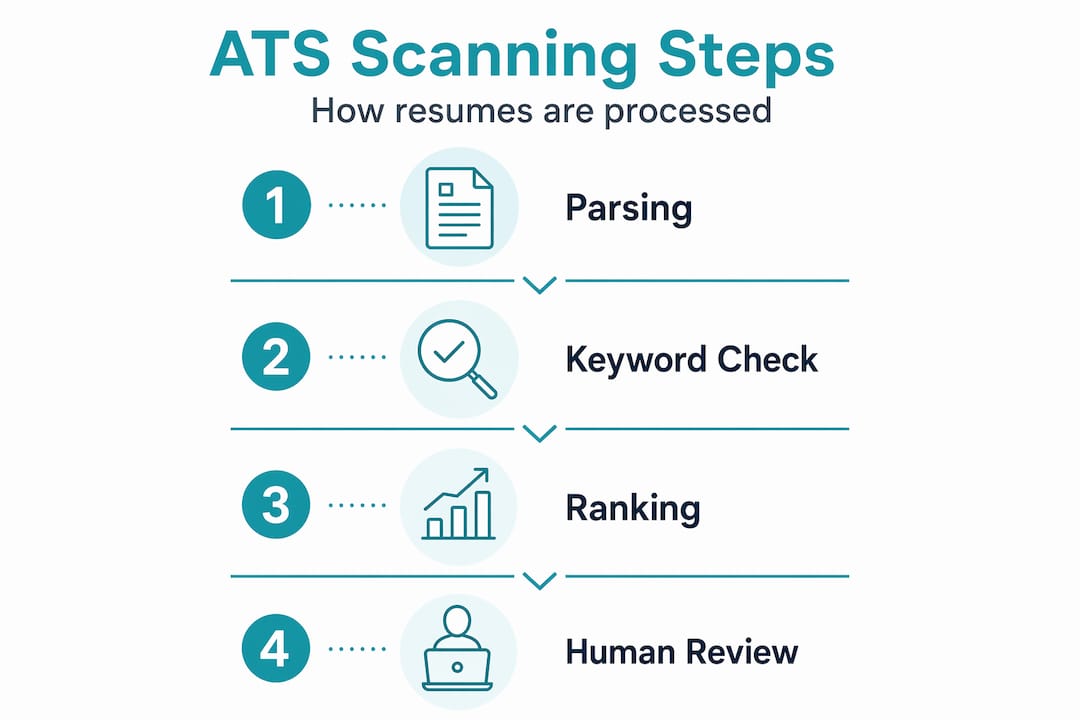
- The three-stage ATS resume scanning process explained
- Why resume formatting and keyword choices make a difference
- Examples: Formatting and keyword strategies that boost ATS performance
- Practical checklist to optimize your resume for ATS scanning
- The overlooked truth about ATS: it’s not the enemy but a filter you can work with
- How Resume Wiz helps you master ATS resume scanning
- Frequently asked questions
Key Takeaways
| Point | Details |
|---|---|
| ATS stores, doesn’t reject | Applicant tracking systems parse and store your resume data but the rejection happens if recruiters don’t find matching keywords. |
| Parsing accuracy matters | Simple formatting with single-column layout and standard headings ensures ATS extracts your information correctly. |
| Keyword alignment is critical | Use exact job description keywords strategically in your summary, skills, and experience sections to improve ATS rankings. |
| Avoid visuals and complex layouts | Graphics, tables, columns, and text boxes often cause ATS parsing errors and lost information. |
| Use ATS checks pre-submission | Test your resume with ATS resume checker tools to fix formatting and keyword gaps before applying. |
What is ATS resume scanning and why does it matter?
An applicant tracking system (ATS) is software that companies use to collect, store, and organize job applications. Think of it less like a bouncer at the door and more like Google for resumes. Your resume goes into a database, and recruiters search that database using keywords and filters to surface candidates worth reviewing.
ATS resume scanning is the multi-step automated process that parses your resume, extracts key data, and ranks it against other candidates based on how well it matches the job description. Here is what that means in practice: up to 75% of resumes may be filtered out or ranked so low that recruiters never see them. Not because the ATS actively rejected them, but because those resumes were never surfaced in a recruiter’s search.
This distinction matters enormously. Most candidates assume ATS acts as a hard filter that tosses bad resumes in the trash. The reality is more nuanced. Your resume stays in the database. It just gets buried if the system cannot read it clearly or if your keyword use to pass ATS filters does not match what a recruiter searched for.
Here is what the ATS scanning process actually does with your resume:
- Converts the file into machine-readable text
- Identifies and labels sections such as Work Experience, Skills, and Education
- Extracts named entities like company names, job titles, dates, and skills
- Scores your resume based on keyword overlap with the job posting
- Ranks you against other candidates in the same applicant pool
Understanding this flow reframes everything. You are not trying to fool a robot. You are making sure your information is readable and relevant.
The three-stage ATS resume scanning process explained
Knowing the individual stages of how ATS scanning works removes the guesswork from formatting and content decisions. Each stage is a potential failure point if your resume is not built with ATS in mind.
-
Parsing. The ATS converts your file into plain text and identifies distinct resume sections. It looks for signals like bold headings, whitespace, and standard labels to understand where your work history ends and your skills section begins. If your formatting is complex, the parser gets confused and may assign your experience bullets to the wrong section, or skip them entirely.
-
Entity extraction. Using natural language processing (NLP) and machine learning, the system pulls out structured data: your name, contact details, job titles, employer names, dates of employment, and skills. This is where ATS parses resumes through document conversion, NLP extraction, and field mapping before ranking them for relevance.
-
Scoring and ranking. The ATS compares the extracted data against the job description’s required qualifications and keywords. The higher the overlap, the higher your rank in the candidate pool. Recruiters typically start their search at the top of that ranked list and may never scroll further.
Each stage depends on the previous one succeeding cleanly. If parsing fails, entity extraction produces garbage. If entity extraction is incomplete, your score suffers even if you are genuinely qualified.
Pro Tip: After applying, search your own resume for the exact phrases in the job description. If you cannot find them, a recruiter searching for those terms will not find you either.
Understanding these stages clarifies why resume formatting and keyword use can make or break your ATS success. A $300 designer resume with columns, icons, and custom fonts may score lower than a simple Word document with the right keywords placed correctly.
Why resume formatting and keyword choices make a difference
Format and language are not aesthetic choices when it comes to ATS resumes. They are functional ones. Visual design elements like tables or columns frequently cause parsing errors, leading to experience being ignored or placed in the wrong category entirely.
Here are the formatting mistakes that most commonly hurt ATS performance:
- Tables and columns: Text inside table cells often gets scrambled or skipped during parsing
- Headers and footers: Contact information placed in the document header is frequently invisible to ATS parsers
- Text boxes: These are treated as floating images, meaning the content inside them disappears entirely
- Graphics and icons: Skill bars, profile photos, and logo icons carry zero data as far as the ATS is concerned
- Non-standard section headings: Labels like “My Journey” or “Core Competencies” may not map correctly to expected fields
The ATS resume format that works best is almost painfully simple. Use a clean, single-column DOCX or text-based PDF with standard section headings. That is what gets parsed accurately.
Pro Tip: Place your phone number, email, and LinkedIn URL in the body of the document, not in the header. Many ATS systems skip header content entirely during parsing.
Keyword strategy matters just as much as format. The goal is to mirror the job description’s exact language. If a job posting says “P&L management” and your resume says “profit and loss oversight,” those may not match in the ATS. Same concept, different words, missed match.
| Resume element | ATS-unfriendly version | ATS-friendly version |
|---|---|---|
| Layout | Two-column design with sidebar | Single-column, top-to-bottom flow |
| Contact info | Placed in document header | In the main body, above the summary |
| Section headings | “My Story,” “What I Bring” | “Work Experience,” “Skills,” “Education” |
| Skills section | Skill bars with visual ratings | Plain text list of skills |
| File format | InDesign PDF or Canva export | DOCX or Word-exported PDF |
Now that you understand how formatting and keywords affect ATS parsing and scoring, let’s look at side-by-side examples comparing effective and ineffective practices.
Examples: Formatting and keyword strategies that boost ATS performance
Real-world application makes abstract rules concrete. Consider two candidates applying for the same VP of Operations role.
Candidate A submits a beautifully designed resume with a two-column layout. Their contact details sit in the header. Their skills are displayed as a row of icons. Their work history bullets quantify achievements, but the job title on their resume says “Operations Leader” while the posting uses “VP of Operations.”
Candidate B submits a plain single-column DOCX. Contact info is in the body. Section headers read “Work Experience” and “Skills.” Their bullets include numbers and mirror the job posting’s language closely: “P&L management,” “cross-functional team leadership,” “supply chain operations.”
Candidate B will rank higher every time, even if Candidate A is more qualified on paper. The system scores based on what it can read and match.
Here is a practical keyword placement strategy based on a real job description:
- Pull 8 to 12 core terms from the job posting: required skills, job title variants, tools, and certifications
- Place each keyword in at least two of three sections: Summary, Skills list, and Experience bullets
- Use exact phrasing where possible, especially for technical terms and qualifications
- Do not stuff keywords in a block at the bottom. Distribute them naturally so the resume reads well once a recruiter actually opens it
Taleo ATS scores resumes based on exact keyword frequency and requires keyword presence across Summary, Skills, and Experience sections. Taleo is among the most widely used ATS platforms in enterprise hiring, so this is not a fringe case.
After you clear the ATS screen, a human recruiter will read your resume. That is why quantified achievements matter. “Reduced operational costs by 23% over two years” is far more compelling to a hiring manager than “responsible for cost reduction initiatives.”
Practical checklist to optimize your resume for ATS scanning
Following this checklist brings together every principle covered so far into a repeatable process you can apply to every application.
- Save as DOCX or text-based PDF. Avoid image-based PDFs, Canva exports, and InDesign files entirely.
- Use standard section headings. Stick with Contact Information, Summary, Work Experience, Education, and Skills.
- Put contact information in the body. Name, email, phone, LinkedIn URL all go above the summary, not in the header.
- Mirror the job description’s language. Copy exact terms for job titles, tools, and required skills into your resume.
- Distribute keywords across three sections. Summary, Skills, and Experience bullets should all contain relevant terms.
- Quantify every achievement you can. Use numbers, percentages, dollar amounts, and team sizes.
- Test your resume before submitting. Free ATS checker tools check formatting, structure, and keyword scoring before you apply.
Pro Tip: Create a master resume with your full history, then build a tailored version for each application. Swap keywords and adjust your summary to reflect the specific job description. This takes 20 minutes but meaningfully improves your ranking.
This checklist applies whether you are applying to a startup or a Fortune 500. ATS resume guidelines are fairly consistent across platforms because the underlying parsing logic is similar.
The overlooked truth about ATS: it’s not the enemy but a filter you can work with
Here is the reframe most job search advice misses. Candidates spend enormous energy trying to “beat” ATS, as if it were an adversary with opinions about them. It is not. ATS is a database with a search engine on top. It does not dislike your resume. It either understands it or it does not.
The frustration most executives and managers feel after applying to dozens of jobs without response is rarely about the ATS being too strict. It is almost always about keyword use to pass ATS filters not matching what a recruiter actually searched. A five-word mismatch between your language and the job description’s language can bury a genuinely strong candidate.
The other piece most people miss: once your resume is in the database, it stays there. Some companies recruit from their ATS backlog for new openings. Getting your resume parsed correctly and scored well means it works for you beyond the specific role you applied to.
The smartest approach is not to game the system but to learn its operational logic and design your resume accordingly. Speak its language. Use the exact terminology from the job posting. Structure your document so a parser can identify every section without guessing. Do those two things well, and ATS becomes an advantage, not an obstacle.
Once you clear the ATS layer, the real evaluation begins. A recruiter is now reading your resume as a human. That is where your quantified achievements, clear career narrative, and leadership examples do the heavy lifting. ATS gets you to the table. Your content keeps you there.
How Resume Wiz helps you master ATS resume scanning
You now have a clear picture of how ATS resume scanning works and what it takes to get your resume in front of recruiters. Putting that knowledge into practice, especially when you are also managing a full-time role, is a different challenge altogether.
Resume Wiz was built specifically for executives and managers who need their resume to work harder and smarter in today’s hiring environment. Founder Kim Taynor brings over a decade of recruiting experience to every engagement, which means your resume is reviewed through the same lens a recruiter uses when searching an ATS. The platform addresses keyword gaps, formatting issues, and executive positioning in a single process, so you go into the market with a document that performs at every stage of the screening process. If getting your resume seen by the right people faster is the goal, this is where to start.
Want a recruiter in your corner for your next senior role? Book a free call with Resume Wiz and we will map out your next move together.
Frequently asked questions
Does ATS reject resumes automatically?
No, ATS stores your resume in a database and does not reject it outright. ATS systems do not reject resumes independently; human recruiters perform searches and decide whom to review, meaning your resume may simply be ranked too low to surface.
What file formats work best with ATS?
The safest formats are a single-column DOCX or a clean PDF exported from Word or Google Docs, with no tables, text boxes, or graphics that can disrupt parsing.
How important are keywords in an ATS resume?
Keywords are the primary ranking factor. ATS scores resumes by keyword frequency and how well your qualifications overlap with the job posting, so mismatched terminology can cost you even if you are fully qualified.
Can images or graphics on resumes affect ATS scanning?
Yes, significantly. Images are invisible to ATS parsers, meaning any information embedded in graphics, such as contact details or skill ratings, is simply not captured in the candidate’s profile.
How can I test if my resume passes ATS scanning?
Free ATS resume checker tools simulate parsing and keyword scoring so you can spot issues before submitting. A good checker reviews formatting, structure, and scoring the same way an ATS would process your file.
