Attach a One Page PDF Cover Letter Unless Asked to Paste in Email
Follow whatever the job posting tells you to do: if it asks for a cover letter, send one exactly as requested. If there’s no instruction, write a short email introducing yourself and attach a tailored, one-page PDF cover letter, pasting the letter into the email body only when the posting or recipient asks for that. Never put the full letter in both places.
Key Takeaways:
- Following application instructions is crucial, as ignoring specific requests for a cover letter or format easily disqualifies candidates.
- Attaching a well-formatted PDF cover letter is preferable when no other method is specified, with clear naming and a tailored, one-page structure.
- Sending a concise email with a short introduction and a reference to your attached cover letter increases the likelihood of your materials being reviewed.
- Common mistakes include using a generic letter, repeating resume points without explanation, and neglecting proofreading and formatting details.
- Treat the email as an introduction and the cover letter as the narrative that justifies your fit, ensuring both are tailored and error-free.
Table of Contents
- When do you actually need a cover letter?
- Cover letter and email serve different jobs
- Should you attach your cover letter or paste it in?
- How to format and send it without errors
- Five mistakes that quietly cost you interviews
- What recruiters actually notice first
- The real debate isn’t email versus cover letter
- Get your cover letter and application ready to send
- FAQ
- Sources
When do you actually need a cover letter?
Start with the posting itself. Many applications tell you precisely what they want, and ignoring that instruction is one of the fastest ways to get filtered out before anyone reads your resume.
- Always include one when the job posting or recruiter requests it, or when the application portal has an upload field for it.
- Include one strategically when you have a story that your resume can’t tell alone, such as a career change, an employment gap, or a referral worth naming.
- Skip it when the posting explicitly says not to include one, or when you can’t produce a genuinely tailored letter and would otherwise submit a generic one.
A cover letter is not a formality you attach out of habit; for tailored advice on crafting concise and well-formatted letters, see this cover letter Archives. According to Tulane University’s career guidance, a cover letter is not basically an email: it’s a document that explains your fit, while the email simply routes your materials to the right reader.
Cover letter and email serve different jobs
The confusion between these two formats comes from treating them as interchangeable, when they do different work. An email is a short, functional message that gets your materials in front of someone and gives them just enough context to open the attachment. A cover letter is a tailored document that interprets your resume, connecting specific accomplishments to what the employer actually needs.
That distinction matters operationally, too. Cover letters often get saved, printed, or forwarded to other decision-makers, and a PDF preserves your formatting through all of that in a way a pasted email body cannot. Recruiters tend to scan the email for quick context, then turn to the letter for the narrative that actually justifies an interview. Treating the email as your pitch and the letter as an afterthought gets the order backward.
Should you attach your cover letter or paste it in?
Use this sequence any time you’re deciding how to deliver your materials.
- Check the posting first. If there’s a portal, upload there. If the posting, a recruiter, or a referral tells you to email your materials, do that instead, and follow any stated file-format rule.
- Default to attaching a PDF. When you’re emailing and no preference is stated, attach a one-page PDF cover letter and write a short email that points the reader to it.
- Paste only when asked. Paste the full letter into the email body when the posting requests that format or you know the recipient prefers reading inline rather than opening files.
Avoid writing the complete letter in both the email body and as an attachment. It’s redundant, it reads as padding, and it buries your actual message. A concise email summary that directs the reader to your attachments does more work in less space.
Pro Tip: When in doubt, write the email as if the attachment might never get opened, then write the cover letter as if the email will never get read.
How to format and send it without errors
Small formatting choices decide whether your materials look careless or deliberate before anyone reads a word of content.
- File type: Use PDF for attachments unless the posting asks for something else. Name the file clearly, something like FirstName-LastName-Cover-Letter.pdf.
- Subject line: State the job title and your name, and mention a referral if you have one. Keep it specific enough that someone searching their inbox later can find it.
- Email intro: One to three sentences naming the role, your strongest point of fit, and a line pointing to your attachments.
- Cover letter length: One page, three to four short paragraphs. NYU Wagner’s cover letter guide recommends fonts of at least 11 points and margins no smaller than half an inch, standards that keep a one-page letter readable without looking cramped.
- Salutation: Use the recipient’s name whenever you can find it. Otherwise, “Dear Hiring Manager” or an equivalent works fine.
- Signature: Name, current title, phone number, and a LinkedIn or portfolio link.
Proofread names, titles, and company references before sending. A single typo in the hiring manager’s name undercuts a letter that otherwise does everything right.
Five mistakes that quietly cost you interviews
Most cover letter problems trace back to a handful of repeatable errors, each with a direct fix.
- Sending a generic letter. Fix it by naming two or three details specific to this employer and role, not just swapping the company name.
- Repeating the resume. Fix it by interpreting your results, explaining why an accomplishment matters for this job, rather than restating your bullet points in sentence form.
- Ignoring instructions. Fix it by rereading the posting before you hit send and matching its exact file-format and delivery request.
- Writing a wall of text in the email body. Fix it by trimming the intro to one to three sentences and letting the attachment carry the detail.
- Skipping final checks. Fix it with a quick send checklist: confirm the file opens, the name is spelled right, and the subject line is clear.
Notre Dame’s career guidance lists customization, concise structure, and careful proofreading among the practices that separate a letter that gets read from one that gets skimmed and discarded.
What recruiters actually notice first
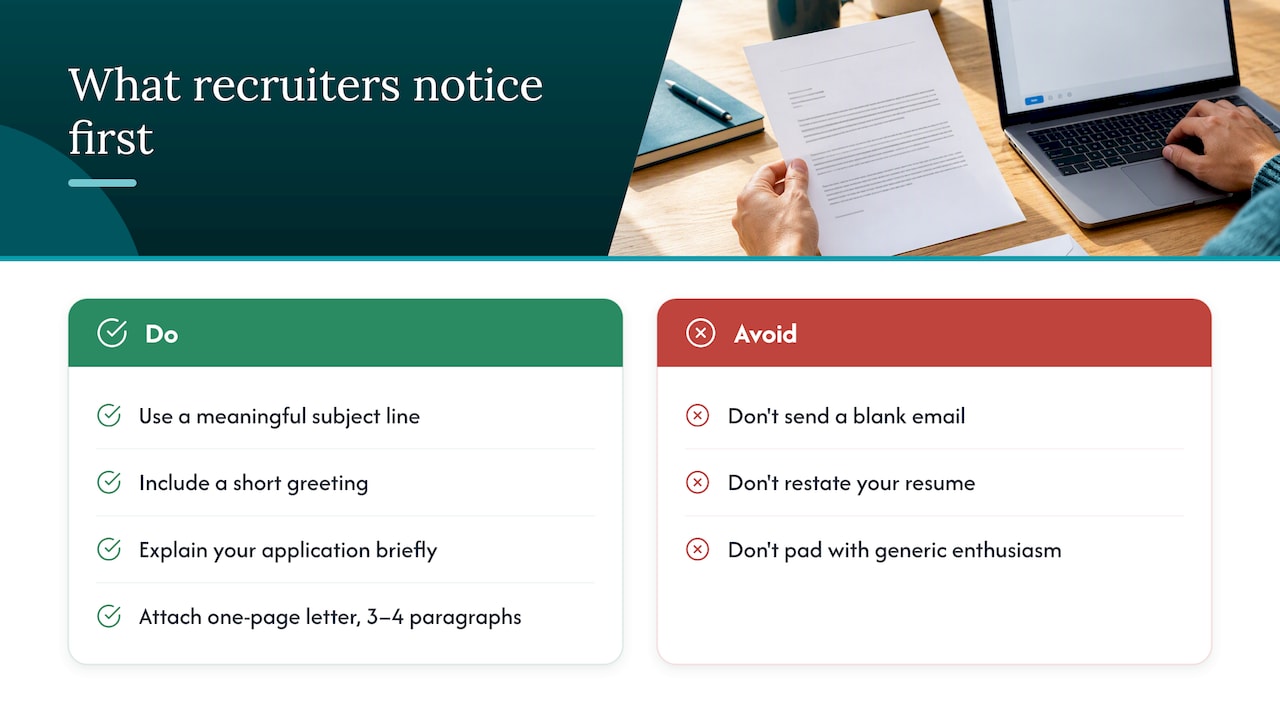
Recruiters open dozens of applications a day, and most decide within seconds whether an email is worth a second look. A blank email with only an attachment and no context reads as careless; Capital University’s cover letter guidance specifically flags this as an avoidable error, recommending a meaningful subject line, a short greeting, a sentence or two explaining the application, and a professional sign-off.
Once a recruiter opens the attached letter, they’re scanning for a clear connection between your background and the role, not a restatement of your resume. A one-page letter with three or four tight paragraphs, built around a specific accomplishment and why it transfers to this job, does more than a longer letter padded with generic enthusiasm. Templates help here, mainly because they keep structure consistent while leaving room for the details that make a letter feel written for one employer instead of fifty.
The real debate isn’t email versus cover letter
Most of the anxiety around this topic comes from treating cover letter and email as competing formats, when they almost never compete. The employer’s instructions settle the question in the overwhelming majority of cases, and the people who agonize over attach versus paste are usually avoiding the harder work of writing a letter worth reading in either format.
Where conventional advice falls short is in treating formatting rules as if they were the hard part. A perfectly formatted PDF with a generic, resume-repeating letter inside it still gets passed over. The formatting rules in this piece exist to remove friction, not to replace substance.
If you take one thing from this, prioritize instruction-following first, a tailored narrative second, and polish third. Readers who get those three in order rarely lose an interview over a subject line.
Kim
Get your cover letter and application ready to send
Writing a tailored letter for every application takes real time, and getting the formatting, tone, and narrative right for each role is its own skill. Career services providers often bundle that work into several packages rather than leaving you to figure it out alone.
- Evolution covers resume and LinkedIn work for professionals who want their documents and profile aligned.
- Elevate adds hands-on coaching and outreach support to your job search.
- Elevate and Land pairs application materials with active outreach for readers who want help getting in front of decision makers, not just writing to them.
- Elevate is a focused option for readers who need interview prep and coaching.
These services often emphasize creating ATS-compliant documents tailored to specific roles, drawing on recruiting experience rather than generic templates. Check Resume Wiz’s services to find the package that fits where you are in your search.
Want a recruiter in your corner for your next senior role? Book a free call with Resume Wiz and we will map out your next move together.
FAQ
What are five common cover letter mistakes?
The most frequent errors are sending a generic letter, repeating resume bullets instead of interpreting them, ignoring the employer’s stated instructions, exceeding one page, and failing to proofread names and attachments. Notre Dame’s career guidance treats customization and careful proofreading as basic requirements, not optional polish.
Do employers still want a cover letter?
Many postings still request one directly, and when they do, skipping it can remove you from consideration before your resume gets a look. Survey data on submission and reading rates varies by methodology and role, so the safest approach is to follow the specific posting’s instructions rather than a general rule.
Is a cover letter basically the same as an email?
No. An email is a short routing message that introduces your application and points the reader to your materials, while a cover letter is a tailored document explaining your fit for the role. Tulane’s career services guidance draws this distinction directly, describing the email as shorter and meant for skimming.
Should I attach my cover letter or paste it into the email?
Follow the posting’s instructions first. When none are given, attach a one-page PDF cover letter and write a brief email that points to it, reserving pasted text for cases where the posting or recipient specifically prefers reading inline.
What file format should I use for a cover letter?
PDF is the standard recommendation unless the posting asks for something else, since it preserves fonts, margins, and layout across devices. Name the file descriptively, such as FirstName-LastName-Cover-Letter.pdf, so it’s easy to identify once it reaches the recipient.
