Three Recruiter Tested Pillars of Executive Resume Design
An effective executive resume design pairs boardroom-level branding with measurable outcomes, wrapped in an ATS-safe, scannable layout. The three pillars that make this work are clean structure, strict formatting discipline, and templates built for how recruiters actually read. Kim Taynor, founder of Resume Wiz, has spent over a decade recruiting for senior roles, and the guidance below reflects what actually clears both software and skeptical hiring committees.
Key Takeaways:
- Use a reverse-chronological format that highlights your most recent and senior roles first, with a two- to three-page length depending on experience.
- Incorporate measurable achievements with quantified impact, like revenue growth or cost savings, rather than vague responsibilities.
- Keep layout simple and ATS-friendly by avoiding multi-column designs, images, and embedded graphics, and test formatting in plain text.
- Tailor core competencies with keywords from the target role and ensure your contact information is in the main body for parsing.
- Use subtle accent colors and minimal graphics only in versions intended for human readers, maintaining a purely text-based version for online applications.
Table of Contents
- What Are the Key Principles of Executive Resume Design?
- Which Resume Format Works Best for Executives?
- How Should You Structure an Executive Resume?
- What Template Style Fits Your Industry Best?
- What ATS Rules Should Executive Resumes Follow?
- What Are the Most Common Executive Resume Mistakes?
- Who’s Behind This Executive Resume Guidance?
- Should You Add Color and Graphics to an Executive Resume?
- How Should Design Change by Industry or C-Suite Role?
- How Do You Balance Content and White Space?
- What Do Recruiters Actually Notice First?
- Get a Custom Executive Resume Built for Your Next Move
- Where to Learn More About Executive Resume Formatting
- Sources
What Are the Key Principles of Executive Resume Design?
Visual hierarchy tells a reader where to look first. Your name should be the largest element on the page, followed by your title or branding headline, then section headers, then body text. Recruiters spend seconds on that first pass, so the layout has to do the sorting work before they read a word.
Font choice matters more at this level than people assume. Use a clean, professional typeface at 10 to 12 point for body text and 14 to 16 point for section headings, with your name set at 18 to 24 point. Anything smaller strains the eye; anything larger reads as amateur design.
- Keep margins between 0.5 and 1 inch on all sides
- Use one accent color at most, applied only to your name or section dividers
- Reserve bold and italics for job titles and key metrics, not entire sentences
- Avoid underlines except for hyperlinks
Subtle two-column layouts or boxed skill grids can look sharp in a PDF sent directly to a hiring manager. They break the moment an applicant tracking system tries to parse them, scrambling the reading order into nonsense.
Pro Tip: Open your resume in Word’s outline view or paste it into a plain text file. If the content still reads top to bottom in a logical order, your formatting is ATS-safe.
Which Resume Format Works Best for Executives?
Reverse-chronological is the default for a reason: recruiters and search firms expect to see your most recent, most senior role first, and this format tracks career progression without forcing them to hunt for it.
Combination format, which pairs a skills summary with a chronological work history, helps when you’re pivoting industries or stepping from a specialized functional role into general management. Pure functional format, which hides dates and buries chronology, almost always backfires at the executive level. It reads as evasive rather than strategic.
Length runs longer here than early-career advice suggests. Executive resumes often run two to three pages, depending on tenure and board history. Page one should carry your summary, core competencies, and most recent role. Everything from ten-plus years back can compress into a shorter “Earlier Career” block.
- Search firms want depth, including board seats and advisory work
- ATS scans prioritize keyword match over page count
- Direct applications to a company website benefit from a tighter, one-to-two-page version when the role is more operational than strategic
How Should You Structure an Executive Resume?
Every section earns its place, or it comes out. Here’s the anatomy that consistently performs.
- Header. Name, title, phone, email, LinkedIn URL, and city/state. Keep this in the document body, not the header or footer field. Many parsing tools skip headers and footers entirely, which means your contact information effectively disappears.
- Executive summary. Three to five sentences establishing your leadership scope, industry, and signature results. A tight formula: years of experience plus industry, one or two flagship achievements with numbers, and a forward-looking statement about the value you bring next.
- Core competencies. A grid of eight to twelve keyword phrases pulled directly from the target role’s language. This is where tailoring happens fastest between applications.
- Professional experience. Company, title, dates, then three to five bullets per role using the Challenge-Action-Result structure. Recruiters and search firms expect quantified, impact-driven bullets tied to financial or operational outcomes.
- Board and advisory addendum. Add this only if you hold formal board seats, advisory roles, or committee positions worth surfacing separately from your operating history.
Before and after, side by side:
- Weak: “Responsible for sales team performance and revenue growth.”
- Strong: “Rebuilt underperforming sales team of 40, driving revenue from $12M to $19M in 18 months through territory realignment and incentive redesign.”
Emphasize measurable outcomes like revenue, headcount, and market expansion instead of listing duties.
What Template Style Fits Your Industry Best?
Three template families cover most executive situations. Classic templates use serif or clean sans-serif fonts, black text, and minimal color, suited to finance, law, and government-adjacent sectors where conservative presentation reads as credibility. Modern templates introduce a single accent color and slightly more generous white space, common in tech, consumer brands, and marketing leadership. Data-forward templates work in a small metrics strip near the summary, useful for CFOs, COOs, and operations executives whose entire value proposition is quantifiable.
Customizing any of these starts the same way: draft your executive summary first, then convert every duty-based line in your experience section into a metric bullet before touching fonts or colors.
- Adjust margins and font sizes only after content is finalized
- Confirm the template uses U.S. Letter page size if you’re applying domestically
- Export as both DOCX and PDF, then test each version by copying the text into a plain text editor to confirm nothing scrambles
What ATS Rules Should Executive Resumes Follow?
Applicant tracking systems fail on predictable elements. Images, embedded logos, text boxes, and multi-column tables commonly break parsing because the software reads left to right in a straight line and has no way to interpret a sidebar. Replace any graphic element with inline text, and replace text boxes with standard paragraph formatting under a clearly labeled heading.
Standard section headings such as “Work Experience” and “Education” parse more reliably than creative alternatives like “Where I’ve Made an Impact.”
Experts recommend simple, text-based PDFs, chosen by 53%, or DOCX files, chosen by 43%, and advise against embedding images inside a PDF.
- Save as DOCX when a job portal explicitly requests it; otherwise a clean PDF preserves formatting across devices
- Confirm every word of text is selectable, not flattened into an image
- Check that headers and footers contain no critical contact information
- Paste the full resume into a plain text file to see if section order and bullet content still make sense
Even executives recruited through search firms benefit from keeping an ATS-safe master version on hand, since many hiring channels feed candidate data into a database regardless of how the resume first arrived.
What Are the Most Common Executive Resume Mistakes?
Vague achievement language is the most frequent failure. “Led key initiatives” tells a reader nothing; “Led a $40M ERP migration across four business units” tells them everything. Decorative formatting, misplaced contact details in a header, and missing metrics round out the usual suspects.
- Quantify every bullet you can, even with estimated ranges when exact figures aren’t shareable
- Simplify any layout element that a plain text paste would scramble
- Test every version in both PDF and DOCX before submitting
- Tailor core competencies to match the specific posting’s language
| Mistake | Fix |
|---|---|
| Vague duty-based bullets | Rewrite using CAR structure with a number |
| Contact info in header/footer | Move into the document body |
| Multi-column or boxed layout | Convert to single-column text |
| Generic keywords | Match language from the job posting |
Who’s Behind This Executive Resume Guidance?
Kim Taynor built Resume Wiz on more than ten years of recruiting experience, spent evaluating exactly the resumes this guide teaches you to write. That vantage point, sitting on the hiring side of the desk, shapes every formatting rule here.
- Resume Wiz offers ATS-compliant executive resume writing, executive summary development, and LinkedIn profile optimization through Evolution, along with 1:1 executive job search coaching through Elevate
- Templates and checklists throughout this guide reflect the same standards applied to Resume Wiz client work
Should You Add Color and Graphics to an Executive Resume?
Color earns its place when it’s restrained. One accent shade, deployed consistently on your name, section dividers, or a thin horizontal rule, signals design intent without distracting from content. Navy, charcoal, and deep burgundy read as authoritative across most industries; bright colors like orange or lime rarely belong on a document meant to project gravitas.
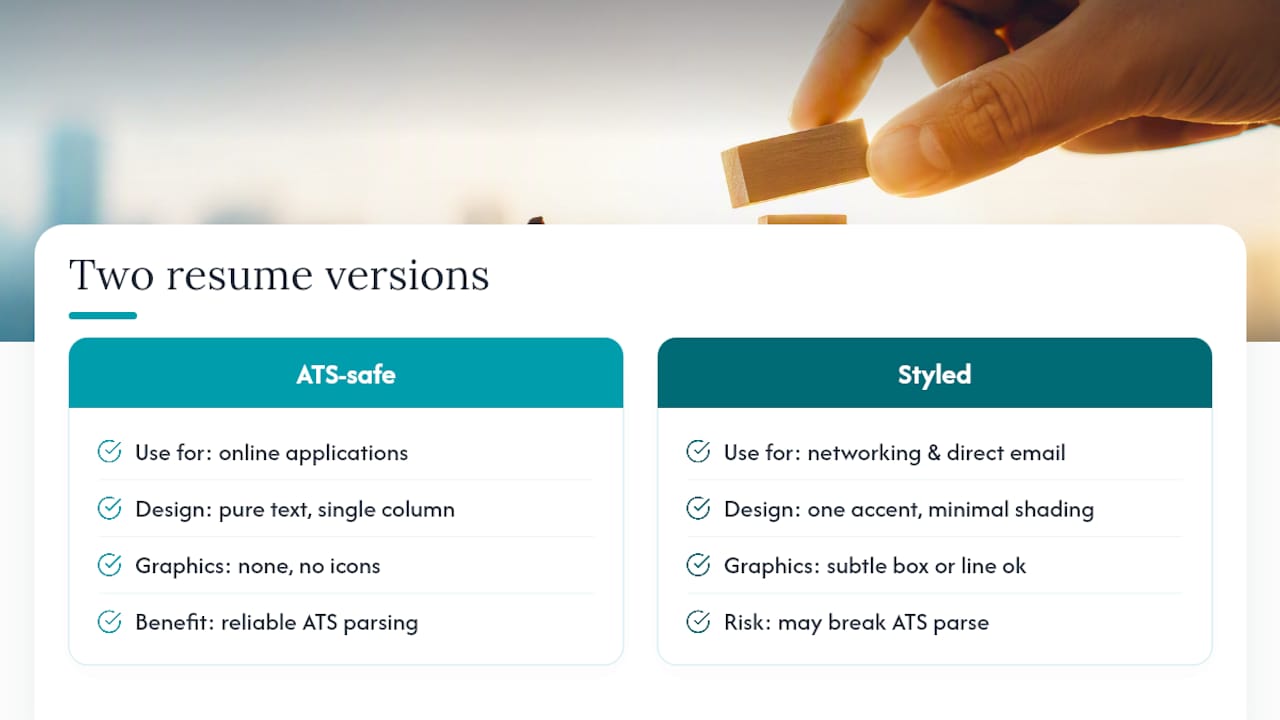
Subtle graphics, a thin bordered box around your executive summary, a light gray shading behind your name block, can work in a PDF sent directly to a hiring manager or forwarded by a personal contact. The moment that same resume gets uploaded into an applicant tracking system, those elements risk breaking the parse entirely. That’s the tradeoff: visual polish for a human reader versus reliability for a machine reader.
The safest approach is a dual-file strategy. Keep one ATS-safe version with zero graphic elements, pure text, standard headings, single column, for any online application. Keep a second, lightly styled version with your one accent color and minimal shading for situations where you know a human will open it first: networking contacts, executive search partners, or a direct email to a hiring executive.
Icons next to contact information or skill categories look modern in a template preview and disappear entirely once parsed by many systems, since icons are technically images. Skip them. If you want visual separation between sections, a simple horizontal line or slightly bolded heading does the same job without the risk.
How Should Design Change by Industry or C-Suite Role?
A CFO’s resume should look different from a CMO’s, and not just in content. Finance, legal, and operations executives generally benefit from a classic, low-color template with a data-forward summary strip up top, since these audiences reward precision over visual flair. A single bolded row of headline metrics, revenue managed, cost savings delivered, portfolio size, sets the tone before a reader even reaches the experience section.
Marketing, technology, and consumer-brand executives have more latitude for a modern template with a single accent color and slightly more visual breathing room. These industries expect some evidence of design sensibility, since a chief marketing officer whose own resume looks dated raises a fair question about their taste.
Role also changes structural priorities beyond CEO. A CFO resume should front-load financial metrics: EBITDA growth, audit outcomes, capital raised. A COO resume leans on operational scale: headcount managed, geographic footprint, process improvements tied to dollar figures. A CHRO resume should emphasize organizational outcomes like retention rates, engagement scores, and executive succession planning, areas that don’t always translate into clean dollar figures but still need quantification wherever possible.
Board-track executives across any function should add the advisory addendum mentioned earlier, formatted identically to the main experience section so it reads as a continuation of the leadership narrative rather than as a separate résumé bolted on.
How Do You Balance Content and White Space?
Executives face a real tension: decades of accomplishment competing for space against a document nobody wants to read for more than 90 seconds. The instinct to cram every achievement onto the page works against you. Dense text blocks with no breathing room push readers to skim past exactly the metrics you most want them to see.
A useful rule: no bullet should run longer than two lines, and no section should sit without at least a half-line of white space above and below it. If your professional experience section for one role has more than five bullets, you’re including too much. Cut to the highest-impact three or four, and let older or less relevant roles compress into single summary lines instead of full bullet lists.
Design guidance that improves human scanning tends to improve machine parsing too. Clear visual hierarchy and quantified bullets that help a recruiter skim in seconds are the same structural choices that help ATS software extract keywords accurately. There’s no real tradeoff between “reads well” and “parses well” once you strip out decorative elements.
White space around your executive summary matters as much as the words inside it. A summary boxed in by dense competency grids above and cramped experience bullets below gets skipped, even when it contains your strongest positioning statement. Give it room to stand alone on the page.
What Do Recruiters Actually Notice First?
The first six to ten seconds are almost entirely about pattern recognition, not reading. A recruiter’s eye lands on your most recent title, your top-line metric, and whether the page looks clean or cluttered. Dense paragraphs, inconsistent bolding, or a resume that clearly fights the template it started from all register as red flags before a single sentence gets read closely.
Board-readiness shows up in specificity. Executives who list “P&L responsibility” without a number read differently than one who writes: “Owned $180M P&L across three business units, improving margin 4 points in two years.” One sounds like a job description. The other sounds like a track record.
Before: “Managed operations for the western region.” After: “Turned around underperforming western region, cutting operating costs 15% while growing unit volume 22% over two years.”
That single rewrite, adding scope, action, and result, is the difference between a resume that gets skimmed and one that gets a callback.
Kim
Get a Custom Executive Resume Built for Your Next Move
Formatting your own resume against every rule above takes hours most executives don’t have between board meetings, quarterly closes, and the search itself. Professional services can build ATS-compliant executive resumes from scratch, pairing a tailored executive summary and quantified experience bullets with LinkedIn profile optimization and interview coaching so your entire candidacy, not just one document, is aligned.
The process starts with a working session on your career narrative, then moves into drafting, formatting, and parsing tests across both DOCX and PDF before anything reaches a hiring manager’s inbox. If you’d rather see the templates and formatting standards described in this guide applied to your own background than rebuild them yourself, visit Resume Wiz to review services and book a consultation.
Where to Learn More About Executive Resume Formatting
For readers who want to go deeper on any single rule covered here:
- Forbes’ 2026 ATS formatting breakdown for file-format statistics and font guidance
- SparkCV’s ATS resume format guide for a deeper dive on parsing-specific formatting traps
- Microsoft’s resume format overview for standard heading conventions
- InPronunci’s case studies for real examples of outcome-focused rewrites
Want a recruiter in your corner for your next senior role? Book a free call with Resume Wiz and we will map out your next move together.
