How LinkedIn Algorithm Ranks Profiles: Improve Visibility
LinkedIn ranks profiles using a proximity-weighted relevance score multiplied by profile authority. In plain terms: how LinkedIn algorithm ranks profiles comes down to three things working together. First, how close you are to the searcher in the network (1st, 2nd, or 3rd degree). Second, whether your profile clears the All-Star completeness gate. Third, how well your keywords match the query in the fields LinkedIn weights most heavily, amplified by your authority score built from connections, endorsements, and activity.
The fastest moves you can make right now:
- Reach All-Star status: photo, headline, location, industry, current position with description, two past positions, education, at least five skills, and a professional network of relevant connections. This is a binary gate, not a sliding scale.
- Rewrite your headline with your primary job title keyword in the first half of the 220-character limit.
- Add your top 10 skills to the structured Skills field (not just mentioned in your About section).
- Rewrite the first 300 characters of your About section to include your two or three most important keywords naturally.
- Post or comment on LinkedIn at least twice this week to signal that your profile is active.
Do those five things in the next 72 hours. The rest of this guide explains why they work and what to do next.
Table of Contents
- How the LinkedIn algorithm ranks profiles: the core signals
- Which profile fields LinkedIn actually indexes and how to use them
- How your activity on LinkedIn builds ranking authority
- Search ranking vs. feed ranking: two different games
- How LinkedIn Recruiter and Boolean search change who gets found
- Your prioritized LinkedIn optimization checklist
- Where this guidance comes from
- How LinkedIn groups affect your profile visibility
- Key Takeaways
- What recruiters actually see when they search
- Resumewiz can handle your LinkedIn profile optimization
- Useful sources for further reading
How the LinkedIn algorithm ranks profiles: the core signals
LinkedIn does not use a single score. It runs a layered evaluation that filters, then ranks, then re-ranks based on personalization. Understanding the layers tells you which levers actually move the needle.
Layer 1: Network proximity. The 3-degree connection model is the first filter applied to every search. First-degree connections surface above second-degree, which surface above third-degree, with out-of-network results appearing last. Mutual connections and shared affiliations add boosts within each tier. This is why two profiles with identical keywords can rank very differently for different searchers.
Layer 2: The completeness gate. All-Star profile completeness is a binary threshold, not a continuous score. Once you clear it, the algorithm stops evaluating completeness and shifts entirely to relevance and authority. Profiles that fall short of All-Star are significantly less likely to surface in recruiter searches, regardless of how well-written their content is.
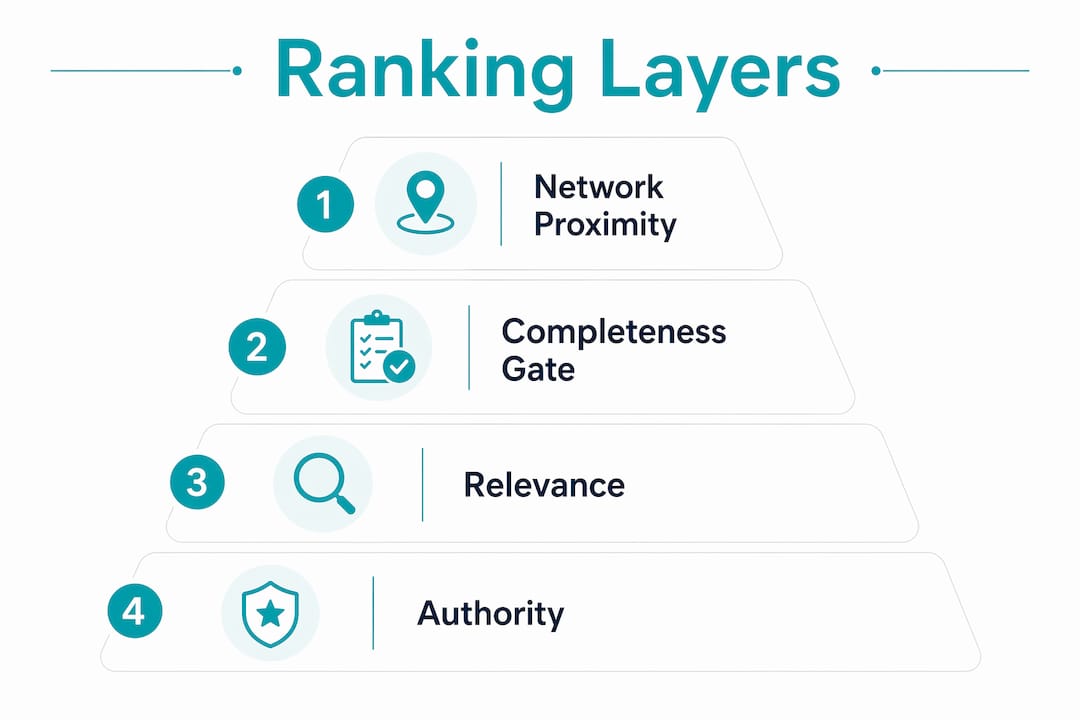
Layer 3: Relevance × Authority. This is the two-factor model that determines final position within the candidate pool. Relevance is lexical and semantic keyword matching across indexed fields. Authority is the multiplier built from connection count and quality, endorsements, activity signals, and profile view velocity. Relevance gets you into the pool; authority determines where you land in it.
Under the hood, LinkedIn’s system performs tokenization, entity mapping, and synonym normalization before building a feature vector for each profile. A learning-to-rank machine learning model then scores candidates, and the model is continuously retrained. That is why ranking gains can feel non-linear: a burst of activity combined with a keyword update can trigger a rapid re-evaluation of your feature vector, producing a jump that looks sudden but reflects accumulated signals.
Key signals the algorithm reads:
- Keyword matches in headline, About section, Experience titles, and Skills field
- Connection proximity to the specific searcher
- Profile completeness (All-Star gate)
- Engagement signals: posting frequency, comment quality, reaction counts
- Profile view velocity: how often your profile is being viewed recently
- Account type: Premium, Sales Navigator, and Recruiter accounts receive a visibility lift
Statistic callout: Users with complete profiles are significantly more likely to receive opportunities through LinkedIn. The All-Star threshold requires a minimum of 50 connections, the authority multipliers become noticeably stronger once profiles reach about 500 connections in a target vertical.
Which profile fields LinkedIn actually indexes and how to use them
Not all fields carry equal weight. LinkedIn’s search engine reads certain fields as structured database filters and others as full-text indexes, and the difference matters enormously for how you write your profile.
The field-weight hierarchy
| Profile Field | Search Weight | How LinkedIn Uses It |
|---|---|---|
| Headline | Highest | Full-text index; appears in search snippets; keyword-heavy |
| About (first 300 chars) | High | Visible in search results; first impression for humans and algorithm |
| Skills (structured field) | High | Direct filter in recruiter tools; not just full-text |
| Experience titles | Medium-High | Indexed for keywords; title field carries more weight than bullets |
| Experience descriptions | Medium | Full-text indexed; good for semantic variations |
| Education | Medium | Structured filter; institution and degree field |
| Certifications | Medium | Structured filter; appears in recruiter filter menus |
| Location | High (filter) | Structured filter; geographic targeting |
| Recommendations | Low-Medium | Trust signal; not a primary keyword field |
| Profile photo | Gate signal | No keyword value; absence penalizes ranking |
How to write each high-value field
Headline (220 characters). Put your primary keyword in the first half. A full, keyword-rich headline significantly outperforms a minimal one in search appearances. The format that works: Primary Title | Secondary Specialty | Value Proposition. Example: “Senior Product Manager | B2B SaaS | Turning Roadmap Chaos Into Shipped Revenue.” That is readable and keyword-dense without being a list.
About section (first 300 characters). These characters appear in search snippets before a user clicks through. Write the first two sentences as if they are your pitch to a recruiter who will read nothing else. Include your two most important keywords naturally in those sentences.
Skills field. LinkedIn’s official documentation confirms that structured filters read specific database fields, not full-text. A skill mentioned only in your About section does not count when a recruiter applies a Skills filter. List skills in the structured Skills field. You can add up to 50; use them deliberately and order your most important skills first since endorsements accumulate on the top-listed ones.
Experience titles. Use the actual job title keywords your target audience searches for, not internal company titles. If your company called you “Growth Ninja,” your LinkedIn title should say “Growth Marketing Manager” or whatever the market-standard term is.
Practical rules:
- Use semantic variations across fields rather than repeating the exact same phrase. LinkedIn now recognizes related terms, and repetitive keyword stuffing is penalized.
- Put formal and informal industry terms in different fields (e.g., “demand generation” in headline, “growth marketing” in skills, “pipeline development” in experience).
- Never list a skill only in prose. The structured Skills field and the full-text index are separate systems.
How your activity on LinkedIn builds ranking authority
A static profile, no matter how well-written, loses ground to an active one over time. LinkedIn’s algorithm uses behavioral signals as a proxy for profile authority, and those signals feed directly into the relevance × authority formula.
The activity signals that matter most:
- Posting frequency: profiles that publish content consistently rank higher than identical profiles with no content history
- Comment engagement: comments on posts by high-authority profiles in your field carry more weight than comments on low-engagement content
- Profile view velocity: a spike in profile views after activity signals to the algorithm that your profile is gaining relevance
- Response rate: replying to messages and connection requests signals an active, engaged professional
- Endorsements received: these accumulate on your Skills field and reinforce authority for specific keywords
Why activity multiplies relevance: when you post content that generates comments and shares, LinkedIn interprets that engagement as evidence of professional value. That lifts your profile’s authority score, which then amplifies how your keyword relevance translates into search position. The cycle compounds: more authority means more search appearances, more views, more connections, more authority.
Pro Tip: Run this sequence over five days: rewrite your headline with target keywords on day one, publish one substantive post on day two, then comment meaningfully on five posts by well-connected people in your field on days three through five. This combination triggers a rapid feature-vector re-evaluation and often produces a visible jump in search appearances within a week.
What types of activity produce the best authority lift, in order:
- Original posts that generate comments (not just likes)
- Thoughtful comments on posts by high-follower accounts in your industry
- Profile updates (new role, certification, or skills addition)
- Receiving new endorsements on top skills
- Accepting targeted connection requests from relevant professionals
Search ranking vs. feed ranking: two different games
Confusing feed virality tactics with search optimization is one of the most common mistakes professionals make. They are related but governed by different signals, and optimizing for one without understanding the other produces mixed results.
LinkedIn search ranking relies primarily on:
- Structured field keyword matches (headline, skills, titles, location)
- Connection proximity to the specific searcher
- Profile completeness and All-Star status
- Recruiter filters (Skills, Certifications, Location, Languages)
LinkedIn feed ranking relies primarily on:
- Content engagement rate (comments weighted more than likes)
- Recency of the post
- Network amplification (shares by well-connected accounts)
- Relevance of content topics to the viewer’s stated interests
A headline and skills update affects your search ranking almost immediately. A viral post affects your feed reach but contributes to search ranking only indirectly, through the authority signal it generates via profile views and new connections.
When to prioritize search optimization:
- You want recruiters or hiring managers to find you for a specific role
- You are in an active job search
- You want to be discovered by prospects searching for your specialty
When to prioritize feed tactics:
- You are building thought leadership and want inbound connection requests
- You want to grow your network broadly in a target industry
- You are not in an active search but want to stay visible
Geographic location and industry influence both paths. LinkedIn personalizes search results based on the searcher’s location and industry, which means your location field and industry selection directly affect which searches you appear in. If you are targeting a specific city’s job market, your location should reflect that city, not a remote-work preference that removes you from local geographic filters.
How LinkedIn Recruiter and Boolean search change who gets found
Recruiters using LinkedIn Recruiter operate with a different toolset than a regular user typing a name into the search bar. Understanding their workflow tells you exactly which fields to prioritize.
LinkedIn Recruiter uses structured filters that read directly from specific database fields:
- Skills filter: reads the structured Skills field only, not mentions in About or Experience
- Title filter: reads current and past title fields
- Location filter: reads the location field
- Language filter: reads the Languages section
- Certifications filter: reads the Certifications section
Boolean operators let recruiters build precise queries. A recruiter searching "product manager" AND ("B2B SaaS" OR "enterprise software") NOT "junior" will pull only profiles where those terms appear in indexed fields. If your headline says “PM” instead of “Product Manager,” you may not surface in that query.
Profile elements that change your qualifying result set:
- Open to Work signal: places you in a filtered pool that recruiters can access directly; it meaningfully increases the likelihood of appearing in recruiter-initiated outreach
- Featured section: not a ranking signal, but it improves conversion once a recruiter lands on your profile
- Premium badge: Premium and Recruiter accounts receive a modest visibility lift in the algorithm’s account-type signal
Practical recipes for recruiter visibility:
- Match your current title to the exact job title keyword recruiters search for in your field
- List skills using the exact terminology that appears in job postings for your target role
- Add certifications to the structured Certifications section, not just mentioned in your About
- Set your location to the metro area where you want to work, even if you are currently remote
Your prioritized LinkedIn optimization checklist
Work through this in order. The sequence matters because each step amplifies the next.
- Reach All-Star completeness first. Add photo, headline, location, industry, current position with description, two past positions, education, five skills, and connect with at least 50 people. Nothing else you do will rank well until this gate is cleared. Authority gains strengthen further as you approach 500 connections.
- Rewrite your headline. Use your primary job title keyword in the first half. Fill all 220 characters with a readable combination of title, specialty, and value proposition.
- Add and order your top 50 skills. Put the skills most important to your target role at the top. Endorsements accumulate on top-listed skills, reinforcing those keywords with authority signals.
- Rewrite the first 300 characters of your About section. Include your two most important keywords in the first two sentences. Write for a human who will read only those sentences.
- Update Experience titles to use market-standard keywords, not internal company titles.
- Add semantic keyword variations throughout Experience descriptions. Use related terms, tool names, and industry-specific vocabulary naturally in achievement statements.
- Grow targeted connections. Prioritize connections in your target industry or with your target buyer profile. Authority signals become noticeably stronger once you reach about 500 connections in your target vertical, and the connection count display changes at this milestone.
- Build an activity plan. Commit to two posts per week and five meaningful comments per week for the next month.
- Request two to three recommendations from managers or colleagues who can speak to your most important skills.
- Customize your LinkedIn URL to your name or name plus title for cleaner external linking.
Copy templates for common roles:
Headline template (Product Manager): “Senior Product Manager | B2B SaaS & Enterprise Software | Shipping Products That Drive Revenue”
Headline template (Marketing): “Demand Generation Manager | B2B Pipeline Growth | HubSpot & Salesforce | $50M+ Revenue Influenced”
About opening template: “I help [target company type] [achieve specific outcome] by [your core method]. With [X] years in [industry], I specialize in [keyword 1], [keyword 2], and [keyword 3].”
Measuring your results:
- Search appearances (found in LinkedIn analytics) is your primary metric. Check it weekly.
- Run an incognito search for your two or three target keywords and note your position.
- Track profile view velocity: a rising view count after changes confirms the algorithm re-evaluated your profile.
- Expect some changes (headline, skills) to show results within days. Authority-building from connections and activity is non-linear and can take four to eight weeks to produce a measurable ranking shift.
Where this guidance comes from
The recommendations in this guide draw from LinkedIn’s own documentation, independent technical analyses of LinkedIn’s search pipeline, and practitioner observations from recruiting workflows.
| Fact | Value | Source |
|---|---|---|
| All-Star required fields | Photo, headline, location, industry, current position, 2 past positions, education, 5+ skills, 50+ connections | LinkedIn / powerin.io |
| Skills field cap | 50 skills maximum | LinkedIn platform |
| Headline character limit | 220 characters | LinkedIn platform |
| Opportunity likelihood (complete profiles) | 40× more likely to receive opportunities | LinkedIn’s own data |
| Authority multiplier threshold | ~500 connections in target vertical | socialboostdigital.com |
| Connection proximity tiers | 1st > 2nd > 3rd > out-of-network | powerin.io |
| Keyword field weight | Headline carries roughly 3 to 5x the weight of an experience bullet | Search Engine Journal / connectsafely.ai |
The practitioner perspective behind this guide comes from Resumewiz, founded by Kim Taynor with over 10 years of recruiting experience. That background shapes the recruiter-facing guidance throughout: which fields hiring teams actually filter on, how quickly profile changes translate into outreach, and what the gap looks like between a profile that ranks and one that converts.
How LinkedIn groups affect your profile visibility
Joining and actively participating in LinkedIn groups is an underused visibility lever, particularly for professionals whose target audience is concentrated in niche industries.
Groups extend your effective network without requiring direct connections. When you join a group, every other member of that group becomes part of your extended network for search purposes. That means a recruiter or prospect who shares a group with you can find your profile in searches where you would otherwise appear as an out-of-network result. For professionals in specialized fields where the total addressable network is small, this matters.
Active participation amplifies the effect. Posting or commenting within a group generates visibility among members who have not connected with you yet, which can produce profile views and connection requests from exactly the audience you want. Those new connections then strengthen your proximity signals for future searches by members of that group.
The practical approach: join five to ten groups that your target employers, clients, or peers actively use. Prioritize groups with genuine discussion activity over large but dormant ones. Post a substantive comment or question once a week. Over time, the combination of extended network reach and activity signals within those groups contributes to both search ranking and feed visibility.
Key Takeaways
LinkedIn’s ranking is driven by a two-factor model where keyword relevance determines whether you enter the candidate pool and profile authority, built from connections, endorsements, and activity, determines where you land in it.
| Point | Details |
|---|---|
| All-Star is a gate, not a score | Clear the completeness threshold first; the algorithm shifts to relevance and authority once you pass it. |
| Headline carries the most weight | Put your primary keyword in the first half of your 220-character headline before touching any other field. |
| Skills field is a structured filter | List skills in the dedicated Skills section; mentions in your About section do not count for recruiter filters. |
| Activity builds authority over time | Consistent posting and commenting lifts your authority score, which multiplies your keyword relevance in rankings. |
| Resumewiz offers profile rewrites | Resumewiz provides LinkedIn profile optimization and recruiter-targeted positioning for professionals ready to accelerate their search. |
What recruiters actually see when they search
Most LinkedIn optimization advice focuses on the algorithm. Here is what it looks like from the other side of the search bar.
When a recruiter opens LinkedIn Recruiter and runs a search, the first thing they see is your headline and your current title. That is it. They are scanning a list of names and one-line descriptions, deciding in about two seconds whether to click. A headline that says “Open to New Opportunities” tells them nothing and gets skipped. A headline that says “Senior Financial Analyst | FP&A | SaaS & Tech | Excel & Tableau” tells them exactly what they need to know.
After clicking through, recruiters look at the About section opening and the Skills list. The About section is where they decide if you are worth a message. The Skills list is where they confirm you match their filter criteria. Recommendations matter less than most people think at the initial screening stage; they become relevant only after a recruiter has already decided you are a strong candidate.
Mutual connections change recruiter behavior in a specific way. When a recruiter sees that you share a connection with someone they trust, they are meaningfully more likely to reach out. It is not just an algorithm signal; it is a human trust signal that makes the outreach feel lower-risk on their end.
Response rate matters more than most professionals realize. Recruiters track who responds to InMail and who does not. A quick, professional response, even to decline, keeps you visible in their mental shortlist. Ignoring messages has the opposite effect.
One pattern that comes up repeatedly in recruiting work: a professional updates their headline and skills on a Monday, and by the following week they are reporting a noticeable increase in recruiter messages. The changes that drive that shift are almost always the same: a clearer title keyword in the headline and the right skills listed in the structured field. The profile was always good enough to convert; it just was not getting found.
Resumewiz can handle your LinkedIn profile optimization
If you have read this far and your reaction is “I know what needs to change but I do not want to write it myself,” that is exactly the gap Resumewiz fills.
Resumewiz offers LinkedIn profile optimization built around recruiter-facing positioning: headline rewrites that target the specific keywords hiring managers search for, About section copy that converts profile views into messages, and a structured Skills list ordered for maximum filter visibility. The service is designed for executives, managers, and career changers who need their profile to work harder without spending hours on trial-and-error keyword experiments.
Kim Taynor’s recruiting background means the optimization is built around how hiring teams actually search, not just how the algorithm is described in blog posts. You get a profile that ranks and reads well to the human on the other side of the search.
Visit resumewiz.org to see the LinkedIn optimization packages and request a profile audit to find out exactly which fields are holding your ranking back.
Useful sources for further reading
-
How LinkedIn Search Works and How to Hack It: Detailed breakdown of the 3-degree connection model, the All-Star completeness gate, and Boolean search mechanics. Start here if you want to understand the proximity filter before diving into keyword strategy.
-
Social SEO for LinkedIn: Profile Prioritization (2026): Covers the relevance x authority two-factor model, semantic clustering, and why keyword stuffing now produces penalties. Useful for understanding how the algorithm has evolved beyond exact-match scanning.
-
How LinkedIn’s Algorithm Ranks Your Profile: A Breakdown: Technical explanation of the ML pipeline: tokenization, feature-vector construction, and the learning-to-rank model. Read this if you want to understand why ranking gains can feel sudden and non-linear.
-
Your LinkedIn Profile Is a Landing Page: Covers the distinction between full-text keyword search and structured database filters, with practical guidance on writing each section for both the algorithm and the human reader.
-
How LinkedIn Search Works: Algorithm Guide for 2026: Comprehensive ranking factor table, the three-stage query processing model, and data on how complete profiles perform versus incomplete ones. Good reference for the 40x opportunity statistic and account-type signal details.
-
Resumewiz: LinkedIn profile optimization and career services for executives and career changers. Use this as your next step if you want professional help implementing the keyword and positioning changes covered in this guide.
Want a recruiter in your corner for your next senior role? Book a free call with Resume Wiz and we will map out your next move together.
