Recruiter Toolkit: LinkedIn Boolean Search, 6 Templates & Rules
LinkedIn’s search bar accepts five Boolean tools: exact-phrase quotes, AND, OR, NOT (typed in capital letters), and parentheses for grouping. Every one of these works across standard search, Recruiter, and Sales Navigator’s keyword fields. The rule that saves the most time: build one OR block for job title variants, wrap it in parentheses, then push location, seniority, and company details into the filter panel instead of cramming them into the string.
Key Takeaways:
- Using uppercase for AND, OR, and NOT ensures LinkedIn interprets them as logic operators, preventing unintended keyword matches.
- Building shorter, focused OR blocks for job titles and testing them separately increases search result accuracy before adding filters.
- Filters should be used to narrow results after verifying the Boolean string, avoiding over-reliance on lengthy, complex Boolean strings.
- LinkedIn does not support wildcards or proximity operators, requiring manual synonym and abbreviation lists using OR clauses for comprehensive results.
- Combining Boolean logic with filters across different LinkedIn platforms requires strategic placement, as each behaves distinctly for optimal sourcing.
Table of Contents
- What Boolean Operators Does LinkedIn Search Support?
- Where Can You Run Boolean Search on LinkedIn?
- Why Is Your Boolean String Returning Zero or Bad Results?
- Copy-Paste Boolean Templates for Common Sourcing Tasks
- How Do You Scale and Repeat Boolean Searches?
- How Boolean Sourcing Fits Into a Real Search Workflow
- Does LinkedIn Boolean Search Understand Synonyms or Wildcards?
- Recruiter vs. Sales Navigator: How Do Their Boolean Fields Differ?
- How Do You Combine Boolean Keywords With LinkedIn Filters?
- How Should You Refine a Boolean String After the First Search?
- Advanced Boolean Strategies for Niche and Diversity Hiring
- Boolean vs. AI Sourcing: What Actually Works
- Improve Your Profile and Outreach After You’ve Sourced the Right People
- Sources
What Boolean Operators Does LinkedIn Search Support?
LinkedIn’s own help documentation confirms the operator set is narrow but reliable: quotes for exact phrases, AND, OR, NOT in uppercase, and parentheses for grouping. There’s no wildcard symbol and no support for square or curly brackets, so anything you’ve picked up from Google’s search syntax mostly won’t transfer.
Here’s what each one actually does:
- Quotes lock a multi-word phrase together:
"product manager"finds that exact title, not profiles where “product” and “manager” appear separately. - AND requires both terms:
recruiter AND healthcarenarrows to profiles containing both words. - OR widens the net:
"talent acquisition" OR recruitercatches either phrasing. - NOT excludes a term:
developer NOT juniordrops junior-level results. - Parentheses group logic so LinkedIn evaluates it correctly:
("product manager" OR "product owner") AND fintech.
Precedence matters more than most people realize. Without parentheses, a mixed AND/OR string can parse in a way you didn’t intend. The safe habit: always wrap your OR list in parentheses before combining it with anything else. A common source of dead-end searches, according to recruiter guides that catalog these mistakes, is simply typing “and” or “or” in lowercase, which LinkedIn reads as plain keywords instead of logic.
Pro Tip: Test your OR block by itself first. If ("engineer" OR "developer") returns a healthy pool, then add your AND/NOT layers one at a time so you can see exactly which addition tanks your results.
Where Can You Run Boolean Search on LinkedIn?
Boolean syntax behaves differently depending on where you paste it, and that difference trips up more searches than bad logic does.
Standard LinkedIn search gives you one keyword field at the top of the page and a lighter filter set underneath. Boolean does the heavy lifting here because you don’t have many structured fields to lean on instead.
Recruiter is built the opposite way. It exposes dozens of structured filters, geography, seniority, years of experience, company size, so LinkedIn’s own Recruiter training recommends keeping the Keywords field concise and letting filters carry the specificity. A bloated Boolean string in Recruiter is usually a sign you should have used a filter instead.
Sales Navigator splits things further, with separate Title, Company, and Keywords fields. This matters: the Title field typically matches only a profile’s current title, while the general Keywords field can match against summary text, past roles, and skills too. Mixing those up is a frequent reason Sales Navigator searches come back thinner than expected.
A dependable build order across all three surfaces:
- Write your role OR block first.
- Layer on structured filters (location, seniority, industry).
- Add one AND clause for context only if the filters can’t cover it.
Why Is Your Boolean String Returning Zero or Bad Results?
Most broken searches trace back to a handful of repeat offenders. Run through this list before you assume LinkedIn’s search is the problem.
-
Lowercase operators. “and,” “or,” and “not” get treated as literal keywords, not logic. Capitalize all three.
-
Missing quotes on phrases.
product managerwithout quotes searches the two words independently, not as a title. -
Commas used as OR. A comma does nothing in LinkedIn’s parser, it’s not a substitute for the word OR.
-
Over-aggressive NOT. Excluding “junior” also excludes anyone whose profile mentions mentoring juniors. Keep NOT lists short and specific.
-
Hyphenation and abbreviation mismatches. “UX” versus “user experience,” “e-commerce” versus “ecommerce,” pick one and OR the variants in.
-
Long OR chains misparsing. Strings with a dozen-plus OR terms can behave unpredictably; the Overloop guide on Boolean strings notes shorter, split searches tend to outperform one massive string.
When a search comes back empty, simplify first. Strip it down to just the OR block, confirm that returns results, then reintroduce your AND NOT clauses one at a time.
Pro Tip: Keep a running note of every term you’ve excluded with NOT. Six months later, when a search feels too narrow, that list tells you exactly which candidates you might be filtering out by accident.
Copy-Paste Boolean Templates for Common Sourcing Tasks
These follow the same skeleton every time: an OR block for role variants, an optional AND for context, and a short NOT list to cut noise.
- Software engineer (backend):
("software engineer" OR "backend engineer" OR "backend developer") AND (java OR python OR golang) NOT intern - Data analyst:
("data analyst" OR "business intelligence analyst" OR "BI analyst") AND (SQL OR tableau) NOT student - Sales development rep:
("SDR" OR "sales development representative" OR "business development representative") NOT manager - Product manager:
("product manager" OR "product owner" OR "senior product manager") AND (SaaS OR fintech) NOT associate - Engineering manager:
("engineering manager" OR "head of engineering" OR "director of engineering") AND (startup OR scaleup) - Executive search (VP finance):
("VP finance" OR "vice president finance" OR "CFO") NOT ("assistant" OR intern)
Take template four apart and it’s easy to see why it works: the OR block catches three ways people title the same job, the AND clause narrows to industry context without eliminating adjacent roles, and the NOT clause removes a junior title level that would otherwise flood the results.
Localize the OR block for your market: swap in regional job-title conventions, common abbreviations, and industry shorthand. If a criterion has its own filter, like years of experience or school, move it there instead of stuffing it into the string. Boolean handles language variation, filters handle structured data.
How Do You Scale and Repeat Boolean Searches?
Once a string works, don’t rebuild it from scratch every week. LinkedIn lets you save a search and turn on alerts so new matching profiles surface automatically, which beats re-running the same manual query on a schedule.
For anyone pulling searches into a broader sourcing workflow, LinkedIn encodes your full query, Boolean string and filters together, into the results page URL. Copy that URL and you can pass it as a customSearchUrl to tools built around LinkedIn’s search structure, reproducing the exact same search programmatically. Worth noting: these tools return public profile metadata, not email addresses or contact details.
Free accounts run into a commercial use limit that throttles search volume once your activity pattern looks like hiring or prospecting. Recruiter and Sales Navigator both raise or remove that ceiling entirely, which is the practical reason high-volume sourcers upgrade.
- Save frequent searches instead of retyping them.
- Use alerts for passive, ongoing sourcing.
- Copy result URLs when you need to reproduce a search outside the LinkedIn interface.
- Reach for structured filters over a 300-character Boolean string once your list of criteria gets long.
How Boolean Sourcing Fits Into a Real Search Workflow
A workable sequence looks like this: write your role OR block, apply location and seniority filters, sample the first page of results and refine the string, then move into outreach.
That last step is where a lot of otherwise well-sourced searches fall apart. Resumewiz was built by Kim Taynor, who spent over a decade recruiting before founding the company, on the premise that a strong candidate list means little if the profile receiving outreach isn’t optimized to convert. Resumewiz pairs sourcing know-how with LinkedIn profile optimization, outreach templates, and interview coaching. If you’re spending hours refining Boolean strings but still getting weak reply rates, especially on executive-level searches where time-to-hire matters most, the bottleneck usually isn’t the search string.
Does LinkedIn Boolean Search Understand Synonyms or Wildcards?
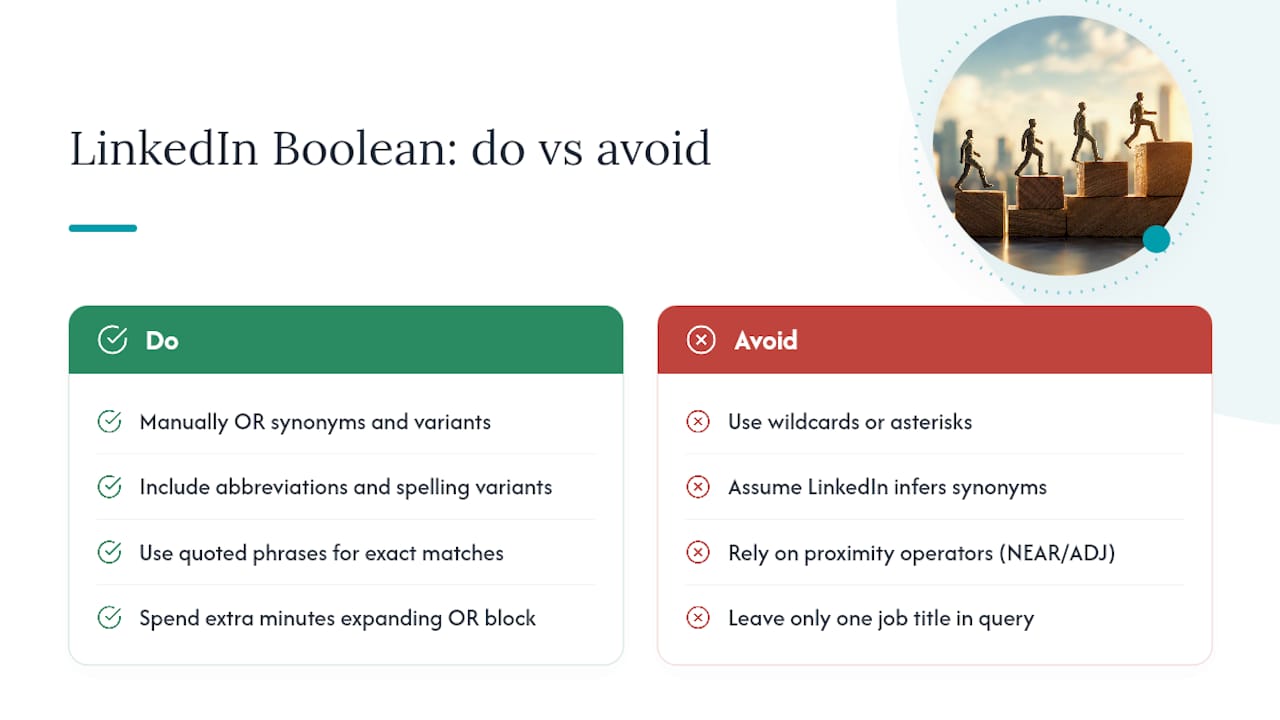
No. LinkedIn’s search engine doesn’t infer synonyms, and it has no wildcard character. Type develop* expecting it to catch “developer,” “development,” and “developing,” and it won’t work, LinkedIn’s parser treats the asterisk as a literal character, not a truncation symbol.
This catches a lot of people who’ve used Boolean on other platforms, since wildcards and stemming are common in database and legal-research tools. LinkedIn simply doesn’t offer that layer of pattern matching.
The workaround is manual: you build the synonym list yourself and OR it together. Instead of hoping the system understands that “engineer,” “developer,” and “programmer” are related concepts, you write ("engineer" OR "developer" OR "programmer") and let the OR operator do the work a wildcard would do elsewhere.
The same logic applies to abbreviations and spelling variants. “VP” and “vice president,” “e-commerce” and “ecommerce,” “UX” and “user experience,” none of these are automatically linked, so each pair needs its own OR clause if you want both to surface.
There’s also no proximity operator (something like NEAR or ADJ in other search systems that finds terms within a set number of words of each other). LinkedIn’s phrase-matching via quotes is the closest equivalent, but it only works for an exact, fixed phrase, not “these two words somewhere near each other.”
Practically, this means your synonym list is the single biggest lever on result quality. A thin OR block, just one job title, catches a fraction of the qualified people using different language for the same role. Spend the extra two minutes building it out.
Recruiter vs. Sales Navigator: How Do Their Boolean Fields Differ?
Both platforms accept the same core operators, but the fields you drop them into behave differently enough to change your results meaningfully.
Recruiter centers on a single Keywords field where Boolean logic runs, backed by an extensive filter panel: years of experience, seniority level, company headcount, industry, school, and more, according to LinkedIn’s own Recruiter training material. The platform’s own guidance nudges users toward filters over long strings, since Recruiter’s structured data is more reliable than trying to encode seniority or company size as keywords.
Sales Navigator splits the keyword concept into separate fields, Title, Company, Keywords, and each has different matching behavior. The Title field, per Sales Navigator’s help documentation, typically matches a profile’s current title only, so searching "VP Sales" in the Title field won’t surface someone who held that title two jobs ago. The general Keywords field casts a wider net across summary, experience, and skills sections, which means the same Boolean string produces different result sets depending on which field you paste it into.
The practical difference: in Recruiter, lean on filters and keep Keywords tight. In Sales Navigator, decide deliberately whether you want current-title precision (use Title) or broader career-history matching (use Keywords), because picking wrong is a common reason searches feel oddly incomplete.
How Do You Combine Boolean Keywords With LinkedIn Filters?
Boolean and filters aren’t competing tools, they solve different problems, and the best searches use both.
Boolean logic is for language variation: the dozen ways people phrase the same job title, the abbreviations, the industry jargon. Filters are for structured data LinkedIn already has tagged on every profile: location, current company, seniority level, years of experience, industry.
A search that tries to do everything through Boolean gets long, fragile, and hard to debug. One that tries to do everything through filters misses candidates whose profiles use unexpected phrasing. Split the work: ("product manager" OR "product owner") as your Boolean core, then apply a Location filter for “Greater Chicago Area” and a Company filter to exclude your own current employer’s competitors, rather than trying to write all of that into one string.
Order matters too. Build the OR block first and confirm it returns a reasonable pool before adding filters. If you apply filters first, you can’t tell whether a thin result count is a filter problem or a keyword problem. Adding one variable at a time keeps your search debuggable.
One filter combination worth using early: title filter (if the platform offers it separately) plus a Boolean AND for a single differentiating skill or industry term. That combination narrows fast without the fragility of a five-clause Boolean string trying to do a filter’s job.
How Should You Refine a Boolean String After the First Search?
Treat your first Boolean string as a draft, not a finished tool. The refinement happens by watching what comes back, not by guessing upfront.
If the result count is too high (thousands of profiles), your OR block is likely too broad, or you’re missing a filter that should be narrowing the field. Add one AND clause or one filter, not both at once, so you can see which change moved the needle.
If the result count is too low or zero, work backward. Strip out your NOT clause first since over-exclusion is the most common cause of an empty result set. Then check your AND clause, an overly specific context term can eliminate qualified candidates who just didn’t use that exact word.
Sample the actual profiles that come back, not just the count. If you’re seeing a pattern, say, every result is five years too senior, that’s a sign to add a seniority filter rather than trying to encode experience level into your Boolean string. If titles you didn’t expect keep showing up, they might reveal a synonym you missed for your OR block.
Keep a simple log of what you tried and what it returned. A search that returns 40 relevant profiles this month might return 15 next month, industries shift, titles shift, and a string that worked in 2026 may need new synonyms in a year. Revisiting a saved search every few months and adding newly common job titles keeps it from going stale quietly.
Advanced Boolean Strategies for Niche and Diversity Hiring
Specialized searches need a different approach than a standard role search, mostly because the target pool is smaller and the language is less standardized.
For niche technical skills, the OR block needs to cover tool names, framework names, and certification titles together: ("kubernetes" OR "K8s") AND ("terraform" OR "infrastructure as code"). Niche skill searches benefit from fewer filters and a wider Boolean net, since narrowing too hard on a small population leaves you with nothing.
Diversity-focused sourcing works better through community and affinity signals than through direct demographic terms, which LinkedIn profiles rarely state explicitly and which raise both accuracy and compliance concerns if used as search criteria. Searching for involvement with specific professional organizations, affinity group leadership roles, or conference speaking history, ("Women in Tech" OR "Black Professionals in Tech") as a phrase match against group or volunteer sections, surfaces candidates more reliably than trying to infer demographics from a name or photo.
For passive executive candidates, keep the Boolean string narrow and lean almost entirely on filters: seniority level, company size band, industry. A three-term OR block for title variants ("VP Engineering" OR "Head of Engineering") combined with a tenure filter often outperforms a longer string, since senior profiles use less varied language than junior ones.
For career-change candidates who don’t yet hold the target title, search adjacent skills and past project language instead of the job title itself, since Boolean can’t infer transferable experience the way a human reviewer can.
Boolean vs. AI Sourcing: What Actually Works
Boolean search still earns its place for one reason: precision. When you need to verify that a specific candidate pool exists, or narrow ten thousand profiles down to fifty worth reviewing, a well-built string does that faster than any AI tool I’ve seen tested against it. AI sourcing tools are better at breadth and ideation, surfacing title variants or adjacent skills you hadn’t thought to search for.
The mistake is treating these as competing methods instead of sequential ones. Use AI to expand your synonym list, then verify and narrow with Boolean. Log what each string returns, and don’t let a search go stale for months without revisiting it. The recruiters getting the best results aren’t the ones with the longest strings, they’re the ones testing frequently and cutting anything that isn’t earning its place.
Kim
Improve Your Profile and Outreach After You’ve Sourced the Right People
Building the perfect Boolean string only gets you halfway. Once you’ve got a list of qualified candidates or target companies, the next bottleneck is usually the profile and the outreach message doing the actual convincing.
Resumewiz works on that other half. The team, led by a former recruiter with over ten years of experience evaluating candidates from the hiring side, builds LinkedIn profile optimization, outreach message templates, and interview coaching around what actually gets a reply and gets a callback. If your sourcing is solid but your response rate isn’t, or if you’re a job seeker on the receiving end of these searches and want your own profile to surface higher and convert better, that’s a narrower problem than most people think, and it’s fixable faster than re-sourcing from scratch. If you’re job hunting yourself and want a profile built to show up in the searches recruiters are running, or you want outreach templates that actually get answered, check out Resumewiz’s services and see which package fits where you are in the search.
Want a recruiter in your corner for your next senior role? Book a free call with Resume Wiz and we will map out your next move together.
