Recruiter Backed LinkedIn Connection Requests Get Executives to Reply
The single most effective way to get an executive to accept your LinkedIn connection request is to send a short, specific note that signals relevance and asks for one small next step. Skip the pitch and the flattery. A note that names a shared signal (a mutual connection, a recent post, a shared employer) and closes with a low-effort ask converts far better than a blank request or a long introduction.
Key Takeaways:
- Sending a personalized LinkedIn note with a shared signal increases the likelihood of acceptance but should mention a mutual connection, recent post, or event directly in the first line.
- Approach only active and relevant executives by narrowing your list using filters, checking the company’s leadership page, and engaging with recent posts or comments before reaching out.
- Keep connection requests brief with one or two sentences, emphasizing relevance and a small, specific ask without pitching or including a long introduction.
- Follow up thoughtfully after acceptance with a brief thank-you and a low-effort, specific request, but avoid multiple follow-ups if no response is received.
- Avoid generic, pitch-heavy, or automated messages, and tailor each note to include real details about the recipient to improve acceptance rates.
Table of Contents
- Why personalization and relevance work with executives
- How to find the right executives and recruiters to approach
- Anatomy of a high-acceptance connection request plus ready-to-use templates
- Timing, cadence, and safe limits for outreach
- Follow-up sequence after a connection is accepted
- Common mistakes that reduce acceptance and quick fixes
- How to research an executive’s background before sending a connection request
- Strategies to demonstrate credibility and relevance in the connection request
- How to handle declined or ignored connection requests professionally
- Recruiter-backed rules of thumb for reaching executives
- How Resume Wiz can help with your LinkedIn outreach
- Sources
- FAQ
Why personalization and relevance work with executives
Adding a personalized message to a LinkedIn connection request meaningfully raises the odds an executive accepts it, according to recruiter guidance compiled by The Muse. Executives get dozens of blank requests a week. A note with context stands out simply because it proves you did homework instead of clicking “connect” on autopilot.
Executives also read LinkedIn in short bursts, often between meetings, which means your note competes for maybe five seconds of attention. A message that states the connection instantly (same company, same industry event, mutual contact) reads as low-risk. A blank request reads as a stranger.
Recruiters describe the same pattern from the inbound side: a short note with context signals trust because it shows the sender understands who they are contacting and why.
- Personalized notes are consistently rated more likely to be accepted than blank requests, per recruiter guidance.
- Executives skim, so relevance has to appear in the first line, not the third.
- A note that names a mutual connection or shared context reduces perceived risk for the recipient.
Personalized outreach with a clear shared signal is one of the more reliable ways to raise acceptance, according to recruiter-sourced guidance, because it gives the executive a reason to say yes in under ten seconds.
How to find the right executives and recruiters to approach
Random outreach wastes both your effort and the executive’s patience. Narrow the list before you send anything.
- Use LinkedIn’s People search filters (title, company, location, school) to build a short list instead of scrolling broadly.
- Check the company’s People page for the actual hiring manager or functional leader tied to the role you want, not just the recruiting team.
- Prioritize people you share a connection with, or who have posted or commented recently, since active profiles are more likely to see your note.
- Look at open job postings to identify which recruiter or hiring manager owns that requisition.
- Reach out to a recruiter when you want visibility into multiple open roles, and go directly to a functional leader when you already know the specific job you want.
Anatomy of a high-acceptance connection request plus ready-to-use templates
A request that works has four parts: an opener that names the shared signal, one line of relevance, a hint of value or reason to connect, and a single, small ask. Keep the whole note to one or two short sentences. Anything longer starts to read like a cover letter, and executives do not read cover letters in a connection request.
Recruiters expect this kind of context. A sentence that explains how you relate to the recipient, whether through a shared company, a mutual connection, the same alumni network, or a recent post, is often enough to earn a reply, according to insider guidance for approaching executive recruiters.
- Mutual connection: “Hi [Name], [mutual contact] suggested I reach out. I’m exploring [function] roles and would value connecting.”
- Commenting context: “Hi [Name], enjoyed your take on [topic] in your recent post. Would love to connect and follow your updates.”
- Recruiter outreach: “Hi [Name], I saw you recruit for [function] roles at [company]. I have [X years] in that space and wanted to connect.”
- Alumni approach: “Hi [Name], fellow [school] grad here. Following your work at [company] and would like to stay connected.”
- Event follow-up: “Hi [Name], great meeting you at [event]. Would love to stay in touch as I follow [company]'s work in [area].”
Pro Tip: A short, professional voice message can help an inbound note stand out once you’re connected, but save it for after acceptance rather than the first request. A practical guide to LinkedIn voice messages covers when the format works and when it feels intrusive.
Timing, cadence, and safe limits for outreach
Sending requests early in the week improves visibility because messages are less likely to get buried under weekend and Friday backlog, per recruiter timing guidance. Pace yourself rather than sending in bulk.
- Send most requests Monday or Tuesday morning when inboxes are freshest.
- Keep daily outreach conservative, around 15 to 20 requests, to avoid looking automated.
- Engage with a post or comment before sending a request when possible, since prior visibility tends to improve acceptance.
- Space follow-up requests to the same person by at least a week if the first attempt goes unanswered.
Follow-up sequence after a connection is accepted
Acceptance is the start of the conversation, not the end of the outreach.
- Send a short thank-you within a day or two that references the same context from your original note.
- A few days later, make one specific, low-effort ask, such as “Would a 10-minute call later this month work?” rather than a long pitch.
- Offer to send a resource or article relevant to their work instead of asking for something first, when appropriate.
- Stop after two follow-ups if there is no response. A third unsolicited message reads as pressure, not persistence.
Save scheduling links for this stage rather than the first note. Calendar links dropped into an initial request tend to feel premature, according to practitioner guidance on outreach sequencing.
Common mistakes that reduce acceptance and quick fixes
Most rejected requests share the same few problems.
- Blank notes: A request with no message at all reads as low effort. Fix it by adding one sentence of context before sending.
- Pitching too early: Asking for a job, a favor, or a sale in the first note kills acceptance. Ask for a connection first and a conversation second.
- Mass automation: Bulk-sent, identical notes get flagged as spam and often ignored outright. Fix it by writing each note around one real detail specific to that person.
Pro Tip: If you use any outreach tool to manage volume, keep the message itself handwritten in tone. Automation that writes and sends without human review carries real risk, a concern echoed in broader discussion of AI-assisted recruitment tools and where their limits show up in practice.
How to research an executive’s background before sending a connection request
A few minutes of research turns a generic note into a specific one. Start with the executive’s LinkedIn profile itself: recent posts, comments, job changes, and any content they have shared in the last month. That activity often tells you what they currently care about, which gives you a natural opener.
Check the company’s newsroom or press page for recent announcements, funding news, or leadership changes. An executive who just took on a new mandate is often more receptive to outreach tied to that shift than to a cold, generic compliment.
Look for shared ground: the same industry group, the same past employer, the same conference, or a mutual connection who can vouch for you informally before you even send the request. Cross-reference this with the company’s People page to confirm the person’s actual scope, since titles alone can be misleading in flatter organizations.
Skip anything that feels like surveillance. Referencing a public post or a professional milestone is research. Referencing something personal from outside LinkedIn is not, and it tends to backfire.
Strategies to demonstrate credibility and relevance in the connection request
Credibility in a short note comes from specificity, not credentials. Naming a real detail, a mutual contact, a specific project, a shared employer, does more work than listing your title or years of experience.
Relevance matters more than seniority. A note that connects your background directly to something the executive is working on right now reads as informed. A note that simply states your job title reads as a form letter.
Keep the tone matched to the relationship. A cold outreach to someone you have never interacted with should stay brief and low-pressure. A note following a real interaction, a comment exchange, an event, a mutual introduction, can reference that moment directly and carry a slightly warmer tone. Either way, the goal of the connection request itself is the connection, not the outcome you eventually want from it.
How to handle declined or ignored connection requests professionally
Most requests that go unanswered are not rejections. Executives simply get more inbound volume than they can process, so silence is often closer to “not now” than “no.”
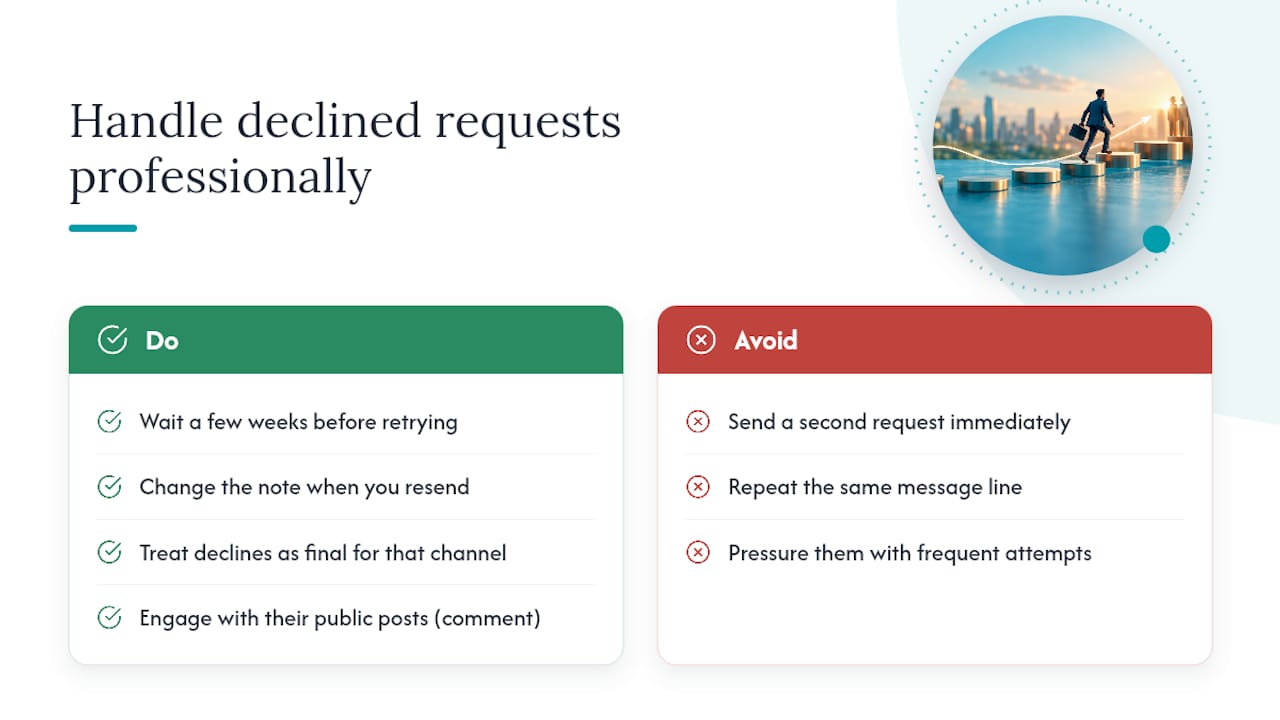
Do not send a second request immediately after the first goes unanswered. LinkedIn does not always allow resending right away, and repeated attempts in a short window read as pressure. Wait a few weeks, and if you send again, change the note rather than repeating the same line.
If a request is explicitly declined or withdrawn, treat it as final for that channel. Look for another point of contact at the same company, or revisit the person later if your own situation changes meaningfully, such as a new role or a shared project that gives you fresh, genuine context.
Keep engaging with the person’s public content even without a connection. A thoughtful comment on a future post can rebuild visibility naturally and sometimes leads to the executive sending the request themselves.
Recruiter-backed rules of thumb for reaching executives
Concise, signal-rich inbound messages consistently earn more attention from recruiters and hiring executives than long introductions, because they respect how little time the recipient has to evaluate a stranger.
Three rules hold up across most outreach: specificity beats flattery, the first ask should always be small, and pacing matters more than volume. A note that names one real detail and asks for one small thing will outperform a longer, more generic pitch nearly every time.
Specificity beats flattery, the first ask should always be small, and pacing beats volume.
Kim
How Resume Wiz can help with your LinkedIn outreach
A strong connection request only gets you in the door. What happens next, your profile, your message templates, and your follow-through, decides whether that door leads anywhere. Resume Wiz builds LinkedIn profiles and outreach templates specifically for executives and managers navigating a job search, so the same recruiting instincts behind this article show up in your actual profile and messages.
The Evolution service pairs a rebuilt resume with a LinkedIn profile refresh built to support the outreach habits covered here. For readers who want ongoing, done-for-you support, the Elevate and Land package extends that into managed outreach so you’re not building templates alone. Current prices are available on the Resume Wiz website. Start with a look at Resume Wiz to see which package fits your search.
Sources
- How to Message Recruiters to Connect on LinkedIn (with Examples!) | The Muse
- Your Best Approach to Executive Recruiters: An Insider’s Guide
FAQ
What does it mean when someone sends you a connection request on LinkedIn?
A connection request signals someone wants to add you to their network, usually because they recognize a shared interest, employer, or contact. The context in the note, if there is one, is the best clue to their actual motive.
What is the 4-1-1 rule on LinkedIn?
Definitions vary, but a common version treats it as a content ratio: for every self-promotional post you share, you post one piece of curated content from others and four pieces of original, non-promotional value. It is a posting guideline, not a connection-request rule.
Is it good to accept all LinkedIn connection requests?
Not necessarily. Accepting broadly can grow your network but also floods your feed with low-relevance contacts, so many professionals accept selectively based on shared industry, mutual connections, or a personalized note.
What should I write in a LinkedIn connection request?
Write one or two short sentences naming a shared signal, such as a mutual connection, a recent post, or a shared employer, and end with a small, specific reason to connect. Personalized notes like this are linked to higher acceptance than blank requests, according to recruiter guidance.
