Get Replies: LinkedIn Outreach Message Templates and a 5 Touch Plan
The fastest way to start a real conversation on LinkedIn is a trigger-event connection request under 180 characters, one that names something specific and recent about the person you’re contacting. Send it, then follow up within 24 hours of the accept with a short, no-pitch message. Below you’ll find the exact templates, a 5-touch cadence, and the character rules that make this work across connection requests, first messages, and InMail.
Key Takeaways:
- Sending connection requests that reference recent trigger events can lift acceptance rates to between 42 and 58 percent, with reply rates around 28 to 36 percent.
- Keep connection notes between 90 and 180 characters, front-load the reason for reaching out, and avoid pitching or using merge tags that might fail.
- Follow a five-touch cadence for outreach, including a connection request, messages within 24 hours of acceptance, and creative touches like voice notes or videos, all within 30 days.
- Personalization should be based on verifiable signals, such as recent posts or company milestones, rather than vague or stale information.
- Measure success through acceptance, reply, and booked meeting rates, and only scale outreach that shows positive reply results, while avoiding volume spikes that could trigger account flags.
Table of Contents
- LinkedIn Outreach Message Best Practices: Targeting, Timing, and Brevity
- LinkedIn Outreach Message Templates for Every Goal
- Which LinkedIn Message Format Should You Use?
- A Tested LinkedIn Outreach Cadence You Can Copy
- Personalizing at Scale Without Faking It
- What to Do the Moment Someone Accepts Your Request
- Measuring and Scaling LinkedIn Outreach Safely
- What Recruiters Wish More Outreach Senders Knew
- How Resumewiz Turns These Templates Into a Full Outreach System
- Where This Outreach Data Comes From
- Sources
LinkedIn Outreach Message Best Practices: Targeting, Timing, and Brevity
Before you touch a template, fix your targeting. Operator playbooks consistently rank three variables in order of importance: targeting first, the offer second, and the message itself last. A polished note to the wrong prospect still fails. A rough note to the right prospect, sent at the right moment, often works anyway.
“Right moment” usually means a trigger event: a new hire announcement, a funding round, a promotion, a recent post that got traction. Trigger-event connection requests that name a recent action can lift acceptance into the 42 to 58% range, with post-accept reply rates landing between 28 and 36% in well-targeted lists. That’s not a small edge. Generic “I’d like to add you to my network” notes don’t get anywhere close.
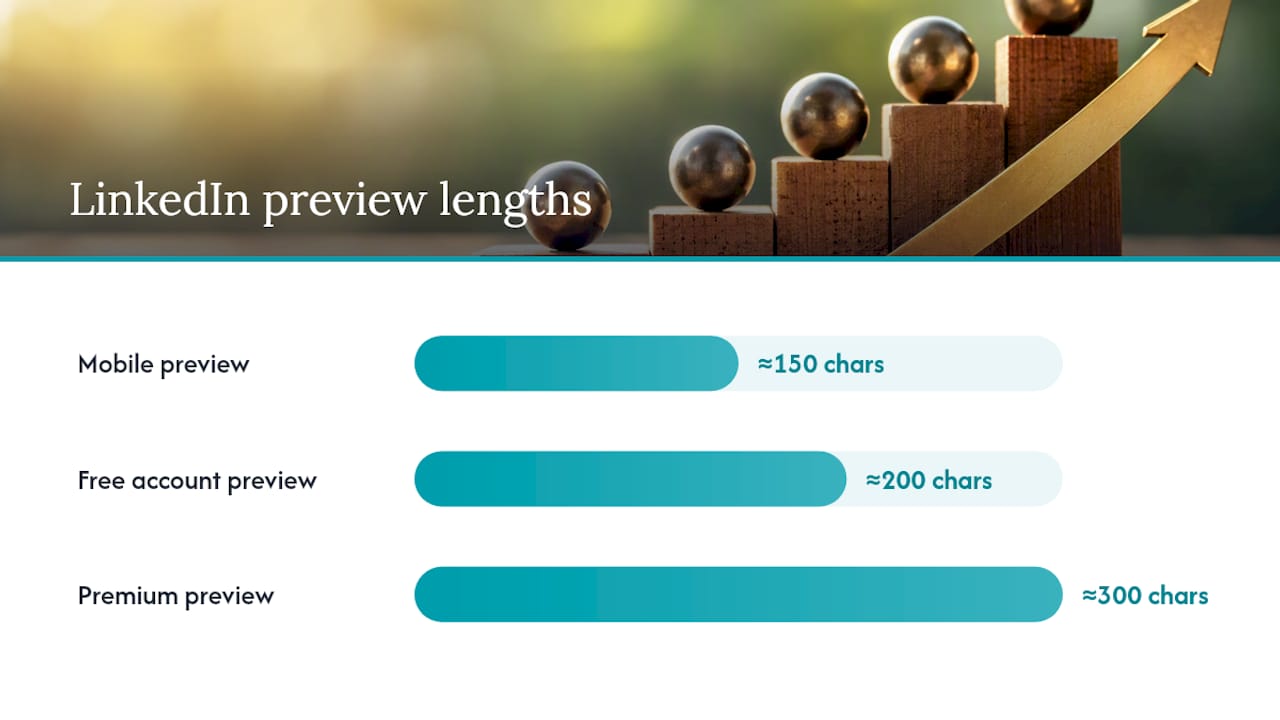
Once you’ve picked the right person, brevity does the heavy lifting. LinkedIn crops connection note previews on mobile around 150 characters, and free accounts see roughly a 200-character preview window, with Premium extending to 300. That means the first 150 characters of your note are the only ones guaranteed to get read. Front-load the signal. Don’t bury your reason for reaching out in the second sentence.
A few rules that separate notes people accept from notes people ignore:
- Lead with the specific reason you’re reaching out, not a greeting or your job title.
- Keep connection notes between 90 and 180 characters. Longer notes get truncated and read as generic anyway.
- Never pitch in the connection note. Save the ask for the message after they accept.
- Skip visible merge tags like “Hi {{FirstName}}” that failed to populate. Nothing kills trust faster.
- Test empty notes against short personalized ones on the same list. Empty invites sometimes match or outperform weak personalized notes for cold outreach, particularly when you have no genuine trigger to reference.
That last point surprises most people. If you don’t have a real signal, a blank note plus a strong post-accept message can outperform a forced, generic personalization attempt.
Pro Tip: If you can’t find a trigger event less than 30 days old, don’t force a weak one. Send an empty connection request and put all your personalization effort into the first message after they accept. Stale “personalization” reads worse than none at all.
LinkedIn Outreach Message Templates for Every Goal
Copy these, then swap in specifics. The bracketed placeholders are where your actual research goes. Never send one with the brackets still in it.
Connection request templates
- Trigger event: “Saw your post on [specific topic], the point about [detail] matched something I’ve been working through. Would love to connect.”
- Mutual interest: “We’re both active in [specific group/community]. I’d like to add you to my network and follow your work on [topic].”
- Alumni or shared event: “Fellow [school/event] alum here. Noticed your work in [field] and wanted to connect.”
- Blank note: No message at all. Just the invite. Best for cold lists with no fresh signal.
- Light personalization, no ask: “Enjoyed your recent piece on [topic]. Connecting so I can keep up with your work.”
Post-accept first message templates
These go out within 24 hours of acceptance, before the connection goes cold.
- Anti-pitch question: “Thanks for connecting! Curious how you’re approaching [specific challenge] at [company] right now. No agenda, just genuinely interested.”
- Quick value share: “Since we connected around [topic], thought you’d find this useful: [resource/insight]. No response needed, just wanted to share.”
- Permission ask: “Would you be open to a quick 15-minute call sometime in the next two weeks? Happy to work around your schedule.”
- Light context, soft ask: “I work with [audience] on [problem]. Would love to hear how you’re handling it at [company], if you have a minute.”
- Direct but respectful: “I’ll be upfront: I help [audience] with [specific outcome]. If that’s not relevant right now, no worries at all. If it is, happy to share more.”
Job seeker and recruiter templates
If you’re messaging a hiring manager, timing beats polish. Messaging within 24 hours of applying reportedly produces meaningfully higher response rates than waiting, especially when the hiring manager is active on LinkedIn and your note references the application directly.
- Apply-first note to a hiring manager: “I just applied for the [role] position and wanted to reach out directly. My background in [specific skill] lines up closely with what you’re building on [team]. Happy to answer any questions.”
- Recruiter first contact: “I saw you recruit for [function] roles at [company]. I’m exploring opportunities in [area] and would welcome the chance to connect.”
- Brief follow-up after no response: “Following up on my application for [role] from last week. Still very interested and happy to send anything else that’s helpful.”
InMail guidance
Reserve InMail for closed networks and senior targets where a connection request would sit unread for weeks. InMail allows more room, but resist the urge to fill it. A tight 3 to 4 sentence InMail that states who you are, why you’re reaching out to this specific person, and one clear ask outperforms a lengthy pitch almost every time. Senior executives skim on their phones between meetings; treat InMail like a slightly longer connection note, not a cover letter.
Follow-up and re-engage templates
- Second touch, added proof: “Wanted to circle back. Since my last message, [new relevant detail]. Still think this could be worth a quick conversation.”
- Final ping (break-up message): “I don’t want to clutter your inbox, so this will be my last note. If the timing’s better down the road, feel free to reach out. Wishing you well either way.”
Which LinkedIn Message Format Should You Use?
The core proposition stays the same across every touch. What changes is length, tone, and the call to action.
Connection request notes cap at 300 characters, but treat 180 as your real ceiling and aim for 90 to 180 so nothing gets cropped. This is not the place for an ask. It’s the place for a reason.
First messages and follow-ups have more room, but stay under roughly 600 characters. People read LinkedIn messages the way they read texts, in short bursts between other tasks. A wall of text gets skipped even when the content is good.
InMail should be reserved for closed networks, cold senior executives, or prospects two or more connection degrees away where a standard invite won’t reach them. Because it interrupts more, it needs a sharper, more specific reason for existing.
Voice notes and short videos work best as a later touch, not an opener. Voice notes deployed as touch three in a sequence produced reply rates between 32 and 48% in operator data, a meaningful jump over plain text at the same stage. They stand out precisely because almost nobody else uses them, which also means overusing them kills the novelty.
- A 30 to 60 second voice note script: “Hey [name], wanted to follow up with something a little different than another text. [One sentence on why you’re reaching out.] Would genuinely value your take, whenever you get a chance.”
- A 30 to 60 second video script: State your name and one shared reference point in the first five seconds, then ask one specific question and stop. Don’t narrate your resume.
Keep the underlying offer identical across formats. Only the wrapper and the CTA shift, from “connect” to “reply” to “grab 15 minutes.”
A Tested LinkedIn Outreach Cadence You Can Copy
Most single-touch outreach fails not because the message was bad, but because there was no second or third attempt. Operator data points to a practical 5-touch cadence that balances persistence against annoyance:
- Day 0: Connection request with a trigger-event note.
- Day 3: First message, anti-pitch question or value share.
- Day 7: Follow-up that adds a new piece of proof or context.
- Day 14: Creative touch, a voice note or short video.
- Day 30: Polite re-engage or break-up message.
Cap the sequence at five touches. If a prospect explicitly asks you to stop, stop immediately regardless of where you are in the sequence. Anything beyond five touches on LinkedIn alone starts reading as pressure rather than persistence.
Reply-rate ranges by pattern: Tight ICP paired with a genuine trigger event runs toward the higher end of the 28 to 36% post-accept reply range. Generic, untargeted sequences on the same cadence typically land well below that, closer to single digits.
Coordinate a same-day email when the prospect’s address is available. Operator playbooks treat LinkedIn as the warm touch in a multi-channel sequence rather than the only channel, with email carrying more detail and phone reserved for closing once interest is established. LinkedIn opens the door. It rarely closes the deal on its own.
Personalizing at Scale Without Faking It
Not every signal on someone’s profile is worth referencing, and some personalization actually backfires. A generic “I see you work at [Company]” note fools no one; everyone knows you pulled that from the profile you’re already looking at.
Signals that reliably lift acceptance instead:
- A post from the last 30 days, quoted specifically rather than referenced vaguely.
- A new hire or promotion announcement.
- A funding round or company milestone.
- A shared group, event, or mutual connection you can name directly.
The line between real personalization and fake personalization is verifiability. If the fact could apply to a thousand other people in the same role, it’s not personalization, it’s a template with a name swapped in. Merge-tag failures make this worse; a note that says “Hi [FirstName]” because the tag didn’t populate is worse than no personalization attempt at all.
A workable workflow: draft the note with a tool or template, then run a human checklist before sending. Confirm one specific, verifiable fact about the recipient made it into the message. Automated data can surface the raw signal, a job change, a post, a shared group, but a person should confirm it’s accurate and current before it goes out.
Pro Tip: Run a simple two-cell test before scaling any campaign: signal versus no signal, and empty note versus personalized note. Send both versions to comparable segments of your list and let the accept and reply rates settle the argument instead of your gut.
What to Do the Moment Someone Accepts Your Request
The connection going cold is the single most common failure point in outreach, and it’s entirely avoidable. Send your first message within 24 hours of the accept. Waiting a week means you’re a stranger again by the time you write.
At the same time, don’t fire off an instant auto-reply the second the accept notification lands. Messages that arrive within seconds read as automated, and prospects notice. A short human delay, even just a few hours, keeps the interaction feeling like a person is on the other end.
Once you send, keep the ask small. A specific question about something in their world beats a broad “how are things going.” Offering one piece of value, an article, a data point, a quick insight relevant to their role, works nearly as well and asks for nothing in return.
- Ask a narrow question: “Curious how you’re thinking about [specific challenge] this quarter.”
- Offer without asking: “Thought this might be useful given what you posted about [topic].”
- Propose a call only after some back and forth, and always offer two concrete time windows rather than “whenever works for you.” A vague scheduling request adds friction exactly when momentum matters most.
Measuring and Scaling LinkedIn Outreach Safely
Three numbers tell you almost everything: acceptance rate on connection requests, reply rate within seven days of your first message, and meetings booked per accepted connection. Track those three before adding anything more elaborate.
Anything well below that signals a targeting problem before it signals a messaging problem.
On safety: free LinkedIn accounts throttle invites to roughly 20 per day, and batch tools that send obviously merge-tagged messages get flagged fast. Space your sends manually rather than blasting a list at once, and treat any noticeable dip in acceptance rate as a signal to slow down before LinkedIn does it for you.
- Run A/B tests on small samples of 30 to 50 prospects before scaling a template to your full list.
- Watch for a sudden drop in acceptance rate. It usually means either targeting drifted or the account got flagged for volume.
- Scale only the version that wins on reply rate, not just acceptance. A high accept rate with no replies isn’t a win.
What Recruiters Wish More Outreach Senders Knew
Kim Taynor built Resumewiz on over a decade inside recruiting, and the pattern that shows up again and again is this: most outreach fails on targeting and timing, not wording. The templates in this piece work because they respect that order. Fix who you’re contacting and when, and even an average message performs. Reverse that order and no template saves you.
DIY templates handle the bulk of outreach fine, especially for individual contributors reaching out to a handful of prospects a week. Where a managed approach earns its cost is at the executive level, where the stakes per conversation are higher, the target list is smaller, and a single mishandled message to a senior hiring manager can close a door that doesn’t reopen. Executives and career changers juggling a live job search rarely have the bandwidth to run a disciplined 5-touch cadence across dozens of contacts while also interviewing.
That gap, between knowing the right structure and actually executing it consistently, is where a lot of good job searches stall out.
Kim
How Resumewiz Turns These Templates Into a Full Outreach System
Resumewiz builds the piece most DIY senders skip: a LinkedIn profile that actually earns the accept once your connection request lands. A sharp trigger-event message means little if the profile it points to reads like everyone else’s. Resumewiz’s LinkedIn profile optimization work fixes that first, then layers on personalized outreach templates built around your actual target list, not generic scripts.
For executives and managers running a live search, Resumewiz also offers a fully managed outreach option, where the cadence, targeting, and follow-up sequencing described above get handled for you as part of a fully managed search with tailored applications and outreach. That’s the option that fits busiest job seekers best: the ones who know the 5-touch cadence works but don’t have hours each week to run it themselves. If that’s where you are, visit the Elevate and Land page to see which package matches your search.
Where This Outreach Data Comes From
The acceptance and reply benchmarks throughout this guide come from operator-side testing rather than theory. Revnu’s outreach data supplied the trigger-event lift figures and the 5-touch cadence model. Lead Scorer’s connection request research shaped the character-limit and mobile-preview guidance. Reachly’s operator playbook informed the targeting-offer-message hierarchy and multi-channel sequencing advice. Outly’s template library backed the voice and video response-rate claims. For job seekers specifically, Remote Job Assistant’s research on hiring manager outreach informed the apply-first timing guidance in the templates section.
Want a recruiter in your corner for your next senior role? Book a free call with Resume Wiz and we will map out your next move together.
