Land More Interviews With a Recruiter Tested One Page Executive Resume
A one-page executive resume works when you can compress the most relevant 10 to 15 years of your career into quantified outcomes without losing the strategic story. It fits application channels where reviewers scan fast, roles where fit matters more than tenure, and senior candidates disciplined enough to cut. Done right, it puts your biggest impact in the top third, survives ATS parsing, and earns the interview instead of admiration for how much you accomplished.
Key Takeaways:
- Prioritize recent roles within the last 10 to 15 years, limiting bullets to three to five per role and cutting older or less relevant experience.
- Use impact-first bullets following the CAR or PAR formula, focusing on measurable results and avoiding duty descriptions.
- Ensure the resume layout stays single-column with 10 to 11pt font, 0.5 to 1 inch margins, and remove graphics or visuals that could interfere with ATS parsing.
- Incorporate keywords directly from targeted job postings into a compact, two-column format to optimize ATS matching and scan speed.
- Tailor the resume length to the specific application channel, opting for one page in fast-scanning scenarios and two pages when depth or technical detail is required.
Table of Contents
- What Goes Into a One-Page Executive Resume?
- How Do You Write Executive-Level Impact Bullets?
- Which Keywords Belong in Your Core Competencies Block?
- Formatting Rules That Keep Your Resume ATS-Safe
- What Should You Cut First When Trimming to One Page?
- How Do You Adapt a Template Without Triggering ATS Problems?
- What’s the Final Checklist Before You Submit?
- Do’s and Don’ts for Compressing to One Page
- Who’s Behind This Guide
- How Do You Handle Career Gaps or Job Transitions on One Page?
- Which Power Verbs Actually Move the Needle for Executives?
- When We Recommend One Page and When We Don’t
- Resume Wiz Packages Built for a Tight, High-Impact Page
- Sources
- FAQ
What Goes Into a One-Page Executive Resume?
A one-page executive resume follows a fixed sequence of blocks, and the order matters almost as much as the content. Reviewers read top to bottom for roughly six to ten seconds before deciding whether to keep going, so the structure has to front-load relevance.
Here’s what belongs on the page, in order:
- Header: full name, target title or headline, phone, email, city/state, and your LinkedIn URL. Skip the street address.
- Executive summary: three to four lines answering who you are, what makes you different, and what you’re pursuing next. No pronouns, no “seasoned professional” filler.
- Core competencies: a compact block of 10 to 12 keywords pulled straight from the roles you’re targeting.
- Professional experience: two to four recent roles, each with three to five impact-first bullets. Older roles get a line, not a paragraph.
- Education and certifications: degree, institution, and relevant credentials in one or two lines. Board seats or publications get a single line each, only if they support the target role.
Everything else, the objective statement, the references line, the hobbies section, gets cut before you touch formatting.
How Do You Write Executive-Level Impact Bullets?
Every bullet on a one-page executive resume needs to answer one question: what changed because you were there? The CAR formula (Challenge, Action, Result) or its close cousin PAR (Problem, Action, Result) forces that discipline. Start with a strong action verb, name what you did, and close with a number.
Compare these two versions of the same accomplishment:
- Weak: “Responsible for managing the sales team and improving performance.”
- Strong: “Rebuilt underperforming 14-person sales team, driving quarterly revenue from $2.1M to $3.4M in nine months.”
- Weak: “Oversaw budget planning and cost reduction initiatives.”
- Strong: “Cut operating costs 18% by renegotiating three vendor contracts, saving $640K annually.”
The second version in each pair does the same job in fewer words because it leads with the verb and lands on a figure. Recruiting experts generally recommend limiting yourself to the most recent 10 to 15 years of experience and three to five bullets per role to keep the page tight without gutting the substance.
Run this quick edit pass on every bullet before you finalize the page: cut any bullet that describes a duty instead of a result, merge two thin bullets into one strong one, and delete any bullet older than 15 years unless it’s your single best achievement.
Pro Tip: If a bullet takes more than one line at 11pt font, it’s carrying too much information. Split the sentence, kill the weakest clause, or move the detail into the summary instead.
Which Keywords Belong in Your Core Competencies Block?
Pull your keyword list directly from three to five job postings for the role you want, not from a generic list of leadership traits. Look for terms that repeat across postings: specific systems, methodologies, budget scale, or team size. Those are the words an ATS is scanning for, and they’re also the shorthand a hiring manager’s brain uses to sort candidates fast.
Format matters here too. A compact two-column keyword block (five terms per row, two rows) reads faster than a wall of inline tags separated by commas, and it takes up noticeably less vertical space, which matters when you’re fighting for every line on a single page.
- Choose scale-specific terms: “P&L ownership up to $80M” beats “financial management.”
- Choose role-specific terms: “Cross-border M&A integration” beats “team leadership.”
- Skip vague buzzwords entirely, “results-driven,” “dynamic leader,” and similar phrases add zero signal and waste space an ATS keyword could occupy.
Formatting Rules That Keep Your Resume ATS-Safe
Format is where most one-page executive resumes quietly fail. The content might be sharp, but a layout an applicant tracking system can’t parse never reaches a human reader at all.
Keep the reading order in a single column. Two-column visual layouts can look polished on screen, but they frequently break parsing in older ATS software, scrambling the sequence of your experience or dropping sections entirely. If you want a visual two-column feel, build it with paragraph styles that still read top to bottom in the file’s underlying structure, not with text boxes or tables.
A few more rules worth following without exception:
- Body text stays at 10 to 11pt; anything smaller sacrifices readability for space, and readability matters more than fitting one more line.
- Margins stay between 0.5 and 1 inch. Below half an inch, the page starts to look cramped even before anyone reads a word.
- Skip graphics, skill bars, and headshots. None of them parse, and none of them influence a hiring decision at the executive level.
- Export as PDF for email and online applications; use DOCX only when a portal specifically requests it.
- Name the file clearly: FirstLast_ExecutiveResume.pdf, not “Resume_Final_v3.pdf.”
Recruiters consistently say they’d rather read a readable one-pager than a cramped two-pager stuffed with 9pt type and 0.3-inch margins. Prioritization, not font manipulation, is what actually saves space.
What Should You Cut First When Trimming to One Page?
Trimming a 20-year career onto one page feels brutal the first time you try it, but the order you cut in determines whether the page still tells a coherent story.
- Cut unrelated or very old roles first. Anything before your 10 to 15 year window becomes a single “Earlier Experience” line: “Additional experience in operations management at [Company], [Company], early 2000s.”
- Cut the references line and the objective statement. Neither has done real work on a resume in over a decade.
- Cut filler skills. “Microsoft Office” and “team player” are assumed at the executive level, not selling points.
- Cut excess bullets before you touch font size. If a role has seven bullets, the weakest three are diluting the strongest four.
- Merge roles only when they were genuinely similar in scope and sequential at the same company. Keep separate entries when a promotion changed your title, budget, or team size meaningfully.
Formatting adjustments, tightening line spacing, nudging margins, come last, after the content is already lean. Adjusting formatting before content just hides a bloated resume instead of fixing it.
How Do You Adapt a Template Without Triggering ATS Problems?
A good one-page executive resume template does two things: it looks clean to a human, and it stays boringly simple to a machine. Editable one-page templates are widely available from major providers, but not every visually appealing template survives contact with an ATS. Avoid any template built with embedded images, text boxes, or graphic skill meters, no matter how sharp it looks in the preview.
Here’s what a real trim looks like in practice:
- Before: “Managed the company’s digital transformation initiative across multiple departments, working with IT and operations to modernize legacy systems and improve overall efficiency.”
- After: “Led digital transformation across 6 departments, retiring 3 legacy systems and cutting processing time 40%.”
- Before: “Responsible for building relationships with key clients and ensuring customer satisfaction remained high throughout the engagement.”
- After: “Grew top-20 client retention to 96% by rebuilding account review cadence and escalation process.”
The most efficient workflow keeps a long master resume, three to four pages, with every role, every metric, every project, and extracts a targeted one-page version for each application. That way you’re never rewriting from memory; you’re cutting from a source document that already has the numbers sourced and verified.
What’s the Final Checklist Before You Submit?
Run through this list before any one-page executive resume goes out the door.
- Top third of the page contains your name, title, summary, and at least one hard metric.
- Core competencies block matches language from the target job posting.
- Each recent role has three to five bullets; each bullet leads with a verb and ends with a number.
- Layout reads single-column top to bottom, even if it looks like two columns visually.
- Font sits at 10 to 11pt; margins sit between 0.5 and 1 inch.
- File is a PDF (unless DOCX is requested) with a clear, professional filename.
- A peer, coach, or second set of eyes has reviewed it for typos and awkward line breaks.
| Check | Why it matters |
|---|---|
| Top-third impact | Determines whether the reviewer keeps reading past the first scan |
| Single-column layout | Prevents ATS parsing errors that can drop entire sections |
| 10 to 11pt font, 0.5 to 1" margins | Keeps the page readable instead of visually cramped |
| PDF export, clear filename | Avoids formatting shifts and identifies you instantly in an inbox |
Do’s and Don’ts for Compressing to One Page
Cutting a long career down to one page creates real temptation to break formatting rules just to make everything fit. Resist it. The don’ts below cost you far more than the do’s gain you.
| Do | Don’t |
|---|---|
| Keep every bullet to one line | Cram content by dropping below 10pt font |
| Tailor competencies and bullets per target role | Include irrelevant early-career roles just to fill space |
| Test the resume through an ATS scanner before sending | Use embedded graphics, charts, or skill-bar visuals |
| Trim content first, adjust formatting second | Shrink margins below 0.5 inches to force a fit |
Who’s Behind This Guide
This guide draws on the recruiting background of Kim Taynor, founder of Resumewiz, who has spent more than 10 years reviewing executive resumes from the hiring side of the desk. That vantage point, seeing which one-pagers get a callback and which get skimmed and closed, shapes the formatting and trimming rules above.
The company offers ATS-compliant resume writing, LinkedIn profile optimization, interview coaching, and fully managed job search packages aimed at executives and senior managers seeking comprehensive career support.
How Do You Handle Career Gaps or Job Transitions on One Page?
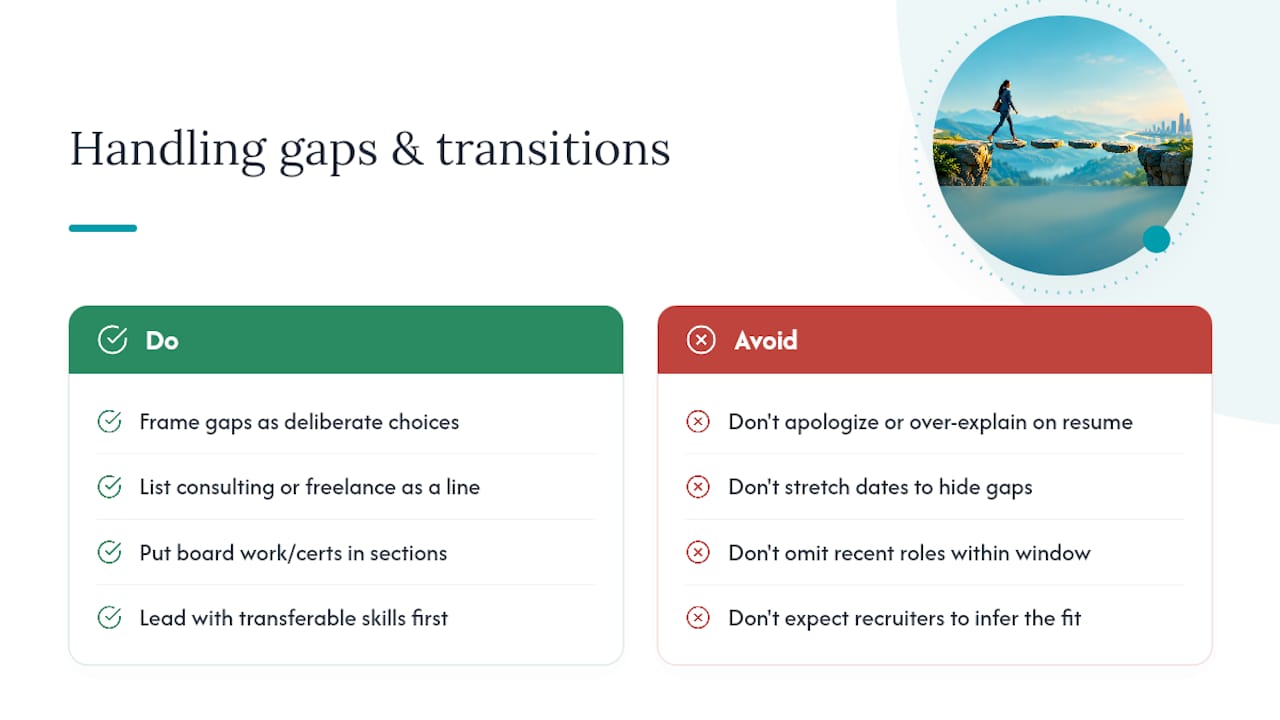
A gap or a transition doesn’t need an apology on a one-page executive resume, it needs a framing decision. The instinct to explain a gap in detail works against you on a page where every line is contested space; save the explanation for the cover letter or the interview, and let the resume carry only what supports your candidacy.
If the gap involved consulting, freelance work, caregiving, or a career pivot, list it as its own line item with a title that names the activity plainly: “Independent Consultant, Strategic Advisory, 2023 to 2024” reads as a deliberate choice, not a hole. If you picked up board work, certifications, or coursework during that time, that line earns its place in the education or experience section because it shows continued engagement.
For a career transition, lead the summary with the transferable skill, not the industry you’re leaving. An operations executive moving from manufacturing into healthcare should open with “P&L leadership, supply chain turnaround, and cross-functional team building,” not “20 years in manufacturing.” The competencies block should mirror the target industry’s language even when your experience comes from elsewhere. Recruiters reading fast will connect the dots faster when the resume does the translating for them instead of expecting them to infer it from an unfamiliar job title.
What you never do is stretch dates to hide a gap or leave a role off entirely if it’s within your recent window; both create problems in reference checks that are far worse than a two-month gap ever would.
Which Power Verbs Actually Move the Needle for Executives?
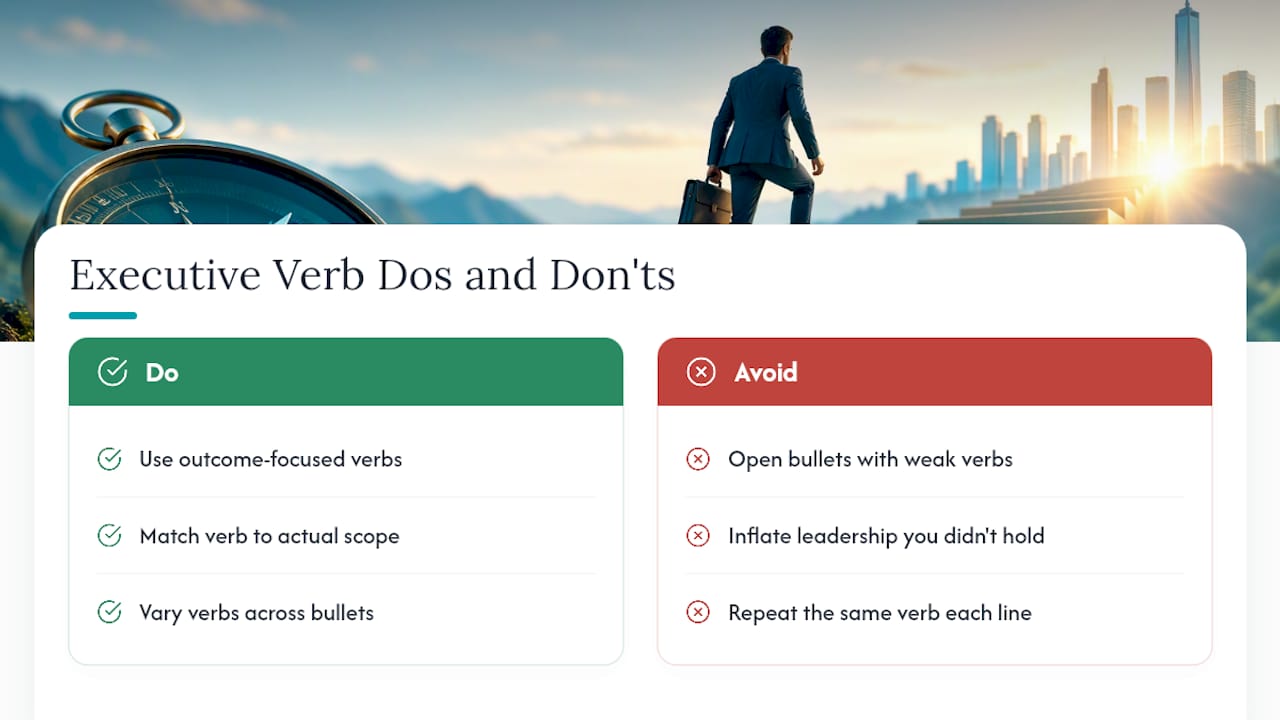
Verb choice is one of the fastest ways to separate a mid-level resume from an executive one, and most people default to the weakest option available. “Managed,” “helped,” “assisted,” and “worked on” describe presence, not impact. They tell a reviewer you were in the room, not what happened because you were.
Executive-level bullets need verbs that carry ownership and outcome in the same word. “Directed,” “restructured,” “negotiated,” “scaled,” “divested,” “spearheaded,” and “orchestrated” all signal that you drove the outcome rather than participated in it. The right verb also communicates seniority without you having to state your title again: “orchestrated a $40M acquisition integration” reads as executive-level even without the word “VP” anywhere nearby.
Match the verb to the actual scope of what happened, though, because inflated verbs are easy to spot and hard to trust. If you supported a restructuring rather than led it, “contributed to” or “co-led” is more accurate than “spearheaded,” and accuracy matters more than sounding impressive when a reference check is one phone call away. Vary your verbs across bullets, too. A page where every line opens with “led” starts to read like a template rather than a career, and reviewers notice the repetition even when they can’t articulate why the resume feels flat.
When We Recommend One Page and When We Don’t
We push clients toward a one-page executive resume for targeted applications, board searches, and any channel where we know the reviewer is scanning fast, a recruiter’s inbox, an executive search firm’s intake form, a warm introduction forwarded to a hiring manager. In those settings, packaging the story tightly shifts attention straight to the metrics that matter.
We recommend two pages more often than the internet assumes: for roles with deep technical requirements, academic or scientific leadership, or searches where the reviewer explicitly wants depth. The right length depends on who’s actually receiving the resume, not on a universal rule. What never changes is the discipline: whichever length you choose, every line has to earn its place with a result, not a responsibility.
Kim
Resume Wiz Packages Built for a Tight, High-Impact Page
Getting a one-page executive resume right on your own means writing summaries, hunting keywords, and trimming bullets solo, then guessing whether the format survives an ATS. Resumewiz replaces that guesswork with a recruiter’s eye trained on more than a decade of watching which resumes actually get callbacks.
If your resume just needs sharpening, the Evolution package rebuilds your resume and LinkedIn profile together for $699. If you’re starting a full search, the Elevate packages add coaching and a complete document overhaul, with pricing detailed on the Elevate page. For executives who also want outreach and application support running in parallel, Elevate and Land offers a fully managed search with tailored applications and outreach, with pricing detailed on its page.
Start by reviewing the full lineup of services and picking the package that matches how close you are to actively applying.
Want a recruiter in your corner for your next senior role? Book a free call with Resume Wiz and we will map out your next move together.
Sources
For formatting rules, Georgetown’s Career Center guide covers font and margin standards in detail. For ATS parsing behavior, RecruitBPM’s breakdown of column layouts explains why single-column reading order matters. For editable one-page templates, Adobe Express’s resume library offers a reasonable starting point, provided you strip out any embedded graphics before submitting.
- Creating impressive resume bullets, Emory CPD
- Resume formatting tips, Georgetown Career Center
- One-page resume templates, Adobe Express
FAQ
Is It Okay to Have a One-Page Resume?
Yes, a one-page resume is appropriate for most executives applying through targeted channels like recruiter inboxes or referrals. The right length ultimately depends on who’s reviewing it; some searches for highly technical or academic roles genuinely warrant two pages.
What Is the Seven-Second Rule for Resumes?
The seven-second rule describes how briefly an initial reviewer scans a resume before deciding whether to keep reading, generally reported in the range of six to ten seconds. That narrow window is why the top third of a one-page executive resume, your name, title, summary, and a standout metric, carries the most weight on the page.
What Is a Good Format for an Executive Resume?
A strong executive resume format uses a single-column layout with a header, a three to four line executive summary, a compact competencies block, quantified experience bullets, and a brief education section. Keeping the reading order single-column, even if it looks visually layered, protects the resume from ATS parsing errors.
What Should a One-Page Resume Look Like?
It should look clean and uncluttered, with 10 to 11pt body text, margins between 0.5 and 1 inch, and no graphics, skill bars, or embedded tables. Every section should be scannable in seconds, with the strongest achievements and metrics placed in the top third of the page.
