3 Checks Recruiters Use to Choose a PDF or Word Resume
Submit whatever format the job posting asks for. If it doesn’t specify one, save your resume as a .docx for the widest compatibility, though a clean, text-based PDF works fine when you need the layout to stay put. The one rule that matters more than the file extension: a PDF must contain selectable text, never a scanned or flattened image, or no system will read it correctly.
Key Takeaways:
- Using a text-based PDF is ideal when submitting directly to a human, especially through email, to ensure your formatting remains intact and easily readable.
- Applying to portals with no specified format preference, uploading a recent, well-exported DOCX file offers the best chance for reliable parsing by applicant tracking systems.
- Avoid image-based PDFs, complex layouts, headers or footers with contact info, and embedded text boxes, as these can prevent ATS from reading your resume correctly.
- Always run a quick copy-and-paste test with a plain-text editor to verify your resume’s text is selectable and in the correct order before submission.
- Maintain one master DOCX file from which you can export a clean, text-based PDF on demand, preventing outdated or inconsistent document versions from slipping through.
Table of Contents
- PDF or Word Resume: A Three-Step Decision Flow
- Pdf Vs Docx Resume: Weighing the Trade-Offs
- Best File Format for ATS Resume: What Actually Breaks Parsing
- How Do You Test a Resume File Before Uploading It?
- Does the Application Channel Change Which Format You Should Use?
- Export and Formatting Checklist for an ATS Safe Resume
- How Resumewiz Applies These Rules With Clients
- A Recruiter’s Honest Take on the Format Debate
- Get Your Resume Format Right, Every Time, With Resumewiz
- Sources
- FAQ
PDF or Word Resume: A Three-Step Decision Flow
You don’t need a debate here, you need a process. Run through these three checks in order, every time you apply.
Step 1: Read the posting. If an employer names a format, that instruction overrides every default and every opinion in this article. Some portals only accept .doc or .docx because their applicant tracking system can’t parse anything else, and some application forms only take PDFs. Treat that line in the job description as the final word, not a suggestion.
Step 2: If nothing is specified, default to DOCX. Word format gives the broadest compatibility across the applicant tracking systems companies use to scan and rank resumes. It’s the safer bet when you’re uploading blind, with no idea what software sits behind the “Apply” button.
Step 3: Keep a text-based PDF ready for presentation moments. A PDF locks your formatting so it looks identical on a hiring manager’s laptop, a recruiter’s tablet, or a printed page. That stability matters when you’re emailing your resume directly to a person rather than feeding it into a portal.
Here’s how that breaks down by situation:
- Choose PDF when: you’re emailing a hiring manager directly, applying for a design or creative role where layout is part of the pitch, or submitting through a system that explicitly accepts PDFs and you want your formatting locked in.
- Choose Word when: you’re uploading to a portal with no stated preference, applying through a staffing agency or recruiter who may need to edit the document, or the posting simply says “.docx only.”
- Do both, structurally: keep one polished DOCX file as your master copy. Every time you need a PDF, export it fresh from that master rather than maintaining two separate versions that can drift out of sync.
This workflow saves you from the actual failure mode most job seekers hit: not picking the wrong format, but forgetting they edited the DOCX three weeks ago and sending an outdated PDF. One master file, exported on demand, solves that permanently.
Pdf Vs Docx Resume: Weighing the Trade-Offs
Neither format is universally better. Each solves a different problem, and the right pick depends on what you’re optimizing for: how it looks or how easily it gets parsed.
PDF pros:
- Formatting stays fixed across every device, browser, and operating system.
- Recipients can’t accidentally alter your content, spacing, or fonts.
- It reads as more polished for direct, human-to-human submissions.
PDF cons:
- A poorly exported PDF, especially one created by “printing” a document or exporting from a design tool, can rasterize your text into an image that no parser can read.
- Some older or lower-quality applicant tracking systems still struggle with certain PDF structures, even when the text is technically selectable.
Word (.docx) pros:
- Broad, dependable parsing across nearly every applicant tracking system in use.
- Easy for recruiters to open, comment on, or lightly edit, which matters more than job seekers realize.
- No risk of an image-based text layer, since Word documents are inherently text.
Word (.docx) cons:
- Anyone with the file can modify it, intentionally or not, before it reaches a decision maker.
- Formatting can shift slightly between Word versions or when opened in Google Docs.
- Old .doc files (the pre-2007 format) sometimes trigger compatibility warnings or parsing hiccups, so stick with .docx specifically.
The practical rule: lean PDF when presentation is the priority and you’re bypassing an ATS entirely. Lean Word when you’re uploading into a system you don’t control and can’t verify.
Best File Format for ATS Resume: What Actually Breaks Parsing
The format debate misses the real issue. Applicant tracking systems don’t fail because a file ends in .pdf or .docx, they fail because of what’s inside the file. DOCX stores your content as structured text data from the start, which is why it parses so reliably by default. A PDF can store text the same way, or it can store a flattened image of your resume that looks identical to a human eye but contains zero readable text to a machine.
The read-order problem is bigger than the format problem. Independent reading-test analysis shows that a clean, single-column, text-based PDF can parse as reliably as a DOCX file. The failures cluster around image-based PDFs and complex layouts, not the file extension itself.
Certain design choices cause the real damage, regardless of which format you choose:
- Image-based text. Any resume exported as a picture, including a screenshot pasted into a PDF, is invisible to a parser.
- Multi-column layouts. Parsers often read left to right across the whole page, scrambling a two-column resume into nonsense.
- Headers and footers. Contact information placed in a header or footer frequently gets skipped entirely.
- Text boxes. Content inside a text box can get dropped or read out of sequence.
- Tables used for layout. A table meant to organize your job history visually can confuse a parser’s reading order.
- Embedded or unusual fonts. Rare fonts occasionally fail to render correctly when a system extracts text.
Workday, a widely used platform among enterprise employers, states this outright in its own developer documentation: any PDF submitted through its Resume REST API must contain selectable, non-image text. That single technical requirement is the clearest boundary in this entire debate, and it applies well beyond Workday’s own platform. If your text isn’t selectable, no applicant tracking system built on similar logic is going to read it.
How Do You Test a Resume File Before Uploading It?
You don’t need special software to check your work, just five minutes and a plain-text editor. Run through this before you submit anything.
- Open your file and try to select the text. Click and drag across a line of your resume. If a highlight box appears around individual words, the text is selectable. If nothing highlights, or the whole page selects as one image, you have a rasterized PDF that no ATS can read.
- Copy the entire document and paste it into Notepad or TextEdit. Check that your name, email, and job titles appear in a sensible order, top to bottom. If everything dumps out scrambled or your header content vanishes, your layout has a read-order problem.
- Use the application portal’s preview feature, if it has one. Many portals show you exactly how the system parsed your resume, sometimes populating fields automatically. If sections come out jumbled or blank, switch formats and resubmit before finalizing your application.
- Confirm you exported the PDF properly. Use “Export as PDF” or “Save as PDF” directly from Word or Google Docs, never a print driver or a screenshot tool, which can flatten text into an image without any warning.
Pro Tip: Keep your tested, working DOCX and PDF pair saved together in one folder labeled by role. When a new posting comes in, you’re exporting from a known-good master instead of troubleshooting under a deadline.
Does the Application Channel Change Which Format You Should Use?
Yes, and this is where most of the confusion actually starts. The “right” format shifts depending on who or what receives your resume first.
Direct email to a hiring manager or contact. A PDF is usually the safer choice here. You’re sending your resume to a human who will open it on an unpredictable mix of devices, and locked formatting means your resume looks the way you designed it, not the way someone’s outdated version of Word decides to render it.
Company career portal or applicant tracking system. Follow whatever the upload field specifies. If it’s silent on format, default to DOCX. Portals are built to ingest structured data, and Word’s native text structure gives you the best odds of clean parsing without any guesswork on your end.
Recruiter or staffing agency submission. Recruiters frequently prefer DOCX because they need to lightly edit your document, whether that’s removing your contact details before forwarding it to a client or reformatting it into their own agency template. Ask directly if you’re unsure, since portal behavior varies enough that guessing wrong can cost you a step in the process.
One more thing worth remembering: don’t attach both a PDF and a Word version unless the posting explicitly invites multiple uploads. Submitting two files when only one was requested can look disorganized, and some systems will simply process the first file and ignore the second, leaving you unsure which version the employer actually saw.
Export and Formatting Checklist for an ATS Safe Resume
Building the file correctly from the start saves you from every problem above. Run through this list before you export anything.
- Build in a single-column layout with standard fonts like Calibri, Arial, or Georgia, sized 10 to 12 points for body text.
- Skip images, icons, and text boxes for contact information. Type your name, phone number, and email directly into the body of the document.
- Avoid headers and footers entirely for anything you need parsed, especially your contact details.
- Use simple formatting for your work history instead of complex tables. Bold job titles and plain bullet points read cleanly across nearly every system.
- Export your PDF using “Save as PDF” or “Export as PDF” from Word or Google Docs, then run the copy/paste test from the section above.
- Name the file clearly and professionally, following a pattern like FirstName-LastName-Role-Resume.pdf, so it’s identifiable the moment it lands in an inbox or a database.
- Save your DOCX as the permanent master file, and generate every PDF export from that same source document.
How Resumewiz Applies These Rules With Clients
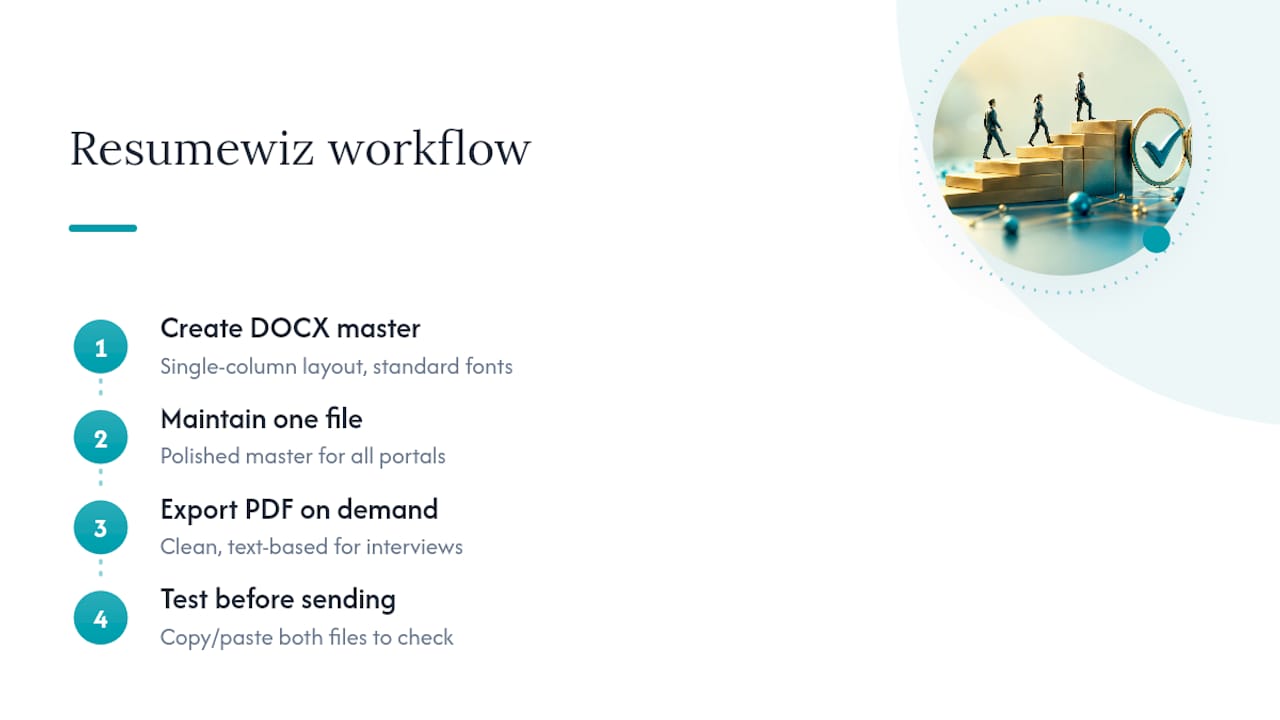
Every professionally built resume should start as a DOCX master, formatted with a single-column layout and standard fonts before a single word of content goes in. A clean, text-based PDF can be exported from that master for direct submissions and interviews, and every file, in both formats, should be subjected to the same copy/paste test before it reaches its recipient.
Applicants often face different format requirements when applying across multiple portals in the same week, with some systems requesting DOCX, others accepting only PDF, and recruiters asking for editable versions for submissions. The recommended solution is to maintain one polished master file, export on demand, and test before sending. Such consistency is especially important for professionals navigating multiple recruiter relationships and internal portals simultaneously.
A Recruiter’s Honest Take on the Format Debate
Ten years of reading resumes taught me something the format debate tends to obscure: nobody has ever rejected a candidate because their resume ended in .pdf instead of .docx. What gets a resume rejected, or worse, silently dropped by an ATS before a human ever sees it, is bad formatting hiding inside a file that technically opens fine. A recruiter can’t fix a resume that arrives with scrambled section headers or a missing phone number because it sat inside a text box.
Stop treating this as a binary choice and start treating it as a two-part discipline: follow whatever the posting says, and test the file you’re about to send. If you take one thing from this, let it be the copy/paste test. It takes ninety seconds and it catches the exact failures that cost people interviews they were actually qualified for.
Kim
Get Your Resume Format Right, Every Time, With Resumewiz
Guessing at file formats is a solvable problem, but it’s not the only variable standing between you and an interview. Resumewiz builds ATS-compliant resumes from the ground up, formatted correctly the first time, so you’re never troubleshooting layout issues on a deadline.
If you want a full brand refresh, including your resume and LinkedIn presence rebuilt around ATS-safe formatting, the Evolution package covers both for a flat $699. For a more hands-on, multi-week engagement that pairs strategic job search coaching with interview prep, the Elevate packages offer support until you land, matched to how much help you need. If you've got an interview locked in and want to walk in sharper, the Elevate program includes interview prep to help you get ready fast. Whatever stage you're at, start by checking what Resumewiz offers and picking the package that matches where you're stuck.
Want a recruiter in your corner for your next senior role? Book a free call with Resume Wiz and we will map out your next move together.
Sources
The format guidance in this article draws on a handful of sources worth bookmarking. Indeed’s file-type guide lays out the “follow the posting” rule in detail. Adobe’s PDF versus Word comparison covers export quality and formatting risk. Workday’s developer documentation supplies the technical requirement for selectable PDF text. FutuRole’s analysis and Uncharted Career’s reading tests both dig into how real parsing systems actually behave. For a broader primer on how these systems work, Kloqk’s overview of applicant tracking systems is a solid starting point, and SparkCV’s guide to ATS-safe formatting covers export mechanics in more depth.
- What Kind of File Should Your Resume Be? | Indeed
- Should your resume be a PDF or Word document? | Adobe
FAQ
Is PDF or Word better for a resume?
Neither format is inherently better since both work fine when the file is properly built. Use DOCX by default for the broadest applicant tracking system compatibility, and switch to a text-based PDF when you’re emailing a resume directly or need your formatting locked in for presentation.
Do employers prefer PDF or DOCX?
It depends entirely on the employer’s system and the job posting’s stated instructions. When a posting specifies a format, that instruction always wins; absent guidance, DOCX is the safer default for portal uploads.
What is the 7 second rule in resume?
The 7 second rule refers to the widely cited claim that recruiters spend only a few seconds on an initial resume scan before deciding whether to keep reading. It’s a reminder to put your strongest, most relevant details near the top, since a scrambled or poorly formatted file can cost you that first glance entirely if an ATS garbles it before a human ever sees it.
Which format do most employers prefer for resumes?
Most applicant tracking systems handle DOCX reliably by default, which is why it’s the common fallback recommendation when a posting doesn’t specify. A well-exported, text-based PDF performs just as well in practice, since layout and export quality matter more than the extension itself.
How do I know if my PDF resume will pass an ATS scan?
Try selecting the text in your PDF and copying it into a plain-text editor like Notepad or TextEdit. If your name, contact details, and job titles paste out in the correct order, the file has a readable text layer and should parse correctly in most systems.
