Recruiter Approved Resume File Name That Gets Opened: FirstName-LastName-Resume.pdf
Use FirstName-LastName-Resume.pdf as your default. That single format covers the vast majority of applications: it’s readable, ATS-safe, and tells a recruiter exactly what they’re opening before they even click. A few situations call for a longer, tailored version, which the sections below walk through, but this is the format to use right now unless a job posting tells you otherwise.
Key Takeaways:
- Use a clear filename with your full name and document type, such as FirstName-LastName-Resume.pdf, to facilitate quick sorting by recruiters.
- Send PDFs by default to preserve formatting unless the application explicitly requests a Word document, which may be necessary for ATS compatibility.
- Avoid leftover version tags, special characters, or vague labels like “final” or “v2,” as they suggest a rushed or unprofessional application.
- Customize your filename only if the job posting specifies a format or if applying to multiple roles at the same company, keeping it concise and relevant.
- Always verify that your filename uses plain ASCII characters, stays within about 40 characters, and matches your document extension before submitting.
Table of Contents
- What is the best resume file name format?
- Should you send a PDF or a Word document?
- What filename mistakes should you avoid?
- When should you customize the filename for a specific job?
- How do ATS and email systems handle filenames?
- Final checklist before you hit submit
- What recruiters actually notice about your filename
- Why the small stuff still matters
- Get a resume built to survive the filename test and everything after it
- Sources
What is the best resume file name format?
The winning formula is simple: full name first, document type last. Indeed’s recruiting guide recommends leading with your complete first and last name, then labeling the file “Resume,” so a hiring manager scanning a folder of forty attachments can identify yours in half a second. That’s the whole point of a good filename: it does the recruiter’s sorting work for them.
Here’s the format breakdown:
- Standard:
FirstName-LastName-Resume.pdf(use this for almost every application). - Tailored:
FirstName-LastName-Company-Position-Resume.pdf(reserve this for competitive roles or when a recruiter is clearly juggling several openings from you). - Cover letter match:
FirstName-LastName-CoverLetter.pdf(keep the naming pattern identical across every document you submit). - Portfolio or writing samples:
FirstName-LastName-Portfolio.pdffollows the same logic.
Real examples make this concrete: Jordan-Reyes-Resume.pdf, Maria-Chen-Nike-MarketingManager-Resume.pdf, Sam-Whitfield-Resume.pdf. Notice none of them run past six or seven words. Hyphens are generally the more modern, readable choice compared to underscores, though either works. What doesn’t work is inconsistency, so if your resume uses hyphens, your cover letter and portfolio should too.
Should you send a PDF or a Word document?
PDF is the safer default. It locks your formatting in place so your carefully aligned bullet points and margins look the same on a recruiter’s laptop as they did on yours, no matter what software they’re running. A Word file, by contrast, can shift fonts, spacing, and even page breaks depending on the version someone opens it in.
Send a .docx file only when the employer or application portal specifically asks for one. Some older applicant tracking systems parse Word documents more reliably than PDFs, and some employers want an editable copy for internal notes.
Keep both versions saved locally. Export your final draft as a PDF (Word: File > Save As > PDF; Google Docs: File > Download > PDF Document) and hold onto the editable .docx as your working copy for future tailoring.
What filename mistakes should you avoid?
A handful of habits quietly undercut an otherwise strong application:
- Version tags and dates. Names like
Resume_v3_final_edited.pdforResume_2026_updated.docxread as unfinished drafts. Recruiters often interpret leftover version numbers as a sign the document wasn’t cleaned up before sending. - Special characters and emojis. Symbols like
#,&,@, or emoji can break how some systems parse or display a filename, and they look unprofessional regardless. - Generic names.
resume.pdformyresume.docxgets lost instantly in a folder with two hundred other files named the exact same thing. - Personal identifiers. Never include your Social Security number, date of birth, or home address in a filename. That information doesn’t belong in a document title, and it creates unnecessary exposure if the file gets forwarded or stored insecurely.
When should you customize the filename for a specific job?
Check the job posting first, always. If an employer specifies an exact naming convention, that instruction overrides every general rule in this guide. Some large employers, especially those with high application volume, request formats like LastName_FirstName_JobID.pdf specifically so their systems can auto sort submissions.
Outside of explicit instructions, add the company name or job title only when it genuinely helps, such as applying to multiple roles at the same company. Keep it tight: Chen-Adobe-UXDesigner-Resume.pdf works; a filename stuffed with the company’s full legal name and a lengthy job title does not. Drop suffixes like “Inc.” or “LLC” and shorten job titles to their core words.
How do ATS and email systems handle filenames?
Applicant tracking systems and email servers aren’t always forgiving. Stick to plain ASCII characters, meaning standard letters A through Z, numbers, hyphens, or underscores. Accented letters and non-English characters can get stripped or garbled depending on the system reading them.
Spaces cause similar trouble. Some portals replace them with %20 or underscores automatically, which can make a clean filename look messy the moment it’s uploaded. Hyphens sidestep that problem entirely.
Length matters too, though not rigidly. A practical ceiling is around 40 characters. That’s flexible when you genuinely need to tailor a filename for a specific role, but treat it as your default target rather than a rule you fight against. For a deeper technical breakdown of how parsing engines read submitted files, SparkCV’s guide to ATS-friendly formatting is worth a look.
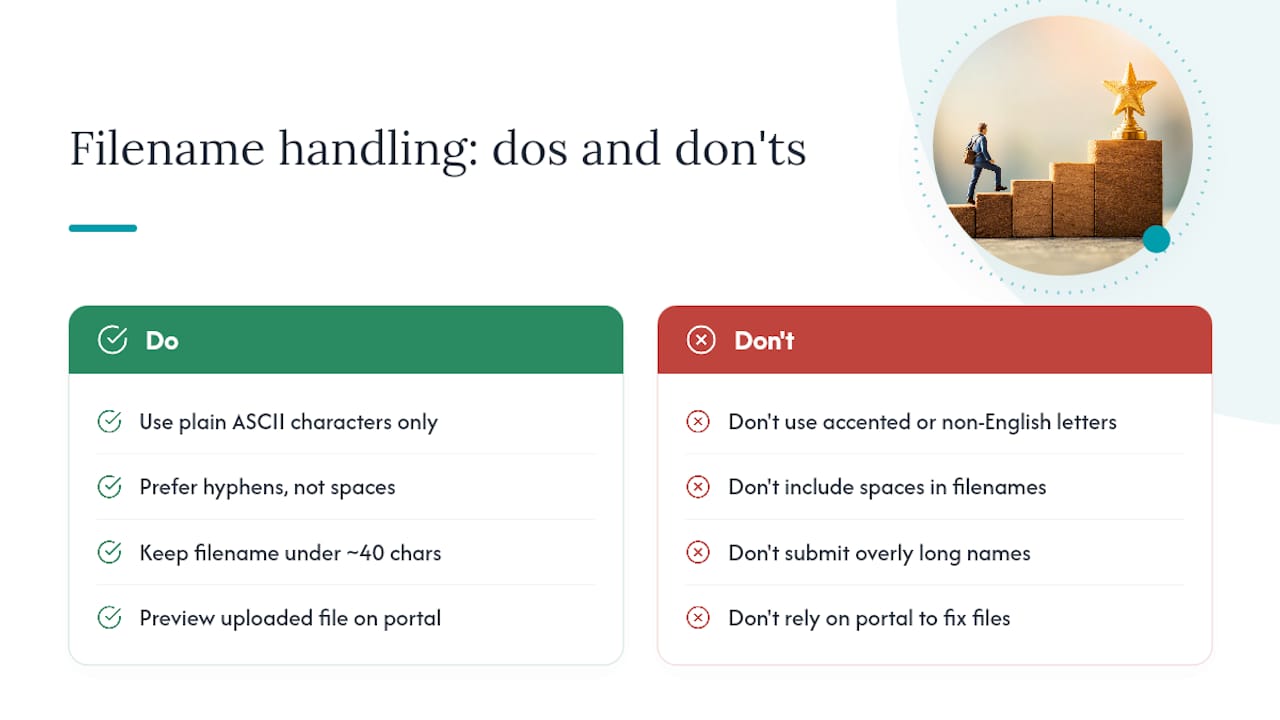
Before you submit anything, preview the uploaded file. Open the saved version on the portal itself to confirm the filename and formatting both survived the upload intact.
Final checklist before you hit submit
- Open your exported file and confirm the formatting looks right, not just the filename.
- Double-check the extension matches what the posting asked for, PDF or DOCX.
- Verify your filename follows your chosen convention with no leftover version tags like “v2” or “final.”
- If you’re emailing your application, confirm you’ve attached the correct file and that your subject line matches what the employer requested.
Running through these four checks takes less than a minute and catches the errors that are easiest to miss when you’re rushing to submit before a deadline.
What recruiters actually notice about your filename
Kim Taynor, founder of Resumewiz, has spent more than a decade recruiting before building a career services practice around what actually gets candidates noticed. One pattern shows up constantly: filenames with leftover version numbers or vague labels signal a rushed application, even when the resume itself is strong. Removing those tags before you submit anything makes the difference between looking finished and looking unfinished.
Pro Tip: Use the exact same filename structure across your resume, cover letter, and any writing samples. If a recruiter downloads three files with three different naming styles, it reads as careless, even if the content inside is excellent.
Why the small stuff still matters
I’ve noticed how often job seekers pour hours into resume content and then rename the file Resume (2) without a second thought. That gap says something. A filename is the first thing a recruiter sees before they read a single line you wrote, and a scattered naming habit across your resume, cover letter, and portfolio suggests the same scattered approach might show up in your actual work. Getting this detail right costs you thirty seconds. Getting it wrong costs you a first impression you don’t get back.
Kim
Get a resume built to survive the filename test and everything after it
A clean filename gets your resume opened. What’s inside it is what gets you the interview, and that’s where Resumewiz focuses its work. The team builds ATS-compliant resumes, tailored specifically for executives, managers, and career changers who need their application to clear automated screening and land in front of an actual decision maker.
Beyond resume writing, career services may include LinkedIn profile optimization, personalized outreach templates, and a fully managed job search process for professionals seeking expert support at every stage, not just a polished document. Free templates and guides are also available if you want to start improving your materials on your own before committing to a full engagement. Visit the Resumewiz home page to see which service fits where you are in your search right now.
Want a recruiter in your corner for your next senior role? Book a free call with Resume Wiz and we will map out your next move together.
