Resume Formatting and Rejections: Why Layout Costs You Interviews
Resume formatting is a technical visibility factor that determines whether applicant tracking systems (ATS) can extract your information before a human recruiter ever reads your name. Most job seekers assume rejections reflect their qualifications. The real culprit is often structural: a two-column layout, a text box, or a graphic element that causes an ATS to score your resume at zero. Poor formatting does not just look unprofessional. It makes your application invisible. Understanding the role of resume formatting in rejections is the first step toward fixing a problem that has nothing to do with your actual experience.
How ATS systems interpret resume formatting
ATS platforms do not read resumes the way a recruiter does. They extract raw text from your document, parse it into fields like name, job title, employer, and dates, then score that content against job description keywords. Visual styling, font color, column dividers, and graphic elements are invisible to this process. The ATS sees only what it can extract as plain text, and anything it cannot extract simply does not exist in its database.
This distinction matters because multi-column layouts confuse ATS text extraction by merging unrelated content from adjacent columns into a single scrambled string. A two-column resume that lists “Project Manager” in the left column and “2019 to 2022” in the right column may be read by ATS as “Project Manager 2019 to 2022 Managed cross-functional teams Proficient in Excel” all on one line, destroying the keyword scoring logic entirely. The ATS cannot assign that content to the correct fields, and your application scores zero on keyword matches.
Tables and text boxes create the same problem. Content placed inside a table cell or a Word text box is often skipped entirely during parsing. Headers and footers present a related risk: contact information placed in the document header may not be extracted at all, meaning the ATS has no way to associate your phone number or email with your application record.
| What a human reviewer sees | What ATS extracts |
|---|---|
| Clean two-column layout with name, contact, and skills on the left | Scrambled merged text with no field separation |
| Graphic timeline of career progression | Nothing. Graphics are skipped entirely |
| Contact info in the document header | Often missing. Header text is frequently ignored |
| Creative section title: “Where I’ve Made an Impact” | Misclassified or ignored. ATS expects “Experience” |
| Single-column plain text with standard headings | Accurate field extraction and keyword scoring |
Pro Tip: Run the paste test before submitting any application. Copy your entire resume and paste it into Notepad or TextEdit. If the text is scrambled, missing, or out of order, your ATS parsing will fail.
Common resume formatting mistakes that cause rejections
The formatting errors that trigger automatic rejections follow predictable patterns. Knowing them by name lets you audit your own resume in under 20 minutes.
- Multi-column layouts. ATS parsing fails when columns are present because text extraction reads left to right across the full page width, not column by column. Switch to a single-column format regardless of how clean the design looks on screen.
- Tables and text boxes. Content inside these elements is routinely skipped by ATS parsers. Convert all table content to plain bulleted lists and delete every text box.
- Creative section headings. Titles like “My Story,” “Core Competencies Snapshot,” or “Career Highlights” confuse ATS field mapping. Standard headings like Experience, Education, and Skills allow ATS to correctly classify your content and extract it into the right database fields.
- Contact information in headers or footers. Place your name, phone number, email, and LinkedIn URL in the body of the document, not in the document’s header or footer section.
- Wrong file format. Text-based PDFs and DOCX files perform best in ATS parsing. Image-based PDFs and designed files with embedded graphics cause parsing failures. Follow the employer’s specified format. When no format is specified, DOCX is the safer default.
- Non-standard fonts. Decorative or script fonts break character recognition in some parsers. Use Arial, Calibri, or Georgia at 10 to 12 points.
- Inconsistent date formatting. Mixing “Jan 2021” with “01/2021” in different entries creates parsing confusion. Pick one format and apply it throughout.
- Photos, logos, and embedded graphics. These are skipped entirely by ATS and add file weight without benefit. Remove them completely.
Pro Tip: After removing graphics and converting to single-column, check your resume in both DOCX and PDF formats. Some ATS platforms handle one better than the other, and submitting in the wrong format can undo every other fix you made.
Visual appeal vs. ATS compatibility: do you have to choose?
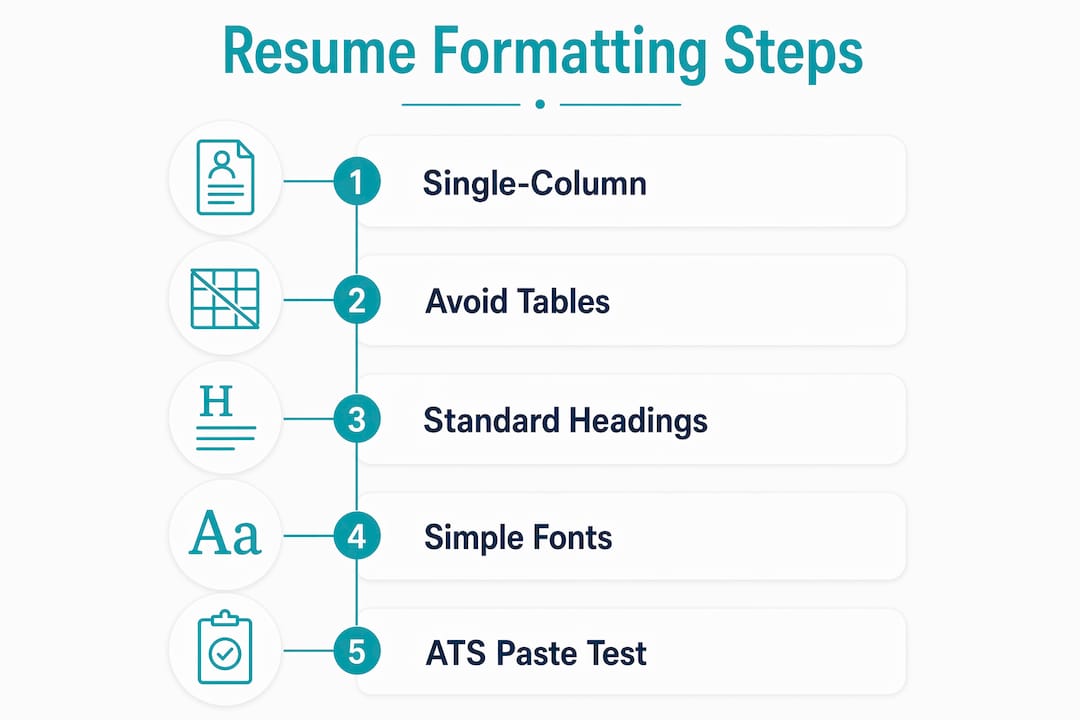
The short answer is no, but the tradeoff is real. A visually impressive resume built with Canva, Adobe InDesign, or a heavily designed Word template may photograph beautifully and fail completely in ATS parsing. The impact of resume layout on your application outcome depends on which system processes it first.
The good news is that clean, minimalist single-column layouts satisfy both audiences simultaneously. A well-structured resume with clear section headings, consistent font sizing, and generous white space is easier for a recruiter to scan in six seconds and easier for an ATS to parse accurately. The two goals are not in conflict when the design is disciplined.
Here is how to balance both requirements without sacrificing either:
- Use a single-column layout with clear visual hierarchy. Bold your job titles. Use a slightly larger font for your name. Keep section headings in a consistent style. These choices create visual structure without introducing parsing problems.
- Apply whitespace deliberately. Adequate spacing between sections helps recruiters scan quickly. Indeed advises choosing a clean, well-organized resume with plenty of white space to direct attention toward skills and experience.
- Choose reverse chronological order. 77% of recruiters prefer the chronological format because it presents recent job history clearly. ATS systems are also optimized to parse this structure.
- Use color sparingly and structurally. A single accent color on your name or section headings is acceptable. Color gradients, shaded sidebars, and decorative borders are not.
- Test every template before committing. If you download a template from Microsoft Word, Google Docs, or any job board, run the paste test immediately. Many popular templates use hidden tables or text boxes that look clean but parse poorly.
The candidates who get screened out most often are not the least qualified. They are the ones who invested in a visually impressive template that an ATS could not read.
Practical checklist to pass ATS and impress recruiters
Fixing your resume formatting is a one-time audit that pays off across every application you submit. Work through this checklist before your next submission.
- Use a single-column layout with no sidebars, columns, or split sections
- Place all contact information, including name, phone, email, and LinkedIn URL, in the body text, not in headers or footers
- Use standard section headings: Summary, Experience, Education, Skills, Certifications
- Choose ATS-safe fonts: Calibri, Arial, or Georgia at 10 to 12 points
- Remove all tables, text boxes, graphics, photos, and embedded images
- Save your file as a DOCX or text-based PDF based on employer instructions
- Apply consistent date formatting throughout: “Month Year” or “MM/YYYY” across all entries
- Use exact keyword phrases from the job description in your Summary and Experience sections. ATS systems weight keywords in summary sections 1.5 to 2 times more than other sections, so paraphrasing costs you ranking points
- Run the paste test: copy and paste your resume into a plain text editor and confirm all content appears in the correct order
- Keep length to one to two pages appropriate to your experience level
Pro Tip: Use a free ATS scanner like Jobscan or Resume Worded to score your resume against a specific job description before applying. These tools show you exactly which keywords are missing and flag formatting issues that would cause parsing failures.
| Point | Details |
|---|---|
| Single-column layout | Eliminates the most common ATS parsing failure caused by multi-column designs |
| Standard section headings | Experience, Education, and Skills allow ATS to correctly classify and extract your content |
| Body-text contact info | Placing contact details in headers or footers causes them to be skipped by most ATS platforms |
| Exact keyword matching | ATS weights keywords in the Summary section 1.5 to 2 times more than other sections |
| Paste test validation | Scrambled or missing text in a plain text editor confirms ATS parsing will fail |
Key takeaways
Resume formatting determines ATS visibility first and recruiter readability second, making structural compliance the single most critical factor in avoiding automatic rejection.
| Point | Details |
|---|---|
| Formatting is a visibility problem | ATS cannot evaluate content it cannot parse, regardless of your qualifications |
| Multi-column layouts cause zero scores | Two-column designs merge unrelated text, destroying keyword scoring in ATS systems |
| Standard headings are non-negotiable | Creative section titles are misclassified or ignored by ATS field extraction logic |
| File format affects parsing success | Text-based PDFs and DOCX files parse reliably; image-based or designed files often fail |
| Minimalist design serves both audiences | Single-column, whitespace-rich layouts satisfy ATS requirements and recruiter scanning habits simultaneously |
What 10 years of recruiting taught me about formatting
I have reviewed thousands of resumes across industries ranging from financial services to healthcare to technology. The pattern I see most consistently is this: highly qualified candidates with genuinely impressive track records are getting screened out before anyone reads a single bullet point. Not because their experience is weak. Because their resume was built in a template that looked polished in a PDF preview and was completely unreadable to the ATS processing it.
The most common mistake I see from executives and senior managers is trusting a visually impressive template. Canva resumes, heavily designed Word files, and two-column layouts from popular job boards look credible. They feel like a step up. But the moment that file hits an ATS, the design works against you. I have seen resumes where the entire Skills section was placed in a sidebar text box. The ATS extracted nothing from it. The candidate appeared to have no skills at all.
My first step with every client is always the same: strip the formatting before touching the content. Get the structure right, then refine the language. Candidates who do this in the right order stop getting ghosted. The ones who spend hours perfecting their bullet points inside a broken template keep wondering why no one calls back.
One more thing worth saying directly: formatting clarity is not about winning on design. It is about making sure your qualifications actually reach the person making the hiring decision. A clean, parseable resume with strong keywords and a clear structure will outperform a beautiful template with scrambled text every single time. Your resume’s job is to get you the interview. Make sure it can actually do that job.
Kim
How Resumewiz helps you get past ATS filters
If you have been applying consistently and hearing nothing back, the problem is likely structural, not personal. Resumewiz was built specifically to solve this.
At Resumewiz, Kim Taynor and her team audit your resume for ATS compatibility, fix formatting errors that cause parsing failures, and tailor your content with exact keyword matching drawn from your target job descriptions. The process covers everything from file format and section structure to LinkedIn profile alignment and interview coaching. Executives, managers, and career changers who work with Resumewiz stop guessing why their applications disappear and start getting interviews with the right companies. If your resume is not working, the formatting audit is where to start.
Want a recruiter in your corner for your next senior role? Book a free call with Resume Wiz and we will map out your next move together.
FAQ
What is the main role of resume formatting in rejections?
Resume formatting determines whether ATS platforms can extract your content and score it against job descriptions. Poor formatting causes parsing failures that result in automatic rejection before any human reviews your application.
Does file format matter for ATS compatibility?
Yes. Text-based PDFs and DOCX files parse reliably in most ATS platforms. Image-based PDFs and files with embedded graphics frequently cause extraction failures that result in rejection.
Why do multi-column resumes get rejected by ATS?
Two-column layouts cause ATS text extraction to merge content from adjacent columns into scrambled strings, destroying keyword scoring. The system cannot assign content to the correct fields, and the resume scores zero on keyword matches.
What section headings should I use on my resume?
Use standard headings: Summary, Experience, Education, Skills, and Certifications. Creative section titles are misclassified or ignored by ATS field extraction, causing your content to disappear from the parsed record.
How do I test whether my resume will pass ATS parsing?
Copy your entire resume text and paste it into a plain text editor like Notepad. If the text appears scrambled, out of order, or missing sections, your formatting will cause ATS parsing failures and you need to rebuild in a single-column plain text structure.
