Why Location Filters Cut Out Remote Candidates
Location filters commonly remove remote candidates because platforms and ATSs treat the location field as a hard eligibility signal rather than a preference flag. A candidate in Austin searching for a role posted with a New York ZIP gets filtered out before any human sees their name, even when the job description says “remote OK.” A survey cited by ResumeXrays found that 43.4% of recruiters apply a location filter when searching candidates, which means how you list location directly determines who surfaces in your pipeline.
Run these five checks right now to diagnose the most common causes:
- Open the job posting and confirm the location field shows a city and state, not just a ZIP code or a blank.
- Verify the “remote” flag or checkbox is toggled on in your ATS or job board posting UI.
- Check whether your ATS has an employer-configured allowed-countries or allowed-states list that could silently block applicants.
- Search for your own posting from an incognito browser while simulating a location outside your metro area.
- Preview any knockout questions and confirm none ask for a local address as a required field.
If a qualified candidate is filtered out at the search or knockout stage, no recruiter ever sees them. The fix starts with understanding why the filter fires in the first place.
Key Takeaways
Location filters remove remote candidates when the location field, remote flag, and schema signals are not all set correctly, and fixing all three is the only reliable solution.
| Point | Details |
|---|---|
| Location field drives indexing | Use “City, State (Remote)” or “Remote: U.S. only,” never a bare ZIP or blank field. |
| Remote flag is platform-specific | Toggle the remote checkbox in every platform’s UI; it does not carry over from one board to another. |
| Schema fields matter for aggregators | Set jobLocationType to "TELECOMMUTE" and populate applicantLocationRequirements so Google for Jobs indexes the role correctly. |
| Legal constraints are real | State tax nexus, workers’ comp, and EOR coverage legitimately limit geography; state them explicitly in the posting. |
| Test after every publish | Search as a candidate from another state in incognito mode and check ATS knockout questions before the role goes live. |
Table of Contents
- Why location filters eliminate remote candidates at the platform level
- How each major platform handles remote visibility
- Why some location filters are intentional and legally necessary
- How to post remote jobs so candidates can actually find them
- How to test whether remote candidates can actually find your posting
- The recruiter’s blind spot nobody talks about
- Sources
Why location filters eliminate remote candidates at the platform level
Job boards and ATSs do not read job descriptions the way a human does. They parse structured fields: city, state, ZIP, country, and a separate remote flag. When a recruiter posts a role and fills the location field with an office ZIP, the platform indexes that ZIP as the job’s geographic anchor. A candidate who searches “remote marketing manager” from Denver may never see that posting because the platform’s radius algorithm places the job in Manhattan and the candidate’s search returns results within a set distance of Denver.
Research on location-based personalization confirms that geographic signals have an outsized effect on local queries and that the difference grows with distance. A posting anchored to a specific city becomes progressively less visible to candidates the farther they are from that city, even when the role is fully remote.
The structured data layer compounds this. Google for Jobs and most major aggregators rely on JobPosting schema fields, including jobLocation, applicantLocationRequirements, and the telecommute flag under jobLocationType. If telecommute is not set to "TELECOMMUTE" and applicantLocationRequirements is left empty, aggregators treat the posting as location-bound. The remote flag in your ATS UI and the schema your feed emits are often two different things, and they can contradict each other.
| Signal type | What it controls | Common misconfiguration |
|---|---|---|
| Location field (city/state) | Radius search indexing | Office ZIP used for a remote role |
| Remote flag / checkbox | Remote filter in job board UI | Left unchecked on hybrid postings |
jobLocationType schema |
Google for Jobs remote indexing | Missing or set to INPERSON |
applicantLocationRequirements |
Aggregator eligibility filtering | Left blank, defaults to no restriction or wrong country |
| Knockout question | ATS candidate eligibility | Asks for local address as required field |
Pro Tip: Set both the UI remote flag AND the schema jobLocationType field to "TELECOMMUTE". They are independent signals. One without the other leaves a gap that aggregators and ATSs will fill with the nearest geographic default.
Ongig’s guidance on location in job descriptions notes that vague or missing city/state data causes applicants to be excluded from city- or ZIP-based searches, and that full street addresses can introduce distance bias. City and state is the right level of specificity.
How each major platform handles remote visibility
Workable
Workable uses the location you enter during job creation to power its candidate search and to syndicate to partner boards. If you enter only an office address for a hybrid role, Workable’s candidate search defaults to proximity matching around that address. The remote checkbox in Workable’s posting form controls visibility in Workable’s own job board, but syndicated postings to Indeed or LinkedIn carry whatever location string you entered, not necessarily a remote signal.
Pro Tip: In Workable, use the format “City, State (Remote)” in the location field and check the remote toggle. Both steps are needed because syndication partners read the text field independently of the toggle.
Wellfound (formerly AngelList Talent)
Wellfound lets you set a role as “Remote” with a specific allowed-region (e.g., “Remote: US only”). If you leave the region blank, Wellfound may surface the role globally, which sounds like a benefit until your ATS’s allowed-countries list silently rejects applicants from outside the U.S. The mismatch between Wellfound’s broad display and your ATS’s narrow acceptance creates a funnel where candidates apply and then disappear.
Pro Tip: Match your Wellfound allowed-region setting to your ATS’s allowed-countries configuration. If your ATS only accepts U.S. applicants, set Wellfound to “Remote: US only” so candidates outside that scope never start an application they cannot complete.
LinkedIn’s job search has a dedicated “Remote” filter that candidates use heavily. A posting surfaces in that filter only when the workplace type is explicitly set to “Remote” or “Hybrid” in LinkedIn’s posting form. Leaving it as “On-site” while writing “remote-friendly” in the description does nothing for filter visibility. LinkedIn also uses the listed location to personalize results for candidates, so location-based personalization effects apply directly here.
Pro Tip: Always set LinkedIn’s “Workplace type” field, not just the description. Candidates filtering for remote roles will never see your posting if the field says “On-site.”
Indeed
Indeed parses both the location field and a separate remote designation. A common mistake is posting with the company’s headquarters city and no remote designation, then wondering why applications skew local. Indeed’s algorithm also uses the candidate’s search location to rank results, so a remote role anchored to a specific city ranks lower for candidates searching from elsewhere. Hidden geographic restrictions in the ATS flow, such as country or state allow-lists, can then reject the few out-of-area candidates who do find the posting.
Pro Tip: On Indeed, use “Remote” as the primary location value and add the geographic constraint in the description (“U.S. only” or “EST/CST timezone required”). This surfaces the role in remote searches while setting accurate expectations.
Generic ATS behaviors
Most enterprise ATSs let hiring teams configure knockout questions and eligibility rules at the requisition level. Common silent killers include: an allowed-countries dropdown set to one country without an EOR exception, a timezone field that auto-rejects candidates outside a specified overlap window, and a “work authorization” question that defaults to requiring U.S. citizenship even for roles that could sponsor. These rules run before any recruiter sees an application.
Why some location filters are intentional and legally necessary
Not every geographic filter is a misconfiguration. U.S. hiring law creates real constraints that force recruiters to limit candidate geography. ADP’s guidance on remote workers crossing state lines outlines the core issues: state income tax withholding, unemployment insurance registration, workers’ compensation coverage, and business tax nexus all attach to the state where an employee physically works. Hiring someone in a new state can trigger registration and filing obligations your company has not set up.
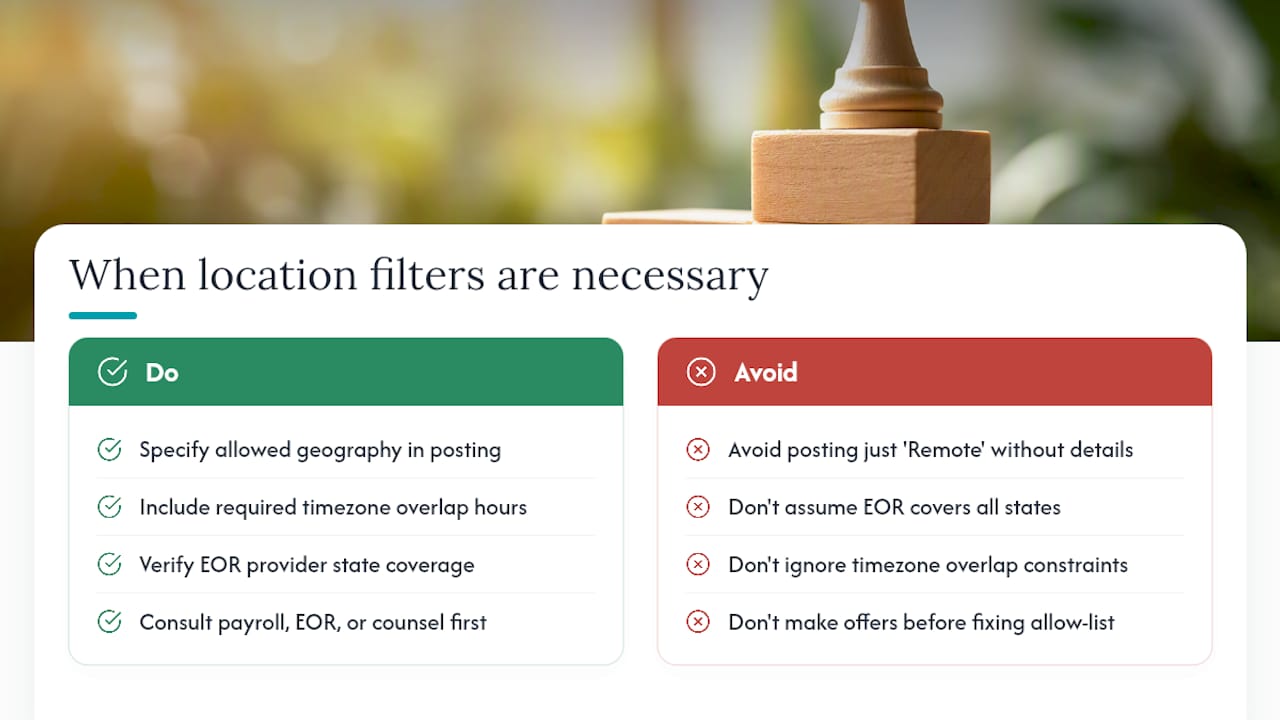
Employer of Record (EOR) providers solve some of this, but EOR coverage is not universal. A provider might cover 40 states but not all 50, or cover the U.S. but not Canada. When a role is posted as “Remote” without specifying the allowed geography, candidates from uncovered states apply in good faith and get rejected automatically, often without explanation.
Timezone overlap is a softer but real constraint. A team operating on Pacific time that needs two hours of daily overlap with a collaborator cannot realistically hire someone on the East Coast who works 9 AM to 5 PM EST. That overlap requirement functions as a de facto location filter even when the role carries no formal geographic restriction.
When a location constraint is real, say so explicitly in the posting. Write “Remote: U.S. only; must overlap with PST 10 AM to 12 PM daily” rather than just “Remote.” Candidates self-select out, your ATS rejection rate drops, and you avoid the goodwill cost of rejecting applicants who invested time in an application they were never eligible for.
Pro Tip: Consult your payroll provider, EOR partner, or employment counsel before expanding remote hiring to new states. The compliance picture changes state by state, and a misconfigured allow-list is cheaper to fix before you post than after you make an offer.
How to post remote jobs so candidates can actually find them
Follow this checklist before publishing any remote or hybrid role:
- Location field: Enter “City, State (Remote)” or “Remote: U.S. only” depending on your constraint. Never leave it blank or use only a ZIP.
- Remote flag: Toggle the remote or hybrid checkbox in every platform’s posting UI, not just one.
- Allowed-countries/states field: Set this in your ATS to match your EOR coverage. If you cover all 50 states, set it to “United States, all states.” If not, list the covered states explicitly.
- Timezone field: If overlap is required, enter it as a text field value (“EST/CST preferred, 10 AM to 2 PM overlap required”) rather than leaving it blank.
- Schema fields: In your job feed or structured data, set
jobLocationTypeto"TELECOMMUTE"and populateapplicantLocationRequirementswith theAdministrativeAreaorCountrythat applies. - Description copy: Add a plain-language location note near the top of the description, not buried in the requirements section.
- Test the live posting: After publishing, search for it as a candidate from a different state using incognito mode.
Copyable location phrases:
| Scenario | Location field text | Description note |
|---|---|---|
| Fully remote, U.S. only | Remote: U.S. only | “This role is fully remote. Candidates must be authorized to work in the U.S. EOR-supported states listed below.” |
| Remote with timezone constraint | Remote: U.S. (EST/CST) | “Remote-first. Requires overlap with Eastern time, 10 AM to 2 PM ET daily.” |
| Hybrid, office optional | Chicago, IL (Remote optional) | “Hybrid-friendly. Chicago office available; remote candidates in the U.S. welcome.” |
| EOR-supported countries | Remote: U.S. + EOR countries | “Open to candidates in U.S. and EOR-supported countries. See list in job description.” |
How to test whether remote candidates can actually find your posting
A posting that looks correct in the admin view can still be invisible to remote candidates. Run this test plan after every publish:
- Open an incognito browser window and search for the role title on LinkedIn, Indeed, and Google for Jobs from a location outside your metro area (use a VPN or ask a colleague in another state to search).
- Apply the “Remote” filter on each platform and confirm your posting appears.
- Log into your ATS and run a candidate search using “Remote” as the location. Then run the same search with a city filter from a distant state. Compare results.
- Walk through the application as a test candidate and answer every knockout question. Note any question that requires a local address or asks about work location in a way that could trigger an automatic rejection.
- Check your ATS’s candidate pipeline for early-stage drop-off. A high application-start-to-completion gap often signals a knockout question is filtering candidates before submission.
Pro Tip: Attach a UTM parameter to your job posting link (e.g., ?utm_source=linkedin&utm_medium=remote&utm_campaign=q1-eng) and track it in your analytics platform. If remote applicants from outside your metro area are clicking but not completing, the dropout point is usually a knockout question or a location-required field in the ATS.
Monitor these metrics weekly during high-volume hiring: application completion rate by candidate location, early-stage pipeline drop-off rate, and traffic source by geography. A sudden drop in out-of-state applications after a posting edit is a reliable signal that a filter changed.
The recruiter’s blind spot nobody talks about
The most common failure I see is not a technical misconfiguration. It is a recruiter who posts a role as “Remote,” sets the location field to the company’s headquarters ZIP because the form requires something, and then wonders why every applicant lives within 30 miles of the office. The platform did exactly what it was told. The recruiter just did not realize the ZIP was the instruction.
Location analytics tools can map where your candidate concentration actually sits before you post, which lets you design the posting around where talent lives rather than where your office is. That flip in thinking, from “where is our office” to “where are our candidates,” is what separates a recruiter who fills remote roles quickly from one who keeps reopening the same requisition.
My concrete recommendation: make remote the default configuration in your ATS template, then document the exceptions. If a role genuinely requires a specific state or timezone, that constraint goes in the template as a named field, not as an afterthought in the description. When constraints are explicit and consistent, your ATS enforces them correctly and your candidates get accurate information before they apply. That is better for your pipeline and better for your employer brand.
Want a recruiter in your corner for your next senior role? Book a free call with Resume Wiz and we will map out your next move together.
Sources
- Personalization
- Where You List Location Changes Who Sees Your Resume | ResumeXrays
- Why Location Matters in a Job Description | Ongig Blog
- Schema
For state-by-state hiring constraints, your payroll provider’s compliance team or an employment attorney is the right first call, not a job board help article.
If you are a recruiter or hiring manager who wants candidates to find your roles and actually get through the ATS, the same mechanics that filter out remote applicants also filter out strong executive candidates with non-traditional location histories. Resumewiz works with mid- to senior-level professionals to build ATS-compliant resumes and LinkedIn profiles that clear location and keyword filters, so the candidates you want to see actually reach your desk.
