Open to Work on LinkedIn: What Executives Should Do
For most executives, the public green Open to Work banner costs more than it earns. It can raise your visibility with recruiters, but at VP, C-suite and board level it tends to shift attention from your leadership value to your employment status. The better path is quieter: use LinkedIn’s recruiters-only setting if you need inbound interest, and put most of your effort into the relationships and positioning that surface roles never posted online.
This guide covers what each setting does, what the evidence says, how to protect yourself if you are still employed, and what to do instead of waiting to be found.
Key Takeaways:
- The public green banner makes you easier to find, but a 2024 Career Angels poll found 44% of participants think it does more harm than good for senior roles.
- The recruiters-only option is the safer choice if you want inbound messages. It is not a guarantee of privacy from your current employer.
- Many executive roles never get advertised, so your own network and outreach matter more than any profile toggle.
- Your headline, About section and banner image should say what you deliver, not that you are looking.
- If you are employed, adjust visibility settings first and talk to people offline before you change anything publicly.
Table of Contents
- What Open to Work actually does
- Why the public banner works against executives
- When the banner can still make sense
- The recruiters-only setting: useful, but not private
- What actually lands executive roles
- Signal availability without the banner
- Banner or no banner: a quick comparison
- Perspective: what we tell executives
- If you want help running the search
- FAQ
- Sources
What Open to Work actually does
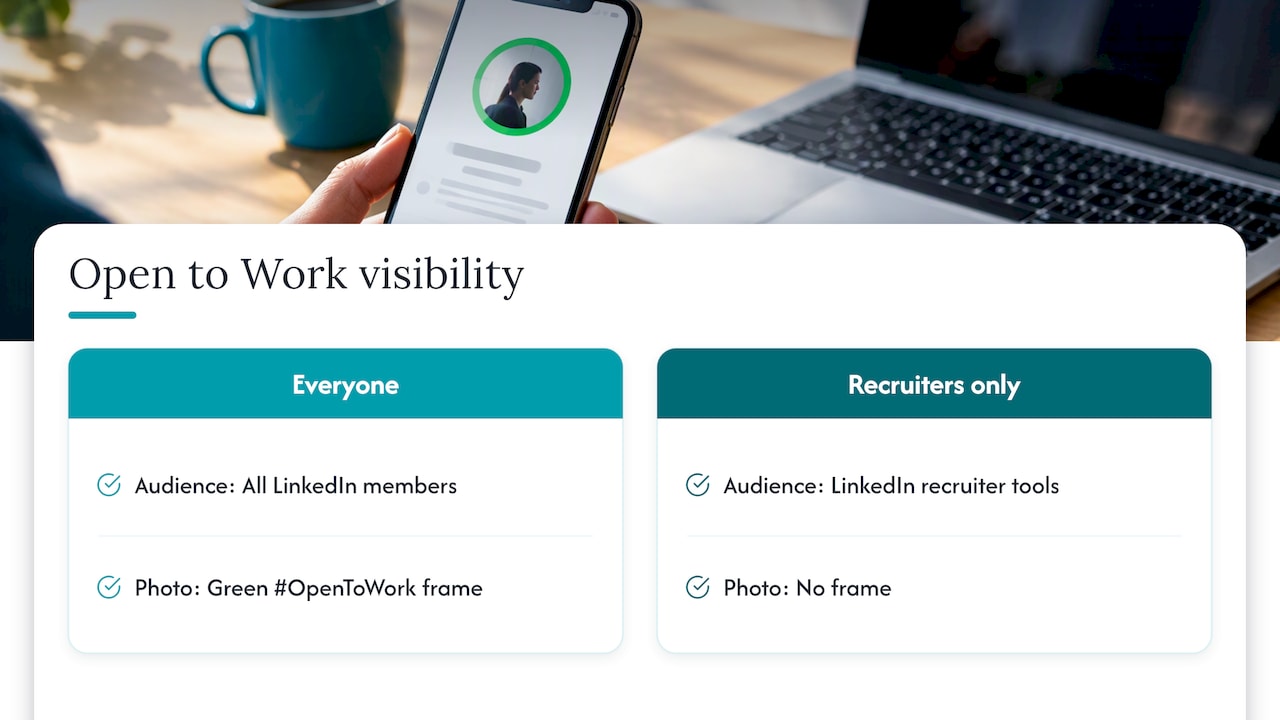
LinkedIn gives you two ways to signal that you are looking. You can show it to everyone, which adds the green “#OpenToWork” frame to your photo. Or you can show it to recruiters only, which adds no frame and is visible to people using LinkedIn’s recruiter tools.
The feature is enormously popular. LinkedIn told CNBC that more than 220 million people worldwide had it turned on, publicly or privately, a 35% increase on the prior year. That number matters for executives for one reason: the signal is no longer rare. When a very large share of the platform is using it, the frame stops saying “I am in demand” and starts saying “I am one of many”.
The visibility upside is real. The Career Angels analysis reports that people who turn the banner on are twice as likely to be messaged by a recruiter and 20% more likely to be messaged by the wider LinkedIn community. The question for an executive is not whether you get more messages. It is whether they are the messages you want.
Why the public banner works against executives
A junior or mid-level candidate competes on availability. Speed and volume matter, and hiring managers are filling roles from a pool of active applicants. An executive competes on scarcity and judgment. Those are different games, and the banner is built for the first one.
It changes the power dynamic
Former Google recruiter Nolan Church compared recruiting to dating: companies want to pursue people who look sought after. A public banner announces that you need something, which makes it harder to be seen as the passive, highly wanted candidate a board or CEO wants to court.
It reads as desperation to some audiences
The Career Angels poll found that the biggest objection among senior respondents was perception: the banner can signal desperation and put your employment status ahead of your track record. Opinion is divided, and CNBC has reported that career experts disagree on whether it is a mistake. The split is itself informative. If a meaningful share of the people you want to impress see it as a negative, you are taking a risk with no clear payoff.
It attracts the wrong inbound
Public availability tends to draw volume: staffing pitches, roles two levels below yours, and mass outreach. A senior leader’s time is better spent on a handful of conversations with the people who can actually create or fill a seat.
When the banner can still make sense
We do not think the answer is a flat “never”. There are situations where a public signal does more good than harm:
- You were laid off and the news is already public. The status is no secret, and a clear signal helps former colleagues route opportunities to you.
- You are moving to a different industry or function. People who do not know you need to know you are looking, and your network may not yet connect your skills to the new field.
- You are an independent consultant or fractional leader looking for engagements rather than a single seat.
- You are a first-time director or senior manager whose realistic target is posted openly, where speed counts.
If you do use it, pair it with a headline and About section that lead with your value. The banner should be the smallest part of what a visitor sees.
The recruiters-only setting: useful, but not private
If you want to be findable without announcing it, the recruiters-only option is the standard answer. Your photo stays clean and your profile looks the same to peers, reports and clients.
The limits matter, especially if you are employed. According to Business Insider’s guidance, LinkedIn says it takes steps to keep recruiters at your current company from seeing your career interests, but it cannot guarantee complete privacy. The same piece advises tightening your profile visibility settings and limiting who can see your connections if you are actively engaging recruiters, so an internal talent team does not notice a sudden pattern.
A practical sequence for an employed executive:
- Review your visibility settings first. Decide who can see your connections and your profile activity before you change anything else.
- Turn on recruiters-only, and list titles you would genuinely accept. A vague list invites vague outreach.
- Do not announce it. No post, no update to the headline that says “seeking”.
- Move real conversations off the platform. A call or a coffee does the work; messaging records do not.
- Check your activity. A burst of new connections with search firms from a single week can look odd to colleagues who notice such things.
What actually lands executive roles
The toggle matters far less than most people think, because most senior hiring does not start with a posting. A Forbes Coaches Council piece notes that estimates put the share of executive roles never advertised publicly between 50% and 85%. Treat that as a wide range from estimates, not a precise statistic, but the direction is consistent: the best seats are often filled through relationships.
That changes where your time should go. We cover the mechanics in our guide to the hidden job market for senior roles and in how an executive job search works. In short:
- Board and peer networks. Roles at your level are discussed among people who already know each other. Our piece on board-level networking lays out three moves that create access.
- Search firms. The type of firm matters. Retained firms are paid across the search and are built to map a market and reach people who are not looking. Contingency firms are paid only on a hire and tend to favor speed and active candidates. According to Hunter Recruiting, retained firms typically charge 25% to 35% of first-year cash compensation and contingency firms 20% to 30%. The fee is paid by the hiring company, not by you, so your job is to build relationships with the partners who run searches at your level.
- Direct outreach to decision-makers. The Forbes piece recommends presenting yourself as a solution provider by asking about business challenges instead of simply applying. That is a stronger position than responding to a post.
Why a banner cannot do this work
A banner is passive. It waits for recruiters to find you, and the recruiters who find you are mostly working roles with an active pool. The retained partner mapping a CEO succession is not scrolling for green frames. She is calling people who are respected in their field, which is why your reputation and your referrals matter more.
Signal availability without the banner
You can make it clear that you are open to conversations without a green frame. These are the moves we see work for senior leaders.
Build a headline around outcomes
Replace a title-only headline with the problems you solve and the scale you operate at. A recruiter searching for a CFO with turnaround or PE experience should find those words in your headline and About section. Our guide to LinkedIn keywords executives should use shows how to pick five to eight terms recruiters search for.
Use the banner image as a positioning statement
The wide image behind your photo is prime space that most executives leave blank or fill with a stock skyline. Use it for a one-line value statement. We walk through it in making recruiters read your LinkedIn banner.
Put your range in the About section
A sentence such as “I am glad to talk with boards, investors and CEOs about growth-stage operations” invites contact without saying you are unemployed or unhappy. It speaks to peers as well as to recruiters.
Keep your profile active
Comment on industry news, share a lesson from a project, and recognize colleagues. Regular, substantive activity makes you look engaged and sought after. For a broader checklist, see our executive LinkedIn profile best practices and the explanation of how LinkedIn builds executive influence.
Make sure the resume matches
When outreach works, your resume is the next thing a decision-maker reads. It should say the same thing your profile says, in a format applicant tracking systems can parse. Our executive resume writing guide and resume strategy for senior professionals cover what to include.
Banner or no banner: a quick comparison
| Setting | Who sees it | Best for | Main risk |
|---|---|---|---|
| Public green banner | Everyone on LinkedIn | Laid-off leaders, career changers, consultants seeking engagements | Can read as desperation; draws high-volume, lower-level inbound |
| Recruiters only | Recruiters using LinkedIn’s recruiter tools | Employed executives open to inbound interest | Privacy is not guaranteed |
| No setting, strong profile and outreach | Anyone who finds or knows you | Senior leaders targeting unadvertised roles | Needs consistent effort on your part |
Perspective: what we tell executives
We started Resume Wiz from a recruiting seat, and that shapes how we see this question. After more than a decade on the hiring side, our founder watched the same pattern repeat: strong leaders lost weeks waiting to be discovered while their profile described a job title instead of a business result.
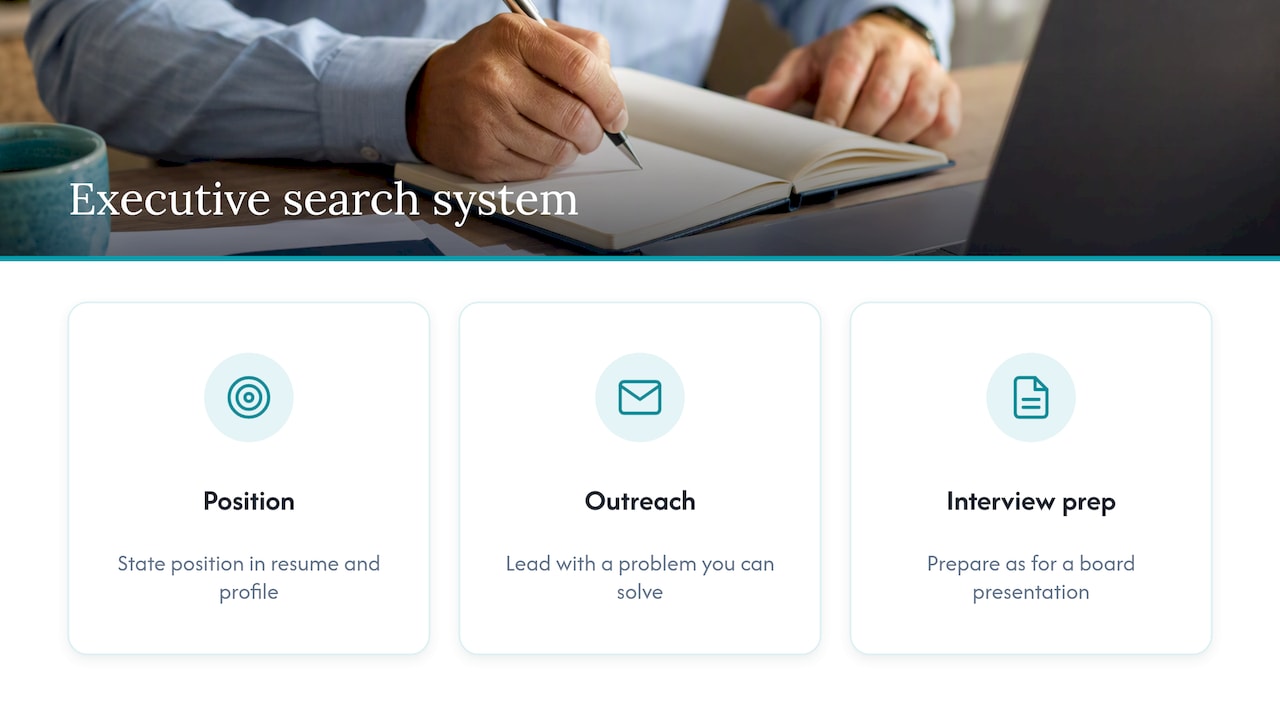
Our view is that the banner is a tactic, and a search is a system. Executives who get interviews at the level they want do three things at once. They state a clear position in their resume and profile. They contact the right people directly, with a message that leads with a problem they can solve. And they prepare for interviews as if each one were a board presentation. The toggle on LinkedIn is the smallest decision in that system.
If you are employed, our default advice is recruiters-only plus direct outreach. If you are between roles and visibly so, a banner can be a reasonable choice, as long as the rest of your profile makes you look like a leader and not a job seeker.
Kim
If you want help running the search
If you want guidance beyond profile settings, Elevate provides 1:1 executive job search coaching, including interview preparation, outreach training and job search tools. See the program page for details.
Want a recruiter in your corner for your next senior role? Book a free call with Resume Wiz and we will map out your next move together.
FAQ
Is Open to Work a red flag for executives?
Not a red flag in the sense of disqualifying you, but the public banner can weaken the impression of a sought-after leader. Experts disagree on how much it matters, so judge by your audience. If you are targeting board or C-suite roles, the safer choice is the recruiters-only setting or none at all.
Is it risky to put Open to Work on LinkedIn while employed?
Yes, if you use the public banner, because your colleagues and boss can see it. Even the private option carries some risk, since LinkedIn says it cannot guarantee complete privacy from your current employer. Tighten your visibility settings before you turn it on, as Business Insider advises.
What is the best way to find executive roles?
Relationships, first. Many senior roles are never advertised, so board and peer networks, retained search partners and direct outreach to decision-makers tend to outperform job boards. Use job boards to learn which companies are hiring and then approach people there directly.
How much does an executive recruiter charge?
You do not pay them. The hiring company does. Hunter Recruiting reports that retained firms typically charge 25% to 35% of first-year cash compensation and contingency firms 20% to 30%. Your job is to be known to the people who run those searches.
Sources
- #OPENTOWORK on LinkedIn for Execs: YES or NO? (Career Angels, 2024)
- The Unpublished Job Market: Where Most Executive Roles Are Hidden (Forbes Coaches Council, 2025)
- How to Quietly Search for Your Next Job on LinkedIn (Business Insider, 2025)
- How Much Do Executive Search Firms Charge? (Hunter Recruiting, 2025)
- Recruiters weigh in if LinkedIn’s open to work feature helps or hurts (CNBC, 2025)
- Is using LinkedIn’s open to work banner a mistake? (CNBC, 2024)
- Don’t use LinkedIn’s open to work sign, says former Google recruiter (CNBC, 2023)
